

Holiday management is the practice of defining which calendar days count as non-working time inside your CMMS, so that MTTR and MTBF calculations reflect only the hours when your team was actually available to respond. Without it, your metrics are mathematically correct but operationally misleading — and maintenance leaders who rely on them make the wrong calls on staffing, scheduling, and asset reliability.
Mean Time to Repair (MTTR) and Mean Time Between Failures (MTBF) are two of the most trusted KPIs in maintenance management. A plant that reports MTTR of 6 hours looks far less capable than one reporting 4 hours — but if the 6-hour figure includes a national holiday shutdown where no technicians were on site, the comparison is meaningless. The asset didn't take longer to fix. The clock just kept running through hours nobody was working.
According to a Reliable Plant study on maintenance effectiveness measurement, inaccurate KPI baselines are the leading reason maintenance benchmarks fail to drive improvement — teams optimize against wrong numbers and wonder why results don't change. Holiday management is one of the simplest, most overlooked fixes.
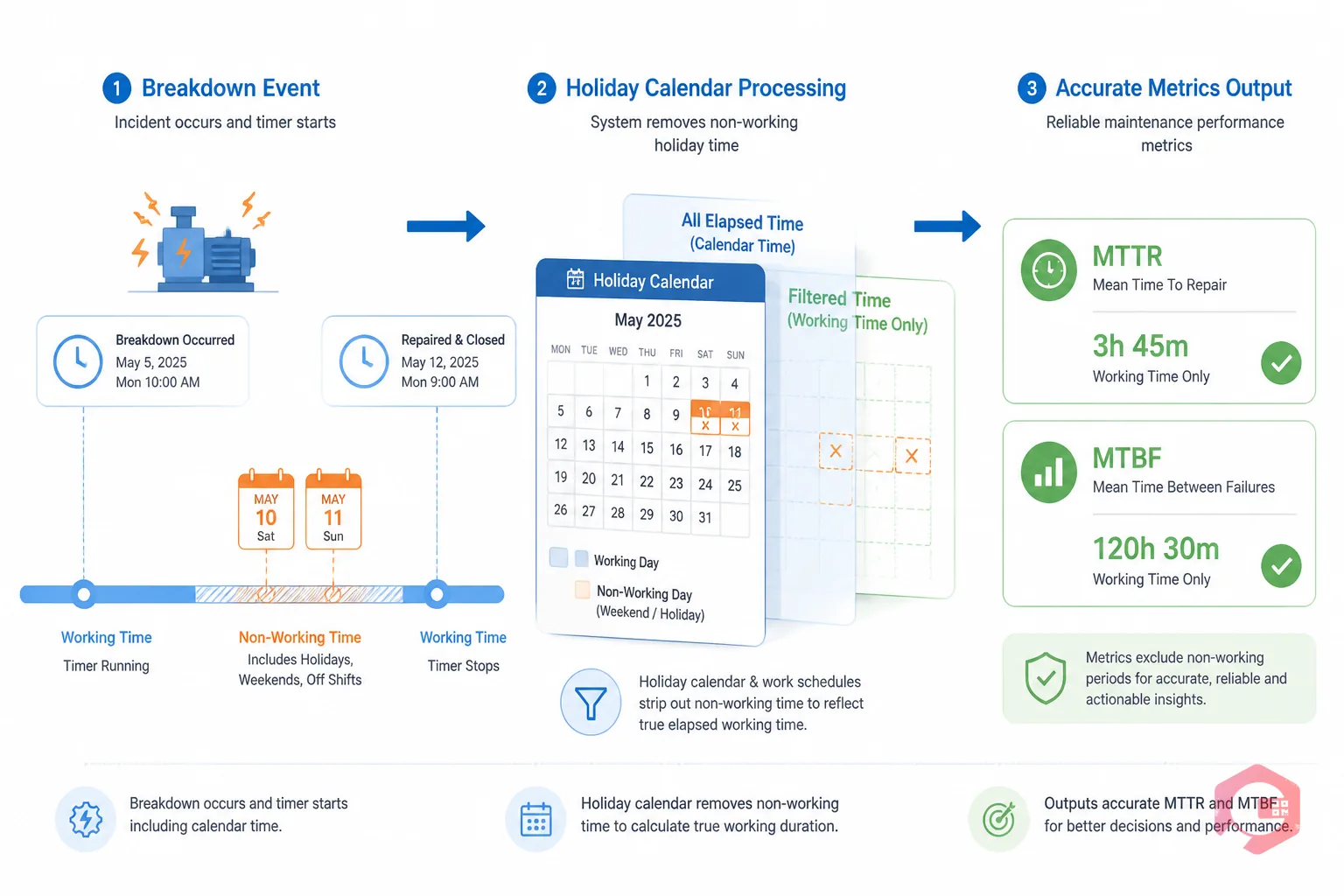
Holiday management is the configuration layer inside a CMMS that separates planned non-working time from active operating hours. It allows maintenance teams to define company holidays, shutdown periods, regional observances, and custom non-production windows — so the system excludes those hours from MTTR, MTBF, and availability percentage calculations.
In practice, this means two things. First, when a breakdown occurs at 4 PM on the Friday before a three-day holiday weekend and is repaired at 9 AM on Tuesday, the MTTR reflects the actual 5 hours of working time — not the 65 clock-hours that elapsed. Second, when MTBF is calculated across a quarter that included two plant shutdowns, those shutdown hours are stripped from the total operating time denominator, giving you a failure rate that reflects real production exposure rather than calendar time.
Most CMMS platforms support this through a holiday calendar or operating hours configuration. Cryotos CMMS includes a dedicated downtime management module with customizable operating hours and holiday differentiation built directly into the KPI engine.
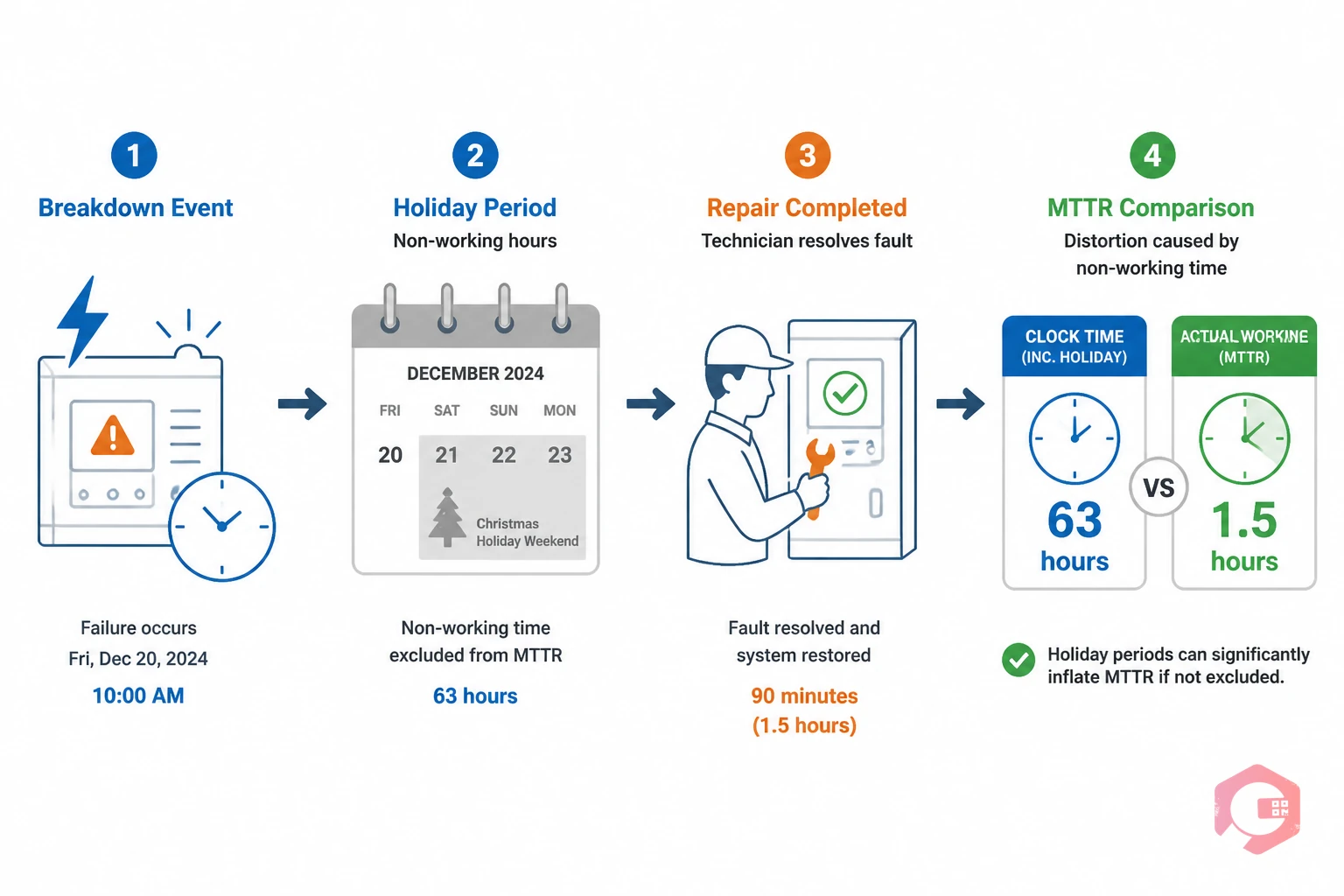
MTTR is calculated as total repair time divided by the number of repairs in a period. The total repair time figure is where holiday distortion enters. If your CMMS measures elapsed clock time from breakdown to resolution — and doesn't subtract non-working hours — every failure that spans a weekend or holiday inflates your MTTR artificially.
Consider a specific example from a mid-size food processing facility. A conveyor motor fails at 6 PM on Christmas Eve. The facility is closed for two days. The maintenance team arrives on the 27th and resolves the fault in 90 minutes. Elapsed clock time: 63.5 hours. Actual repair time: 1.5 hours. If your CMMS reports MTTR based on elapsed time, this single event adds over 60 hours of phantom repair time to your quarterly average — skewing every benchmark comparison, every staffing justification, and every reliability report you share with leadership.
Multiply this across a year with multiple holidays, weekend breakdowns, and shift gaps, and the cumulative distortion makes your MTTR data unreliable as a management tool. The fix is straightforward: configure your CMMS to count only working hours in MTTR calculations, and define your holiday schedule so the system knows which hours to exclude.
MTBF is calculated as total operating time divided by the number of failures. The total operating time variable is where holiday distortion affects this metric. If a plant operates 5 days per week with 12 company holidays per year and two annual shutdown weeks, the actual operating time is substantially less than calendar time — yet many CMMS configurations use calendar hours by default.
The consequence runs in the opposite direction from MTTR distortion. Inflating the operating time denominator makes your MTBF appear higher than it actually is — suggesting assets are more reliable than they are. A motor that fails 4 times in a quarter looks like it has an MTBF of 540 hours if you use full calendar time, but only 420 hours if you correctly account for 6 holidays and 2 weekends of non-operation in that period.
This matters enormously for two decisions: when to schedule preventive maintenance and when to flag an asset for replacement. A falsely high MTBF leads teams to extend PM intervals beyond what's safe, and delays asset replacement decisions that the real failure rate would justify. According to a Plant Engineering benchmarking study, MTBF errors of 15 to 25 percent are common in facilities that don't configure operating calendars in their CMMS — and those errors directly affect PM scheduling accuracy.
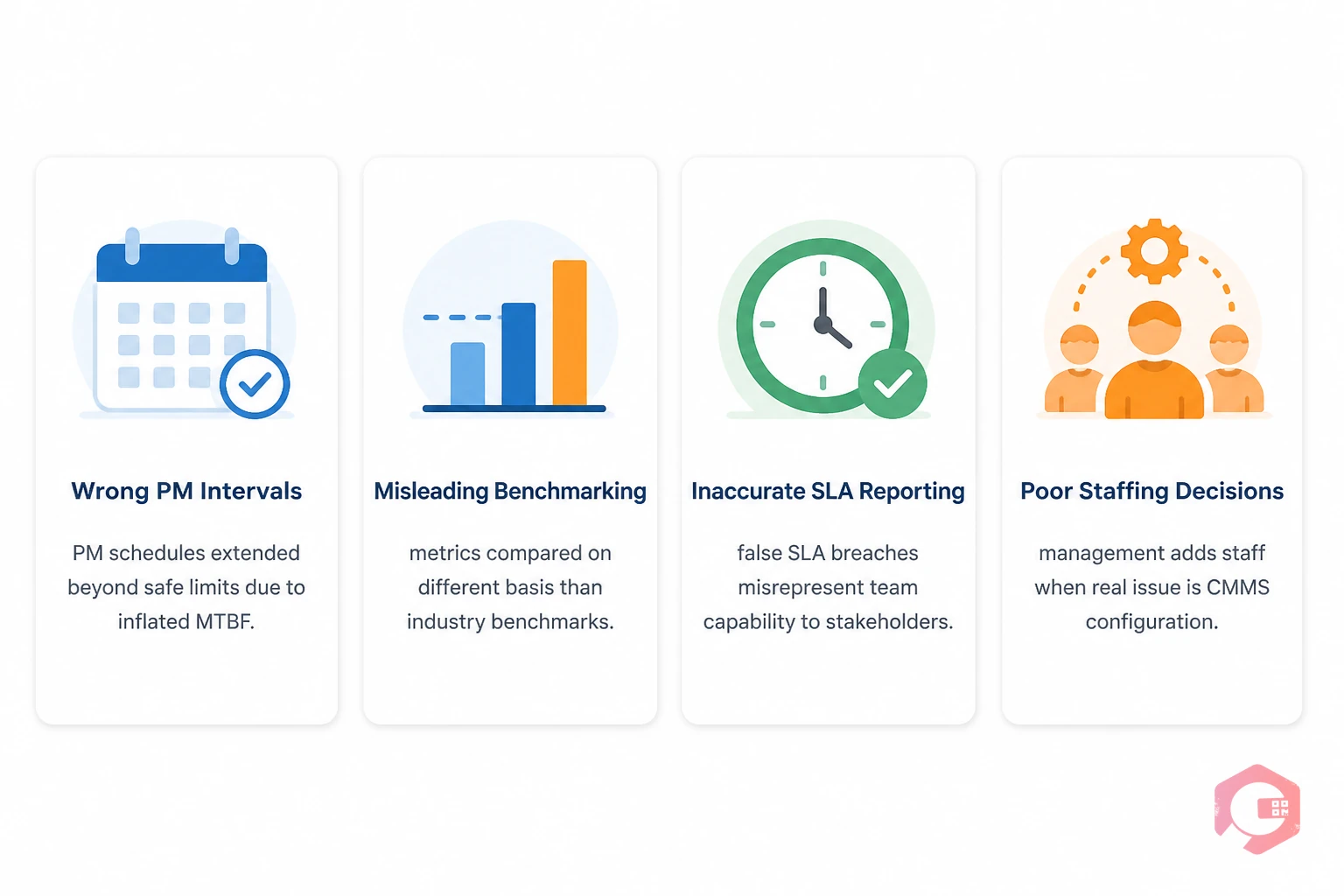
The downstream effects of holiday-distorted MTTR and MTBF data reach further than most maintenance managers expect. Here are the four most common operational problems that trace back to misconfigured holiday settings:
Setting up holiday management correctly requires three decisions: what counts as a holiday, how operating hours are defined outside of holidays, and how the CMMS should handle breakdowns that occur during non-working periods.
Start by listing every planned non-working period for the next 12 months: national public holidays, company shutdown weeks, scheduled maintenance windows, and any department-specific closures. Separate these from your standard working hours — for example, a facility that runs Monday to Friday, 7 AM to 7 PM, with 14 named holidays and two shutdown weeks has a very different operating calendar than a 24/7 continuous operation with no holidays.
Your CMMS operating calendar is the foundation. Every MTTR and MTBF calculation the system generates will reference it.
Not all non-working time is a holiday. Planned downtime for scheduled shutdowns, turnarounds, and major overhauls should be tagged differently from holiday closures — both may be excluded from MTBF operating time, but they serve different analytical purposes. A shutdown that triggered multiple corrective work orders tells a different story than a Christmas break with no activity.
The difference between planned and unplanned downtime matters for your KPIs. Holiday periods that include zero maintenance activity should be excluded entirely. Planned shutdowns where maintenance work occurs need careful handling — the hours when technicians were active should still count in MTTR calculations for that work.
Decide how your CMMS records breakdowns that occur during non-working hours. There are two valid approaches. The first is to record the actual breakdown time and the actual repair completion time, then have the system calculate elapsed working hours by subtracting all non-working periods in between. The second is to record the breakdown time and use the first available working hour as the response start time for MTTR purposes.
The first approach gives you more accurate data for root cause analysis — you know exactly when the asset failed. The second is simpler and appropriate for organizations where measuring response delay through holidays isn't operationally relevant. Cryotos supports both approaches through its work order and downtime configuration settings.
Cryotos CMMS includes native holiday management as part of its downtime tracking and KPI reporting framework. The platform is built to calculate MTTR, MTBF, and availability percentage using actual operating hours — not calendar hours — once the holiday and operating schedule is configured.
The downtime management module in Cryotos tracks every breakdown with a timestamp and reason code. When a breakdown spans a holiday period, the system references the operating calendar to calculate the working-hours MTTR rather than the clock-hours elapsed. This means when your maintenance manager reviews the monthly MTTR dashboard, every figure reflects real team responsiveness — stripped of the noise introduced by holidays, weekends, and non-operating periods.
For MTBF calculations, Cryotos excludes defined holiday and shutdown periods from the total operating time denominator automatically. A plant that experienced 3 failures in a quarter with 2,100 actual operating hours (after removing holidays and shutdowns) gets an MTBF of 700 hours — not the inflated figure that would result from using 2,600 calendar hours. That 700-hour figure is what drives the PM schedule, what gets compared to the OEM's recommended service interval, and what feeds the asset replacement decision.
The BI Dashboard in Cryotos surfaces MTTR, MTBF, availability percentage, and breakdown hours — all calculated against the correct operating baseline. Reports can be filtered by department, plant, unit, and asset, with holiday-adjusted figures at every level. When you share reliability reports with plant leadership, the numbers represent genuine performance rather than calendar-based artifacts.
Cryotos also supports complex scheduling conditions — different operating calendars for different departments, multi-shift operations with non-standard hours, and facilities in multiple countries with different public holiday schedules. This is particularly important for multi-site manufacturers where MTTR benchmarking across plants only makes sense if every plant's figures are calculated on the same operating-hours basis.
Plants using Cryotos report up to a 30% reduction in downtime and 25% faster repair times. Those results are measurable because the metrics they're improving against are accurate in the first place — which is exactly what correct holiday configuration makes possible.
MTTR measures how long it takes to repair a fault. If your CMMS uses elapsed clock time and a failure spans a holiday weekend, those non-working hours inflate the MTTR figure significantly — making your team appear slower than they are. Holiday management strips out non-working time so MTTR reflects actual technician response and repair duration.
No — it makes it more accurate. MTBF measures how long an asset operates between failures. If the asset wasn't operating during a holiday shutdown, those hours aren't part of its operating exposure. Including them inflates MTBF artificially, which leads to over-extended PM intervals and missed replacement decisions. Correcting for holidays gives you the true reliability picture.
Both are types of planned non-working time, but they serve different analytical purposes. A holiday exclusion applies to the entire facility — no production, no maintenance activity. Planned downtime for a scheduled shutdown may include active maintenance work, so it needs different handling: the shutdown hours when no one is working are excluded, but the hours when technicians are actively repairing assets still count toward MTTR for those specific work orders.
Yes. Cryotos supports multiple operating calendars configured by department, plant, or organizational unit. This is essential for multi-site manufacturers where different facilities have different regional holidays, different shift patterns, and different production schedules — all of which should feed into separate, correctly calculated MTTR and MTBF figures for each location.
Review and update your operating calendar at the beginning of each calendar year — and again mid-year if any unplanned shutdowns or additional holidays are announced. Leaving last year's calendar in place is one of the most common causes of gradual KPI drift that goes unnoticed until someone questions why benchmark comparisons have shifted.
Accurate MTTR and MTBF data is the foundation of every good maintenance decision — from PM scheduling and staffing to asset replacement and SLA reporting. Holiday management is the configuration that keeps that foundation solid. Without it, your metrics accumulate distortion silently every time a breakdown spans a weekend, a national holiday, or a plant shutdown.
If your team is benchmarking maintenance performance, reporting reliability to leadership, or using MTBF to drive PM intervals, the first question to ask is whether your CMMS is calculating those figures against actual operating hours. If not, the data you're optimizing against is wrong — and improving it becomes much harder than it should be.
Cryotos CMMS gives maintenance teams the tools to configure accurate operating calendars, calculate holiday-adjusted MTTR and MTBF automatically, and surface reliable reliability KPIs across every department and site. Book a free demo today and see how accurate maintenance metrics can change the quality of every decision your team makes.




Cryotos AI predicts failures, automates work orders, and simplifies maintenance—before problems slow you down.



