
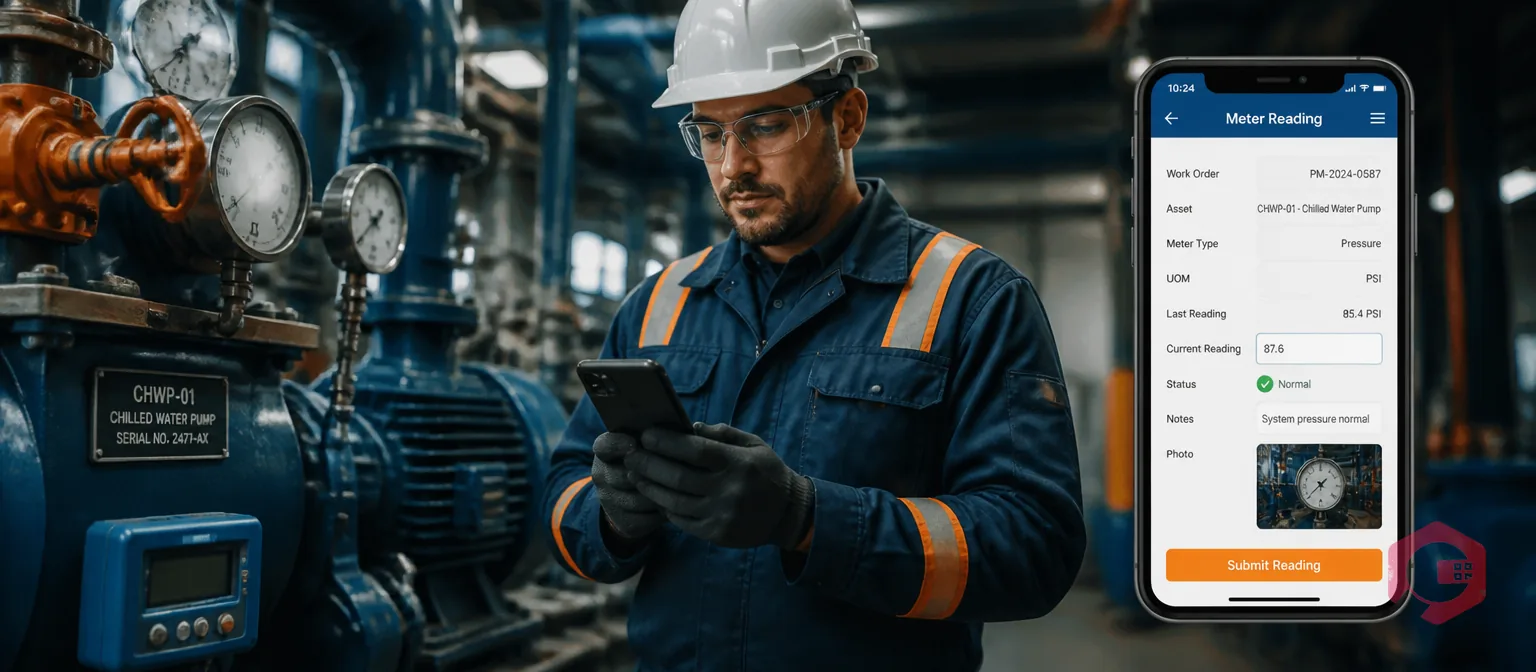
Capturing meter readings during preventive maintenance (PM) and breakdown maintenance is the process of recording an asset's current usage value — runtime hours, cycle counts, mileage, or pressure — at the exact moment a work order is executed. Done consistently, these readings tell your CMMS when an asset actually needs its next service, what its condition was at the point of failure, and whether your PM intervals are calibrated to real usage. Most maintenance teams already understand why meter readings matter in theory; what they often lack is a clear, step-by-step procedure for capturing them during both planned PM tasks and unplanned breakdown events. This guide covers exactly that — including how manual and IoT capture methods work, common mistakes to avoid, and how a modern CMMS automates the entire process.
Key Takeaways

A meter reading is a numerical measurement that records how much an asset has been used at a specific point in time. In maintenance management, meters are configured against individual assets to track the usage dimension most relevant to that asset's wear cycle. Meter-based maintenance uses these values to trigger work orders when an asset reaches a defined service threshold — rather than on a fixed calendar date regardless of how much or how little the asset has actually run.
The four most common meter types used in maintenance are:
Each meter type can have one or more PM thresholds configured — for example, a generator might trigger a PM every 500 runtime hours and an inspection alert if temperature exceeds 180°F. When any threshold is crossed, the CMMS generates the appropriate work order automatically.
Calendar-based PM scheduling is a practical default for many assets — but it has a fundamental flaw: it assumes every asset accumulates wear at the same rate regardless of how it's actually used. A compressor running 20 hours a day needs service far sooner than one running 4 hours a day, even if both are serviced on the same monthly calendar cycle. The first gets under-maintained; the second gets over-maintained. Both outcomes cost money.
Meter readings fix this by anchoring maintenance decisions to actual usage data. According to the Society for Maintenance and Reliability Professionals (SMRP), world-class maintenance programs achieve a planned maintenance percentage above 85% — a benchmark that is only achievable when PM schedules are driven by reliable usage data rather than guesswork. Every meter reading captured during a work order contributes to that data foundation.
There are four specific outcomes that consistent meter reading capture enables:
Use the MTBF calculator to establish your baseline before analysing whether your current PM intervals are correctly calibrated to your actual failure history.

Capturing meter readings during a PM work order is a structured four-step process. Each step matters — skipping any one of them breaks the data chain that makes meter-based scheduling work.
Cryotos's preventive maintenance software embeds the meter reading field directly into the PM work order checklist, so technicians capture the value as part of the normal job flow — not as a separate step they might forget.
Before starting any PM task, the technician should read the current meter value from the asset itself — the physical display on the equipment, the onboard hour counter, or the connected sensor readout — and compare it to the last recorded value in the CMMS. If the reading has advanced by significantly more or less than expected since the last PM, flag this for the maintenance supervisor before proceeding. A runtime meter that advanced 800 hours in what should have been a 500-hour interval means either the PM was delayed or the asset is running harder than planned — both worth noting.
Log the current meter value into the CMMS work order at the start of the job, not at the end. This pre-task reading is your reference point. If the PM involves any work that affects the meter — resetting an hour counter, replacing a sensor — you need a confirmed pre-work reading on record before any changes are made.
Execute the full maintenance checklist — lubrication, inspection, part replacement, calibration, torque checks — in the sequence defined by the PM procedure. Use the mobile CMMS app to check off each step as it is completed and attach photos of any findings. This is normal PM execution; the meter reading step does not change any of it.
Before closing the work order, confirm the meter value one final time. In most cases this will be the same as the opening reading (no additional runtime during the PM window), but for assets with ongoing production during a partial service, it may have advanced. Submit the final reading and close the work order. The CMMS uses this confirmed value to reset the PM interval — calculating the next service trigger date or threshold from this baseline. If you close the work order without a meter reading, the CMMS has no anchor point and either misses the next PM or generates a duplicate.
Breakdown maintenance (BDM) meter reading capture follows a different logic than PM capture. In a PM, you're confirming the asset's usage at a scheduled service point. In a breakdown, you're creating a forensic record — capturing exactly what the asset's usage state was when it failed, which is the first piece of data needed for root cause analysis.
Cryotos's work order management software supports breakdown work order creation via mobile — a technician can raise the corrective work order by scanning the asset's QR code, log the meter reading immediately, and get the repair process started without leaving the floor.
The moment a breakdown is confirmed, the technician should log the current meter reading before any repair work begins. This is the most critical reading in the sequence. It tells you the asset's exact usage state at the point of failure — how many hours since the last PM, how many cycles since the last service, or what the condition value was when the fault occurred. This data is the foundation of every 5 Whys or RCA session that follows.
In practice, this means training your technicians to open a CMMS work order and log the meter reading as their very first action on a breakdown — before picking up a single tool. It takes 30 seconds and creates a data point that would otherwise be lost permanently.
After the repair is complete and the asset has been returned to service, log a second meter reading as the work order is closed. This post-repair reading establishes the new baseline from which the next PM interval will count. If the repair involved any component replacement that resets a counter — a new motor with a new runtime meter, a replaced pump shaft that affects cycle count — confirm which meter value applies going forward and update the asset record accordingly.
The interval between the last PM reading and the pre-failure reading is your failure interval. If your PM is set to trigger every 500 runtime hours and the asset failed at 620 hours since the last service, your PM interval is too long for the actual operating conditions on that asset. Repeat this pattern across three or four failures and you have clear evidence to shorten the PM interval. Conversely, if the asset consistently fails at 200 hours into a 500-hour PM cycle, there may be a different failure mode entirely — one that a time-based PM cannot prevent regardless of how it's timed.
Most maintenance operations use a combination of manual and automated meter reading capture. The right approach for each asset depends on its criticality, the availability of sensor integration, and whether readings need to be continuous or only captured at service events.
| Method | How It Works | Best For | Limitation |
|---|---|---|---|
| Mobile manual entry | Technician reads the physical meter and logs the value in the CMMS mobile app at the asset | Most assets where readings are only needed at PM or breakdown events | Depends on technician discipline; readings are point-in-time only, not continuous |
| IoT sensor auto-feed | Sensor connected to the asset streams readings directly into the CMMS in real time | High-criticality assets, continuous-process equipment, and assets prone to sudden failure | Requires sensor installation and integration; higher upfront cost per asset |
| SCADA/PLC integration | Plant control systems push runtime and condition data to the CMMS via API | Facilities already running SCADA where meter data is already being captured at the controller level | Integration setup requires IT/OT coordination; not all SCADA data maps cleanly to CMMS meter fields |
| QR code scan + mobile entry | Technician scans the asset QR code, opens the meter entry form, and logs the reading in one flow | Field teams managing large asset fleets where speed and accuracy both matter | Still requires a technician present at the asset; not a substitute for IoT on critical equipment |
For most organisations, the practical starting point is mobile manual entry for all assets, with IoT integration phased in for Tier 1 critical assets as sensor deployment scales. Cryotos's IoT meter reading feature connects to SCADA systems, PLCs, and edge devices — so readings from connected assets flow into the CMMS automatically, triggering work orders the moment a threshold is crossed without any manual input required.
Most meter reading failures are process failures, not technical ones. The data collection tools exist and work correctly — what breaks down is the discipline around when and how technicians use them.
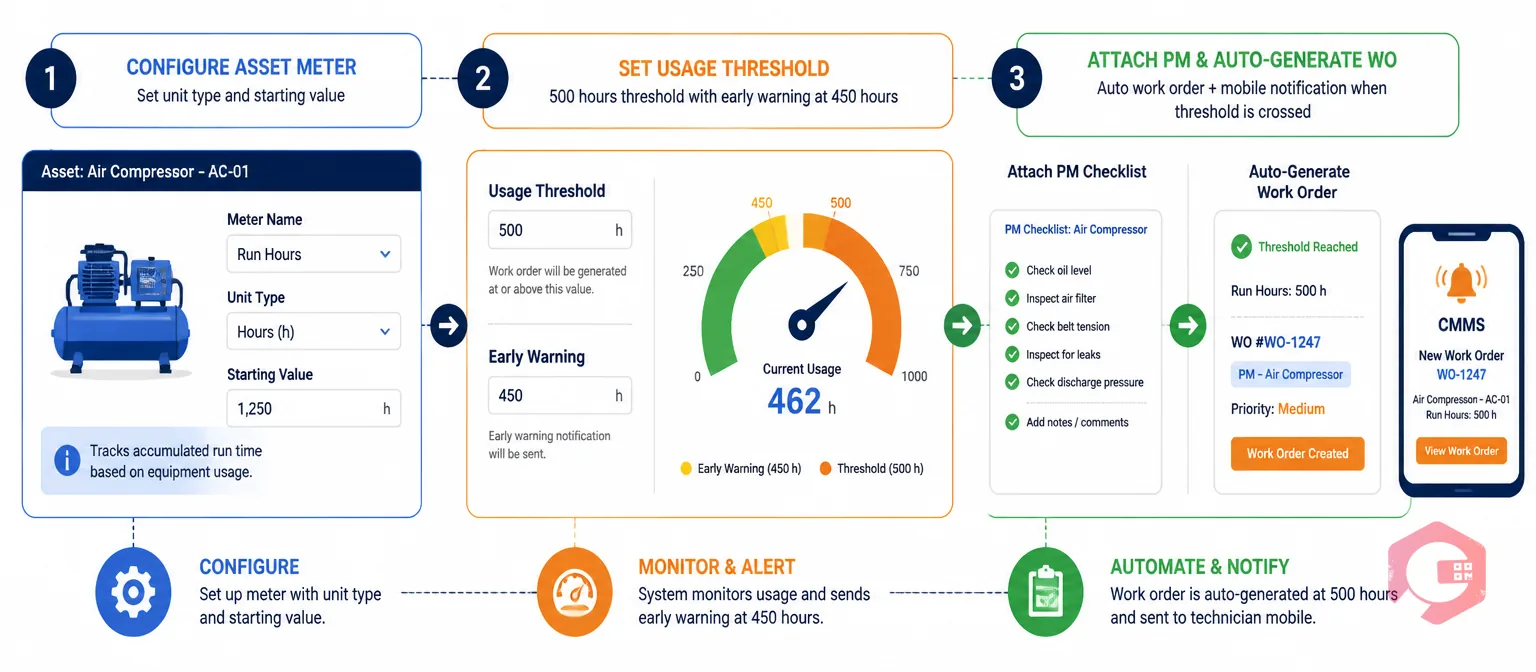
Setting up meter-based PM triggers is a three-step configuration process: define the meter, set the threshold, and attach the PM checklist. Once configured, the CMMS handles trigger generation automatically every time a reading is submitted.
In Cryotos, open the asset record and add a meter — selecting the unit type (hours, cycles, miles, or a custom unit), the meter name, and the starting value. If the asset has never been tracked before, start from zero or enter the best available historical value. If the asset is being migrated from a paper-based system, use the most recent recorded reading as the starting point — acknowledge it may not be precise, but any baseline is better than none.
Define the usage interval that should trigger a PM work order — for example, every 500 runtime hours or every 10,000 cycles. You can also set an early warning alert threshold at, say, 450 hours, so your maintenance planner has lead time to schedule the work before the formal trigger fires. For assets where both time and usage matter, configure a dual trigger: PM fires at 500 hours or 90 days, whichever comes first.
Link the PM procedure checklist, required spare parts, and default technician assignment to the meter trigger. When the threshold is crossed, Cryotos automatically generates a work order pre-loaded with all of this information — the technician receives a mobile notification and can begin work immediately without waiting for a planner to manually create and assign the job. This is the step that closes the loop between meter reading capture and automated PM scheduling, turning raw usage data into actionable maintenance work.
According to the ISO 55000 asset management standard, documented maintenance plans with defined inspection intervals are a core requirement of a conforming asset management system. Meter-based PM triggers provide the evidence trail that satisfies this requirement — with every reading timestamped, every threshold crossing logged, and every generated work order traceable back to the meter value that triggered it.
A meter reading is the current usage value of an asset at a specific point in time — for example, 4,750 runtime hours. A meter threshold is the usage level at which the CMMS automatically generates a PM work order — for example, every 500 hours. The reading is the data input; the threshold is the rule that determines when that data input triggers a maintenance action. You need both configured correctly for meter-based PM scheduling to work.
Yes. A single asset can have multiple independent meters configured — each tracking a different usage dimension with its own PM threshold. A generator, for example, might have a runtime hours meter triggering a PM every 500 hours and a condition meter flagging an alert if operating temperature exceeds 185°F. Both meters run concurrently and generate their own independent work orders when their respective thresholds are crossed. Cryotos supports multiple meters per asset, all tracked on the same asset record.
If the meter reading field is set as required in your CMMS work order template, the system will not allow the work order to be closed without an entry — eliminating the problem at the source. If it is not required, the work order closes without the reading, and the PM interval counter either carries forward from the previous reading or defaults to the calendar date, depending on your CMMS configuration. This is why making the meter reading a mandatory field on every PM and BDM work order template is the single most important configuration change most teams can make.
At minimum, meter readings should be configured and captured for all Tier 1 critical assets — those whose failure has a direct production, safety, or compliance impact. For Tier 2 and Tier 3 assets, the decision depends on whether the asset's wear pattern is better predicted by usage than by calendar time. A good rule of thumb: if you've experienced a failure on a calendar-based PM that felt like it came too early or should have been caught sooner, that asset is a candidate for meter-based scheduling. Start with your highest-criticality assets and expand as your team's reading discipline becomes consistent.
Consistent meter reading capture — across both planned PMs and reactive breakdown events — is what converts your CMMS from a scheduling tool into a genuine asset intelligence platform. Cryotos connects manual mobile capture, IoT sensor feeds, and SCADA integrations into a single meter reading workflow, so every reading is timestamped, stored against the asset record, and automatically triggers the next PM work order when the threshold is crossed. Explore how Cryotos supports meter-based maintenance at cryotos.com.


Cryotos AI predicts failures, automates work orders, and simplifies maintenance—before problems slow you down.



