

Asset maintenance history in a CMMS is the complete, timestamped record of every work order, inspection, repair, and part replacement ever performed on a physical asset — stored against that asset's unique ID and accessible in seconds from any device. When this history is captured consistently, maintenance teams cut repeat failures, speed up fault diagnosis, and produce audit-ready compliance records without manual effort. According to a Deloitte predictive maintenance study, organisations that maintain clean asset histories reduce unplanned downtime by 10–20% within the first year of structured tracking.
This guide walks you through exactly what asset maintenance history is, why it gets lost, what data to capture, and how to set up a CMMS to track it reliably — with a step-by-step process your team can start using this week.

Asset maintenance history is the chronological record of all maintenance activities performed on a specific piece of equipment from the day it enters service. Every work order closed against an asset — whether it's a planned preventive maintenance task, a corrective repair, or an inspection — adds one more data point to that asset's history.
A complete maintenance history answers the questions every technician and maintenance manager needs answered fast:
Without this history, every technician who responds to a fault starts from zero. They cannot tell whether the fault has occurred before, what fixed it last time, or whether a pattern of failures points to a deeper root cause. Asset maintenance history is the institutional memory that makes maintenance smarter over time — and a CMMS is the only practical way to capture and retain it at scale.
Most maintenance teams lose asset history because they track it in systems that are not designed for it. The three most common failure modes are paper-based logs, spreadsheets, and the heads of senior technicians.
Paper job cards get filed in folders that no one can search. A technician who worked on a compressor six months ago may be on a different shift, on leave, or no longer with the company. Spreadsheets capture some information but rely on manual discipline — and entries get missed, overwritten, or left blank when teams are under pressure. None of these systems are asset-centric: they record work done, not the asset it was done to.
The result is a maintenance team that repeatedly diagnoses the same faults from scratch, replaces components that were already replaced three months ago, and cannot produce a coherent service record for a compliance audit without hours of manual document hunting. According to Plant Engineering's maintenance benchmarking research, facilities that rely on manual maintenance records achieve 35% worse cost performance than facilities using a CMMS — a gap driven almost entirely by the absence of usable asset history.
A CMMS solves this by tying every work order to a specific asset ID. History is created automatically as work is done — no separate logging step, no end-of-shift paperwork, no reliance on individual discipline. Every technician who ever works on that asset adds to a shared, searchable record that anyone on the team can access from their phone in the field.

The value of an asset's maintenance history depends entirely on the quality of data captured in each work order. A closed work order with a one-line note ("repaired motor") is almost useless for future diagnosis. A closed work order that captures the full context of what happened is genuinely valuable intelligence.
Every maintenance event should record the following:
Capturing all of this consistently requires a work order management system with mandatory fields and mobile access so technicians can complete records at the point of work — not from memory at the end of a shift.
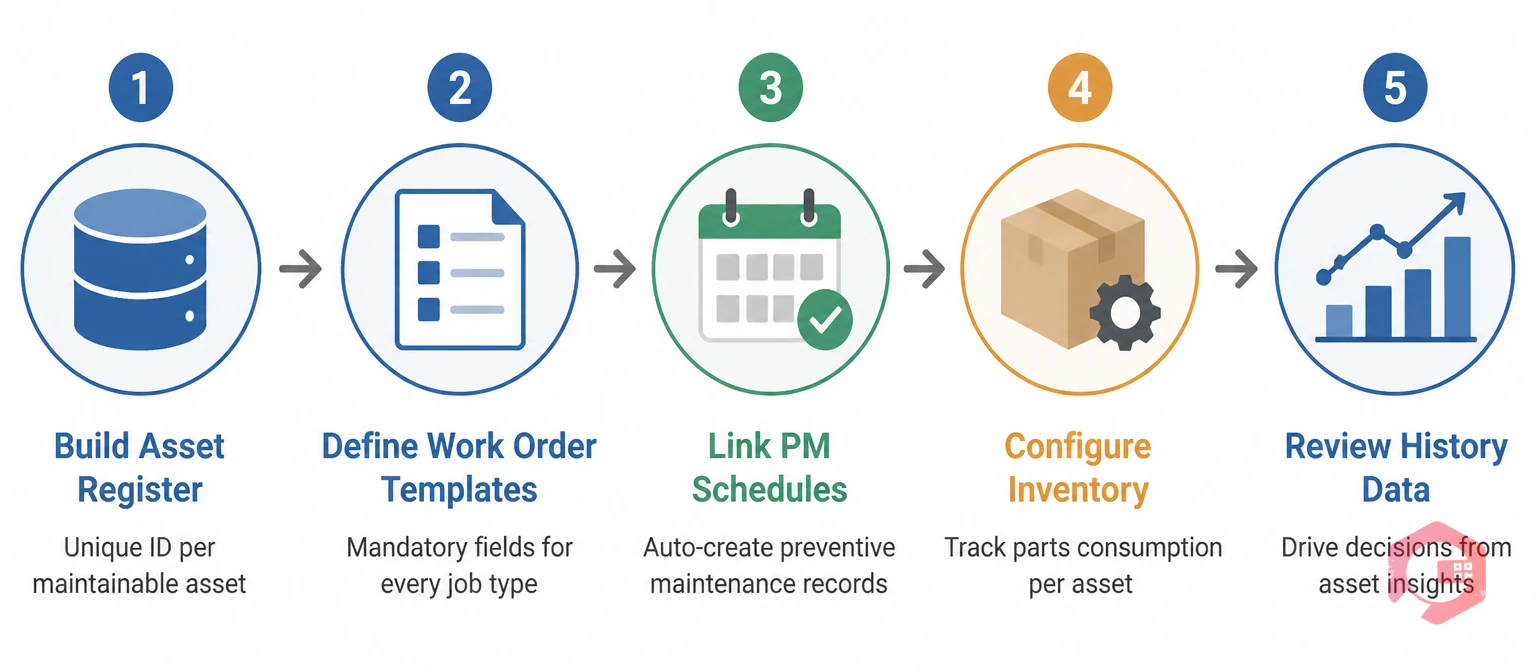
Setting up asset maintenance history tracking in a CMMS is a structured process. Here are the five steps that get you from a blank system to a working history record for every asset in your facility.
Before you can track history, every asset needs a record. Create one entry per maintainable asset with: a unique asset ID, make, model, serial number, installation date, location, criticality tier, and warranty status. This is the anchor for every work order, inspection, and history entry that follows. Use QR codes with asset QR code scanning so technicians can pull up any asset's history by scanning a label on the machine — no typing required.
Set up work order templates for each maintenance type — corrective, preventive, and inspection. Make the critical fields mandatory: fault description, root cause, work performed, and parts used. If technicians can close a work order without filling in these fields, the history record will be incomplete. A CMMS with configurable forms lets you enforce this discipline without adding friction to the mobile workflow.
Set up preventive maintenance schedules for every critical asset. When a PM task is completed, the work order closes against the asset — automatically adding the service event to the history record. The date of the last PM and the date of the next one are always visible from the asset profile, without anyone having to update a spreadsheet.
Link your spare parts inventory to the asset register. When a technician issues parts against a work order, the consumption is recorded in the asset history. Over time, this data shows which assets are consuming the most parts, which components are wearing out fastest, and whether the current stock levels match actual usage patterns. Spare parts inventory software that integrates with your work order flow makes this automatic.
Asset history only delivers value if someone uses it. Set a monthly review cadence where maintenance supervisors check the history of your top 20 critical assets. Look for repeat failures, rising MTTR, and increasing parts spend per asset — these are the signals that tell you when a PM interval needs adjustment, when a component has reached end of life, or when an asset should be escalated for engineering review.
Choosing between manual systems and a CMMS is not just a technology preference — it determines whether your asset history is actually usable when you need it.
| Capability | Paper / Spreadsheets | CMMS |
|---|---|---|
| Search asset history by date, fault type, or technician | Manual file search — hours of effort | Instant search from any device |
| Mobile access for field technicians | Not available | Full mobile app with offline mode |
| Automatic history creation from completed work orders | Requires manual data entry after every job | History updates automatically on work order close |
| Parts consumption tracked per asset | Requires separate inventory system — rarely linked | Integrated — parts issued against work orders update asset history |
| MTBF and MTTR calculations | Manual calculation — unreliable with incomplete data | Automatically calculated and displayed in real time |
| Compliance audit readiness | Days of document gathering for a single asset | Full record exported in minutes |
| History survives staff turnover | Institutional knowledge walks out the door | Permanent record tied to asset, not individual |
Cryotos builds asset maintenance history automatically as your team completes work — there is no separate logging step, no end-of-day data entry, and no reliance on individual technicians remembering to update a system. Here is how the key features tie together to create a complete, reliable history record for every asset.
Teams using Cryotos report a 30% reduction in unplanned downtime and 25% faster repair times — results that trace directly to technicians arriving at a fault with full asset history in hand, rather than starting from zero.
A CMMS gives you the capability to capture great history — but the quality of that history still depends on consistent team discipline. These five practices separate maintenance operations with genuinely useful asset history from those with fragmented, incomplete records.
Asset maintenance history in a CMMS is the complete, chronological record of all work orders, inspections, repairs, and part replacements performed on a specific asset — stored against that asset's unique ID and updated automatically every time a work order is closed. It includes technician names, dates, fault descriptions, root causes, parts used, and labour hours.
Tracking maintenance history prevents repeat failures, speeds up fault diagnosis, supports accurate lifecycle cost analysis, and produces the audit-ready records required for regulatory compliance. Without history, every technician diagnoses from scratch, parts get replaced unnecessarily, and organisations cannot make data-driven repair-versus-replace decisions.
Best practice is to retain the full history for the lifetime of the asset, plus any regulatory retention period that applies in your industry. For equipment subject to ISO 55000, OSHA, or sector-specific regulations, six to ten years of history is a common requirement. A CMMS makes indefinite retention practical — the data cost is negligible and the historical value grows over time.
A maintenance log is a general record of work done, typically organised by date or technician. Asset maintenance history is organised by asset — every event linked to a specific machine's ID, regardless of when it happened or who did it. History is searchable by asset, which is what makes it useful for fault diagnosis and lifecycle analysis. A log is searchable by time, which is rarely the dimension that matters at the point of repair.
Yes. A CMMS generates a timestamped, tamper-resistant record of every maintenance activity, inspection, and corrective action performed on each asset. This record satisfies the documentation requirements of ISO 55001, OSHA, GMP, and most other regulatory frameworks. Producing it for an auditor takes minutes, not days.
If your team is losing asset history to paper logs, spreadsheets, or staff turnover, Cryotos asset maintenance management software captures it automatically — from every work order, every PM, and every IoT reading — and makes it accessible to any technician in under five seconds via QR code scan. Book a free demo to see how Cryotos builds a complete maintenance history for every asset in your facility from day one.



Cryotos AI predicts failures, automates work orders, and simplifies maintenance—before problems slow you down.



