

Maintenance knowledge transfer is the process of identifying, capturing, documenting, and sharing the technical expertise your maintenance team has built over years of hands-on work. When a skilled technician retires or moves on, the institutional knowledge they carry — fault patterns, equipment quirks, repair shortcuts — often walks out the door with them. According to a McKinsey study on operational learning, organizations lose up to 30% of critical operational knowledge when experienced workers leave without a structured handoff plan. A solid knowledge transfer strategy protects your team from that loss and keeps asset uptime high even through workforce changes.
This guide walks you through every step: what maintenance knowledge is worth capturing, how to document it properly, and how to transfer it so your whole team benefits — not just the person who was trained by the outgoing expert.
Maintenance knowledge transfer means moving critical technical know-how from one person (or system) to the rest of your team in a way that makes that knowledge usable, searchable, and durable. It covers everything from written SOPs and equipment manuals to troubleshooting logic that lives only in a senior technician's head.
This process matters most in three situations: when experienced staff retire or resign, when new technicians join the team, and when equipment or systems change significantly. Without a deliberate transfer process, each of these events creates a knowledge gap that shows up as longer repair times, repeat failures, and unnecessary downtime.
Most maintenance knowledge falls into one of two categories, and your transfer strategy needs to handle both:

Knowledge loss in maintenance isn't just about retirements. It happens constantly and in more ways than most managers expect. Understanding the root causes helps you build a transfer system that addresses them directly.
Before you can transfer knowledge, you need to know what to capture. Not everything needs to be documented in equal depth, but these categories are almost always worth the effort.
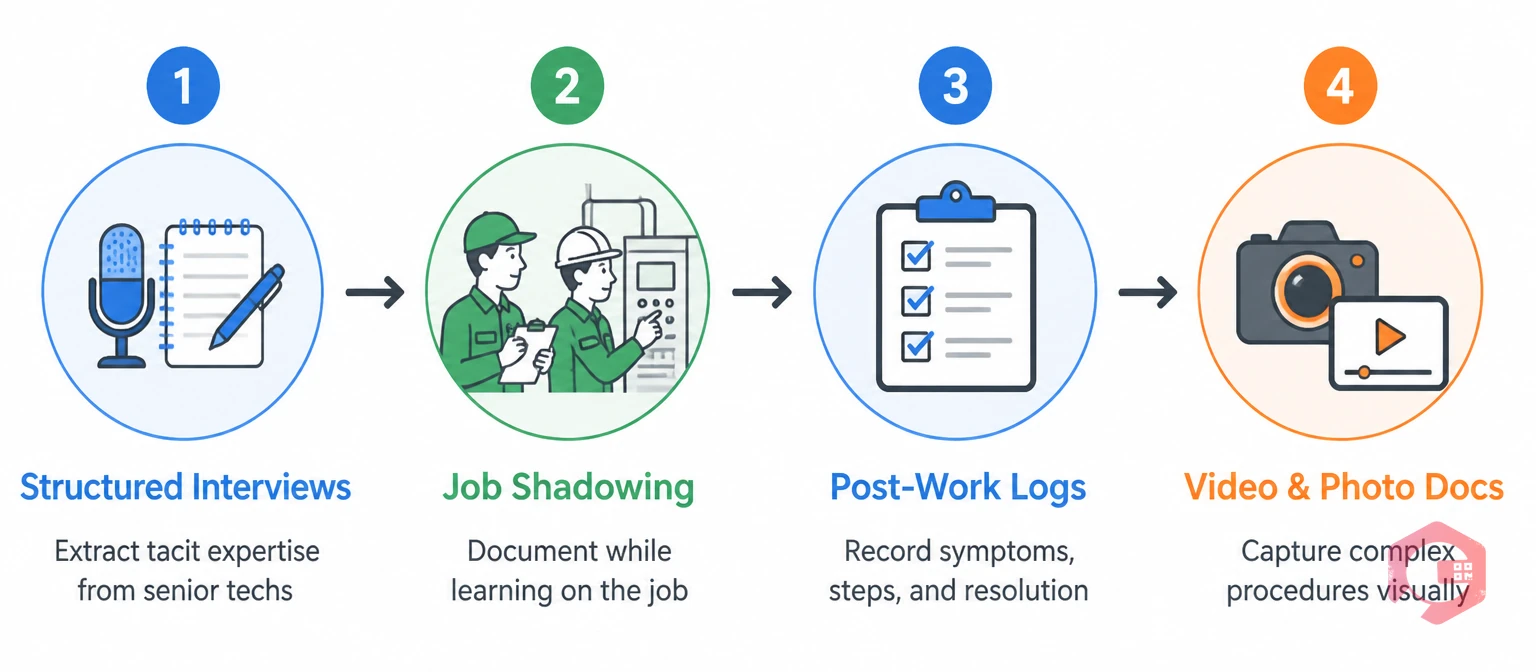
The biggest challenge with knowledge capture isn't willingness — most experienced technicians are happy to share what they know. The challenge is making capture easy enough that it actually happens during a busy shift. Here are the methods that work in real maintenance environments.
Schedule dedicated sessions with senior technicians to extract tacit knowledge before they transition out. A facilitator asks targeted questions: “What's the first thing you check when this asset behaves like X?” or “What would a new technician get wrong about maintaining this pump?” Record these sessions and convert them into structured documents. Even 60 minutes with an experienced technician can produce months of usable documentation.
Pair a new technician with an experienced one — but require the new technician to write down what they observe. This forces verbalization of steps that experienced techs do automatically. After the shadowing session, both parties review the notes together to catch gaps. The output is a draft procedure that can be refined into a formal SOP.
Require technicians to log what they did after completing any non-routine repair — not just the part replaced, but the symptoms they observed, the diagnostic steps they took, and what resolved the issue. This can be done in a work order system with a structured notes field. Over time, these logs become a rich troubleshooting reference for future technicians.
For complex procedures, video is often clearer than text. A five-minute walkthrough video of how to access and replace a component inside a machine is faster to produce and easier to follow than a written procedure with 20 steps. Mobile CMMS apps make it easy to attach photos and videos directly to work orders and asset records.
Capturing knowledge is only half the work. Documenting it in a way that technicians will actually use is the other half. Poor documentation — too long, too vague, or too hard to find — is almost as bad as no documentation.
Every procedure document should follow the same format so technicians know where to look for specific information. A solid maintenance SOP template includes the asset name and ID, the task scope, required tools and parts, safety precautions, step-by-step instructions, acceptance criteria, and estimated duration. Consistency makes documents easier to scan under pressure.
Use plain language, short sentences, and numbered steps. Avoid jargon that only office staff would use. If a step requires judgment — “tighten until snug” — add a concrete reference: “tighten to 45 ft-lbs using a calibrated torque wrench.” Assume the reader is competent but unfamiliar with this specific asset.
A procedure document that sits in a shared folder no one checks is useless. Attach documents directly to the asset record in your maintenance management system so technicians find them at the point of need — when they're standing in front of the equipment with a work order in hand. This is where asset tracking tied to a knowledge base pays off directly.
Stale documentation is worse than no documentation because it erodes trust. Set a review cycle — at minimum annually, or after any significant repair or equipment modification — and assign ownership so reviews actually happen. According to ISO 45001 occupational health and safety standards, documented procedures must reflect current practices to be compliant.
Documentation creates the asset. Transfer makes it useful. Even the best-documented knowledge goes unused if there's no system for getting it into technicians' hands when they need it.
New technicians should follow a defined onboarding path that introduces them to each critical asset class, its failure history, and the documented procedures for working on it. Pair this with mentored shadowing on live jobs. Track completion so you know what each technician has been exposed to — not just that they've been “trained.”
Before technicians start a complex or infrequent task, require a brief review of the documented procedure. This is especially important for safety-critical work. A 5-minute briefing against a checklist prevents most of the errors that happen when experienced techs skip steps because they're confident they remember them.
Rotate technicians across different asset types and shifts to distribute knowledge across the team. This reduces dependence on any single individual and accelerates transfer because technicians learn from each other on real jobs. Track cross-training coverage using your maintenance checklists and scheduling tools to identify gaps before they become operational risks.
Hold short team meetings — monthly or after major incidents — where technicians share what they learned from recent repairs. A 15-minute session where someone walks through a tricky diagnosis they solved last week produces informal knowledge transfer that documentation alone can't replicate. Capture the key points and add them to your documented records afterward.

A CMMS platform is the operational home for your maintenance knowledge base. It connects procedures, history, and assets in one place so knowledge is accessible at the moment of need — not buried in a shared drive or locked in someone's email. Here's how a well-configured CMMS turns documentation into a living, searchable knowledge system.
Tribal knowledge refers to information about equipment, processes, or procedures that exists only in the minds of experienced team members — never written down. It's called “tribal” because it passes person-to-person, like oral tradition. In maintenance, it typically includes undocumented troubleshooting methods, equipment quirks, and workarounds. The risk is that when those people leave, the knowledge leaves with them.
Start the knowledge capture process at least six months before retirement, not in the final weeks. Use structured interviews, job shadowing with documentation, and recorded walkthroughs of critical procedures. Enter everything into a CMMS knowledge base so it's accessible to the whole team — not just the person who was trained directly by the retiree.
A practical knowledge base can take three to twelve months to build, depending on the size of your asset portfolio and how much documentation already exists. The fastest approach is to start with your most critical assets — the ones where a knowledge gap causes the most downtime — and build outward from there. Progress compounds quickly once the first batch of high-quality procedures is in place.
No, but it can make their knowledge available to the whole team even after they're gone. A CMMS stores the history, procedures, and troubleshooting logic that experienced technicians have built up so newer team members can access it. Think of it as extending the reach of your best technicians rather than replacing them.
Training is typically a one-time event — a course, a certification, or an onboarding program. Knowledge transfer is an ongoing process of capturing and distributing expertise as it develops. Good training programs use documented knowledge as their source material, which is why building a knowledge base and improving training go hand in hand.
Maintenance knowledge transfer is one of the most practical investments a maintenance team can make. It reduces downtime, speeds up onboarding, and protects your operation against the inevitable churn of experienced technicians. The key is building a system — not relying on memory, informal shadowing, or hoping the right person is available when something breaks.
If your team is ready to build a knowledge base that actually works in the field, Cryotos CMMS gives you the tools to capture, organize, and surface maintenance knowledge exactly when technicians need it. Book a free demo today to see how teams use Cryotos to stop losing knowledge and start building it.


Cryotos AI predicts failures, automates work orders, and simplifies maintenance—before problems slow you down.



