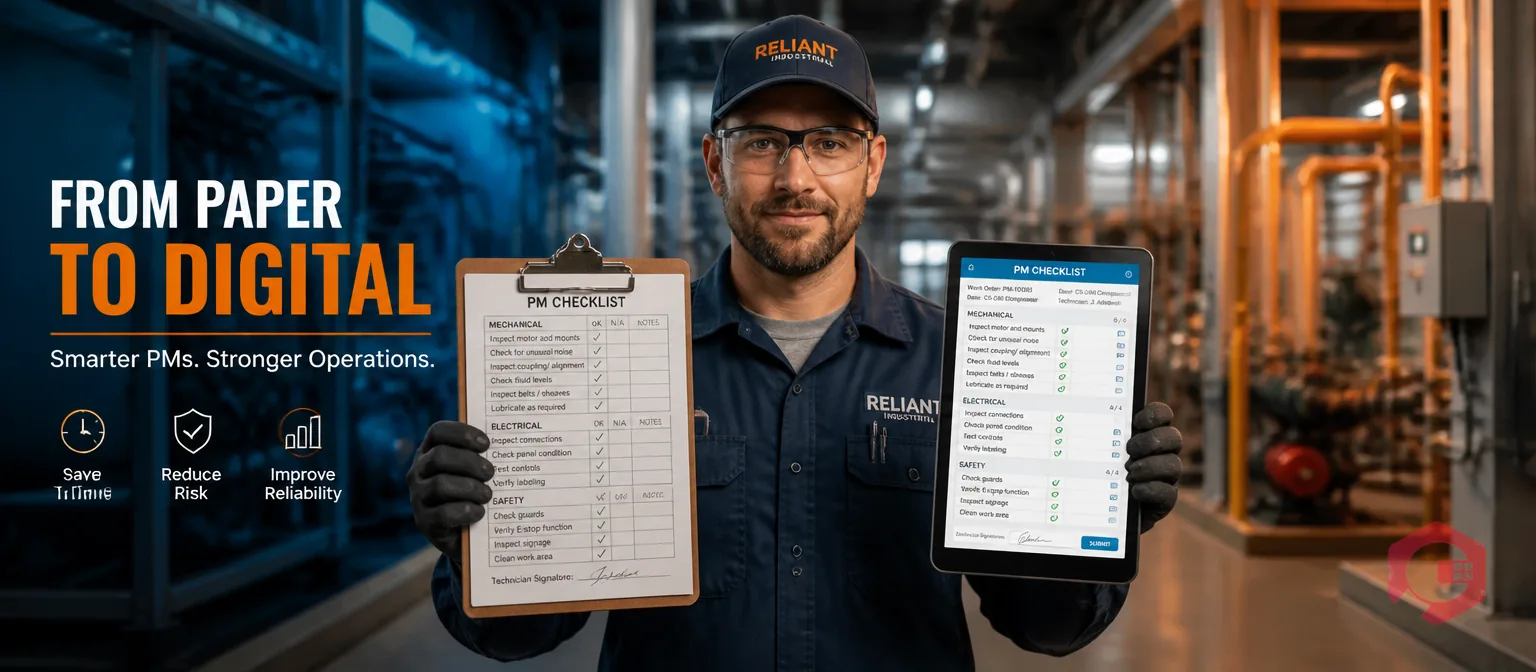
Paper PM checklists cost the average team roughly 30 minutes per technician per shift in data entry, illegible records, lost forms, and missed escalations. Cryotos CMMS replaces that workflow with a digital checklist that auto-schedules itself, captures evidence on mobile, escalates failures automatically, and produces an audit-ready record without a single retyping step.
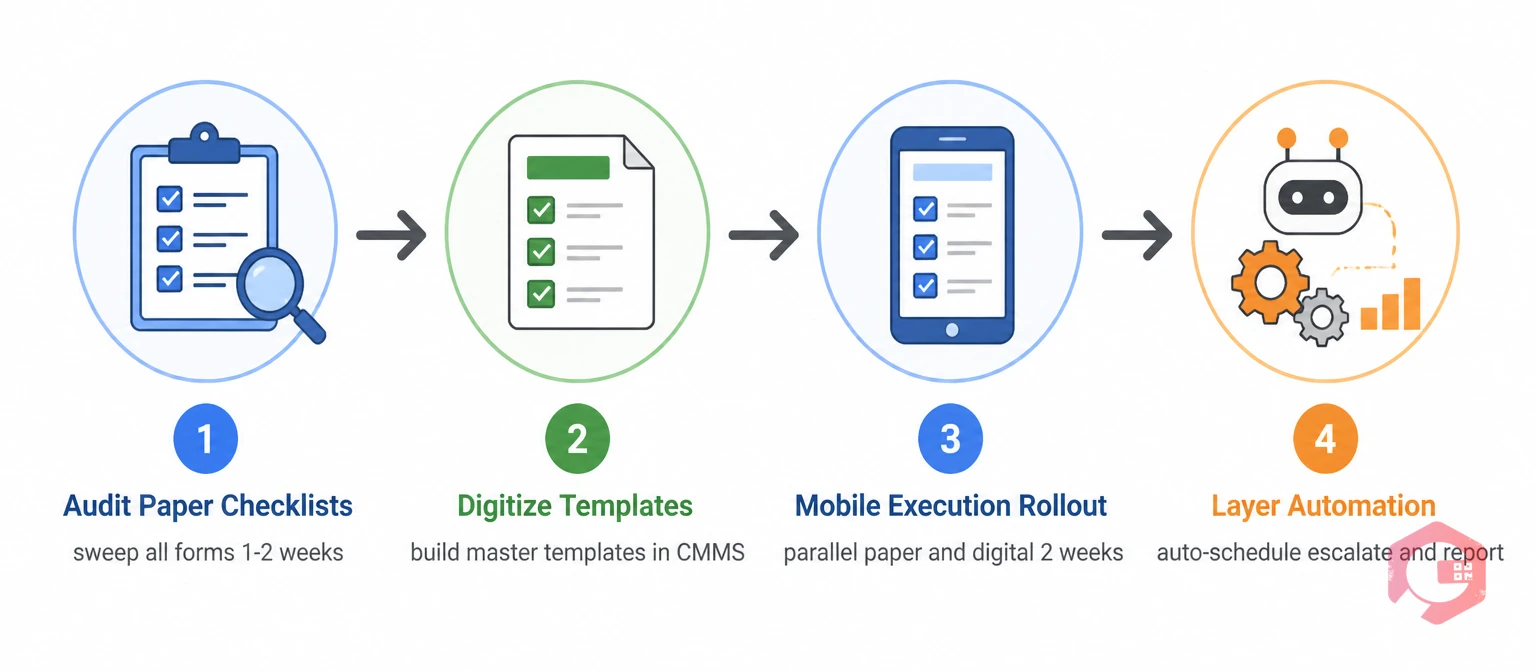
This post walks through the four-phase migration from paper to digital — audit your forms, digitize templates, roll out mobile execution, then layer real automation on top. By the end you'll know exactly what gets automated, what gets faster, and what the rollout looks like.
What Changes When a PM Checklist Goes Digital
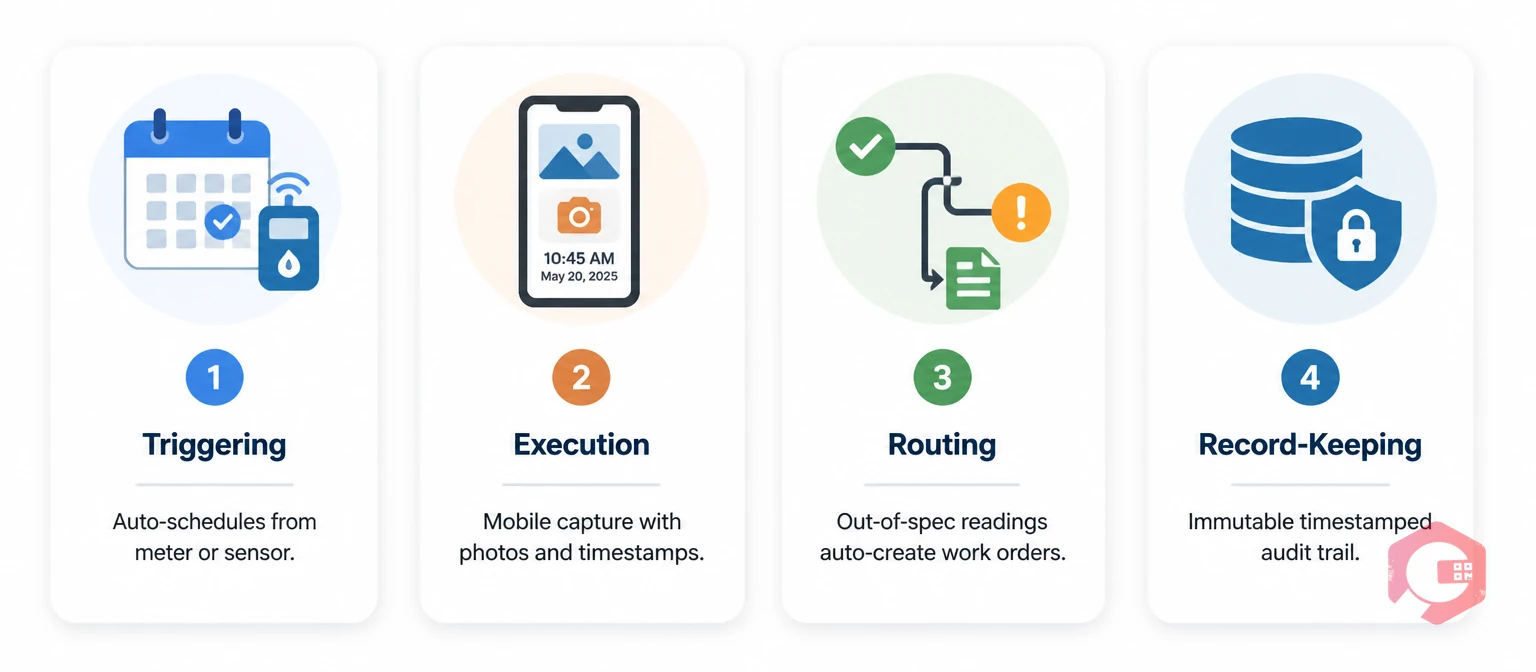
"Digital" doesn't just mean "the same paper form on a screen." A properly automated PM checklist changes four things at once:
- Triggering: The checklist fires automatically on a schedule, run-hours, or sensor reading — not because someone remembered to print it.
- Execution: The technician runs the checklist on a phone or tablet, capturing photos, timestamps, and geolocation as they work.
- Routing: Out-of-spec readings or failed checks auto-create corrective work orders and notify the right person — no paper handoff.
- Record-keeping: Every entry timestamps itself with the technician's identity, immutable audit trail, and is searchable from day one.
The result is a checklist that does work for you, not one you have to chase through clipboards and filing cabinets.
The Real Cost of Paper-Based PM Checklists
Before the migration plan, it helps to size the problem honestly. Paper-based PM checklists carry costs that hide in plain sight:
- Data entry tax: 20% to 30% of a technician's shift spent on paperwork or duplicate data entry into Excel. Plant Engineering maintenance surveys consistently put this figure in the 30-minute-per-shift range.
- Lost or illegible forms: Industry surveys put the rate of unreadable or missing paper checklists at 5% to 15% — meaning that share of your PM evidence simply doesn't exist.
- Delayed escalations: A failed reading written on paper might sit for 3 days before anyone with authority sees it. By then, the failure has already happened.
- Audit prep panic: A 3-week scramble to assemble PM records for an ISO or OSHA audit, every single year.
- No trend analysis: Paper readings are data points trapped in cabinets. They never become a trend line that predicts the next failure.
According to OSHA penalty data, missing maintenance records during inspections routinely trigger violations at $16,550 each. That single fine pays for years of CMMS subscription.
Phase 1: Audit Your Existing Paper Checklists
Don't digitize what you don't understand. The first phase is a 1-to-2 week sweep of every paper checklist currently in use across your facility.
What the audit captures:
- One copy of every active checklist from each shop, area, or asset class.
- Frequency of use: Daily, weekly, monthly, annually — and how often it's actually completed vs. skipped.
- Owner per checklist: Which technician, planner, or supervisor signs off.
- Pain points reported by users: Too long, wrong sequence, vague tasks, missing fields.
- Duplicates and contradictions: The same compressor often has 3 different checklists from 3 different decades.
This audit usually finds 30% to 50% of paper checklists are redundant, outdated, or missing critical components — see our breakdown of the key components of an effective PM checklist for the structural audit framework. Clean the inventory first, then digitize.
Phase 2: Digitize Templates in Cryotos
Once the audit is clean, the templates go into Cryotos. This is the phase most teams over-engineer — you don't need a custom workflow per asset. Use templates and reuse them.
What happens in this phase:
- Master templates per asset class (pumps, motors, HVAC, conveyors) created once and applied to many assets.
- Pass/fail thresholds added to every measurable task — oil pressure ranges, vibration limits, temperature ceilings.
- Photo fields marked as required for gauge readings, fluid levels, and wear indicators.
- Asset hierarchy linked so each template auto-pulls the correct asset ID, location, and history.
- OCR or Excel import used to bring in legacy task lists in bulk — no retyping required.
Most teams configure their first 10 templates in under a week. After that, each new asset just inherits the right template via the maintenance checklists module.
Phase 3: Roll Out Mobile Execution to Technicians
The success of the migration hinges on this phase. If technicians don't adopt the mobile app, you've just added a step to the same paper workflow.
What this phase looks like:
- Device strategy: Company-issued ruggedized tablets for shop teams, BYOD-allowed phones for field techs. Cryotos works on both.
- Offline mode tested: Techs verify checklists complete cleanly in low-signal areas — basements, refrigerated rooms, outdoor yards.
- QR codes deployed on assets so a scan instantly opens the right checklist for that exact unit. (See our deep dive on QR code maintenance logs for the full workflow.)
- Two weeks of parallel running — paper and digital side by side — to catch gaps before retiring the paper.
- Daily standup feedback loop in the first two weeks so techs can flag friction in real time.
Plants that skip parallel running almost always revert to paper within a month. Plants that run parallel for 14 days transition cleanly and never look back.
Phase 4: Layer Automation on Top of Digital
This is the phase competitors usually skip. Going digital is not the same as automating — and the real ROI is in the automation layer that sits on top of the digital checklist.
What real automation looks like in Cryotos:
- Auto-scheduling: Checklists fire on time, meter reading, or sensor trigger — no calendar reminders required.
- Conditional task routing: A failed task auto-creates a corrective work order and routes it to the right technician with priority and SLA attached.
- Smart notifications: Email, mobile push, or WhatsApp alerts only when thresholds are tripped — no notification fatigue.
- Escalation rules: Critical failures escalate to supervisors automatically if not acknowledged in 15 minutes.
- Inventory auto-decrement: Spare parts consumed during PM auto-update inventory levels in real time.
- Live dashboards: Compliance, MTTR, MTBF, and downtime trends update the moment a checklist closes.
This is where the 30-minutes-per-shift savings shows up. Techs stop chasing paperwork, planners stop hunting for missing forms, and supervisors get a real-time compliance view instead of a monthly Excel export.
Six Cryotos Automations That Replace Paper Habits
Six specific things change for technicians and managers the day the migration completes:
- QR scan opens the right checklist instantly — no flipping through binders to find the right form.
- Required photos before task completion — no more "I forgot to take the gauge picture" gaps.
- Out-of-spec readings create the WO automatically — no manual handoff between PM and corrective maintenance.
- Timestamps prove the checklist was actually run — no more 30-minute checklists "completed" in 90 seconds.
- Templates update once, propagate everywhere — fix a task on the master template and every asset using it updates instantly.
- Audit reports export in 30 minutes — instead of three weeks of binder hunting.
None of these are theoretical. They're built into Cryotos CMMS as standard configuration, not custom development.
Rollout That Sticks: Change Management Tips
The technology is the easy part. Adoption is what makes or breaks the migration. Three things consistently separate clean rollouts from failed ones:
- Pick one super user per shift — a respected technician who learns the system first and helps peers in real time.
- Train on real work, not classroom scenarios — run actual PMs on the new system from day one rather than fake demo data.
- Celebrate the first prevented failure publicly — when digital catches a bearing temperature trend that would have been missed on paper, tell the story across the team.
Plants that follow this pattern see 90%+ adoption within 60 days. Plants that don't usually have techs sneaking paper notes for another year.
Frequently Asked Questions
How long does the paper-to-digital migration take?
For a single site with 50 to 200 assets, expect 4 to 8 weeks from kickoff to retiring paper. Phase 1 (audit) takes 1 to 2 weeks. Phase 2 (templates) takes 1 to 2 weeks. Phase 3 (mobile rollout with parallel running) takes 2 to 4 weeks. Phase 4 (automation rules) layers in after go-live. Multi-site rollouts add 2 to 3 weeks per additional site.
Do technicians need expensive hardware?
No. Cryotos works on standard Android and iOS phones, including BYOD. Most plants use ruggedized tablets only for shop-floor stations where a phone could get damaged. The hardware cost for most rollouts is well under $200 per technician — a fraction of the first month's labor savings.
Can we keep some paper backup during the transition?
Yes, and you should — for the first 2 to 4 weeks. Parallel running with both paper and digital catches gaps in the digital templates before paper retires permanently. After the parallel period, keep paper available only for true offline emergencies (long-duration network outage, unusual ATEX areas).
Does going digital actually improve PM compliance?
Yes — significantly. Auto-scheduling, mobile reminders, and supervisor dashboards drive PM compliance from a typical paper-era baseline of 50% to 65% up to 85% to 95% within 6 months. The compliance gain alone usually justifies the entire investment.
Make the Switch
The paper PM checklist isn't getting cheaper, faster, or more reliable — and every audit cycle, every missed escalation, every unreadable form adds to the bill. The four-phase migration above is the cleanest way to move off paper without losing PM compliance or technician trust along the way. To see what your specific checklists look like in Cryotos before you commit, book a demo with our team and we'll walk through your migration plan with you.