A QR code maintenance log is a digital record of maintenance activity captured when a technician scans a unique QR code attached to an asset. Instead of writing on a paper form, the scan opens a pre-filled digital entry on the technician’s mobile device — recording the asset ID, location, timestamp, and task details automatically. According to a Plant Engineering maintenance survey, facilities that still rely on paper-based maintenance records lose an average of 30 minutes per technician per shift to manual data entry alone. QR code maintenance logs eliminate that waste entirely — and do much more.
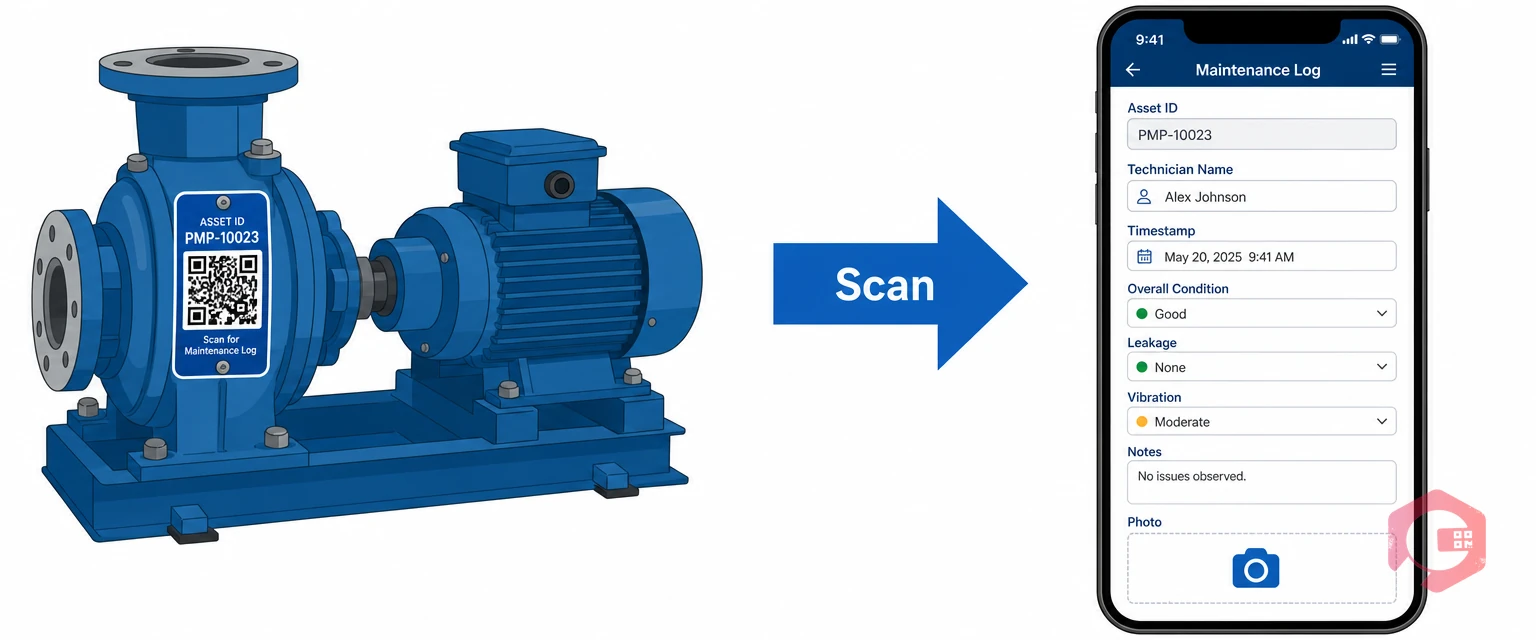
A QR code maintenance log is a digital record created when a field technician scans a QR code label attached to a physical asset — a pump, conveyor, HVAC unit, or any piece of equipment that requires regular upkeep. The scan triggers a structured digital form on the technician’s mobile device. The tech fills in findings, actions taken, and parts used. That entry is then saved to a central database, timestamped, and linked permanently to that specific asset’s history.
Think of it as a paper maintenance checklist that can never be lost, misfiled, or illegibly filled in — because it was never paper to begin with.
Paper checklists are filled in by hand at the machine, carried back to an office or supervisor, manually transcribed into a spreadsheet or CMMS, and then filed in a binder. Every step in that chain introduces delay, error, and the risk of data loss. A QR-based log collapses all of that into a single scan. The moment the tech submits the entry, the record is live — visible to supervisors, searchable in reports, and ready for compliance review.
Each scan-triggered log entry typically captures:
The cost of paper-based maintenance logging isn’t just the paper itself. It’s the compounded inefficiency across every person who touches that form — from the technician filling it in to the planner trying to extract useful data from a stack of handwritten sheets at month-end.
A McKinsey analysis on digital maintenance transformation found that manual data capture and re-entry accounts for up to 20% of a maintenance team’s total working hours. For a team of 10 technicians, that’s two full-time-equivalent roles doing nothing but copying data from paper to screen. Beyond time:
Regulatory bodies like OSHA and ISO 55001 require accurate, traceable maintenance records. Paper logs present three specific compliance vulnerabilities: they can be backdated or altered, they offer no audit trail showing who made a change and when, and gaps in a paper log sequence are easy to miss until an inspector points them out. Digital QR-based logs are immutable once submitted — every entry carries a timestamp, a user ID, and a device fingerprint that creates a court-admissible audit trail.
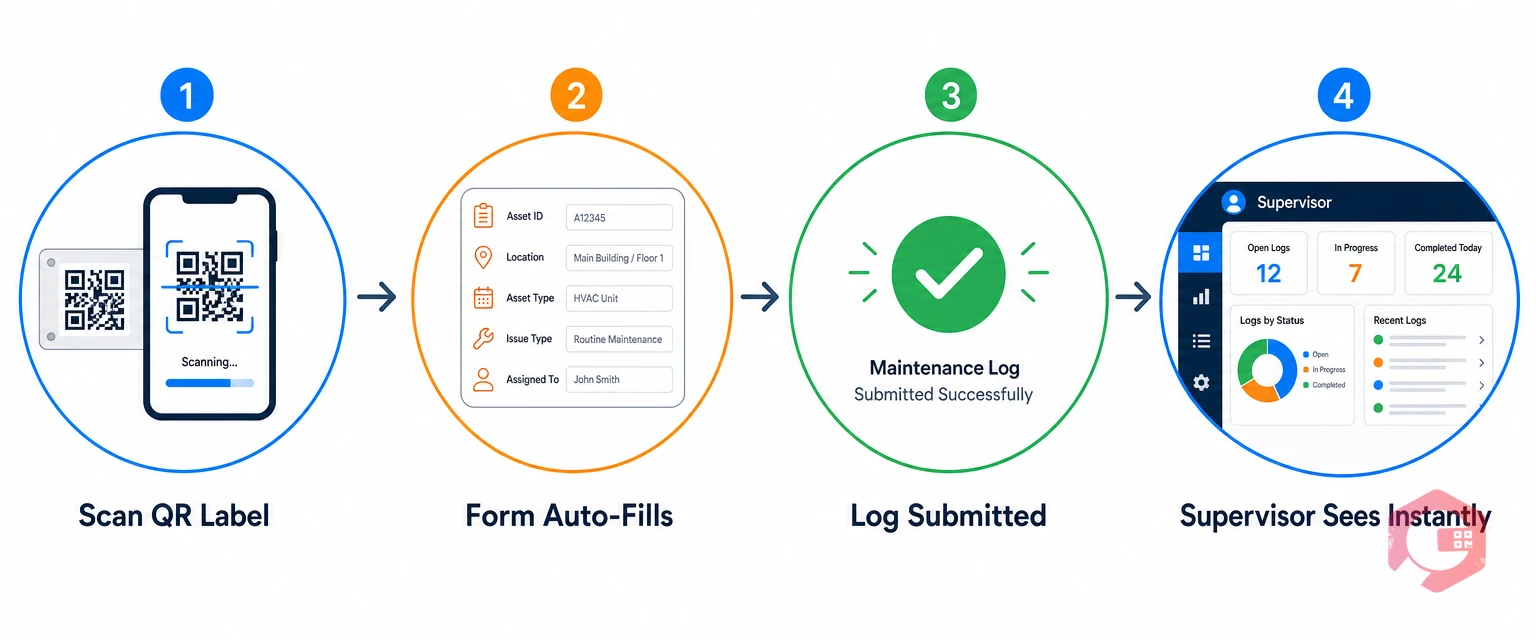
Setting up QR code maintenance logging is more straightforward than most teams expect. Here’s the end-to-end workflow from label to report.
Every asset in scope gets a unique QR code generated by your CMMS or asset management software. The code encodes the asset’s unique ID — nothing more. All the asset data (name, specs, history, assigned PMs) lives in the database; the QR code is just the key that unlocks it. Print the labels on polyester or metal-foil stock for industrial environments where heat, oil, and UV exposure would destroy a standard paper label. Affix the label to a clearly visible, scannable surface on the machine.
The technician opens the CMMS mobile app and taps the scan icon — or simply uses their phone camera if the system supports browser-based scanning. Pointing it at the QR code for under a second pulls up the asset profile: current condition, open work orders, last inspection date, attached manuals, and the log entry form for today’s task. No typing the asset ID, no risk of logging against the wrong machine.
The log form pre-fills the asset name, location, technician name, and timestamp automatically. The tech fills in the inspection findings — using structured condition fields, free-text notes, or a quick photo attachment — and submits. If connectivity is limited on the shop floor, modern CMMS apps store the entry in offline mode and sync it automatically when the device reconnects to the network. No entry is lost.
The submitted log appears in the supervisor’s dashboard in real time. If the tech flagged an issue — say, unusual bearing vibration — the supervisor can immediately escalate to a corrective work order from the same screen. Every action from that point — work order creation, assignment, completion — is appended to the asset’s log history automatically, building an unbroken maintenance chain from routine inspection to repair to sign-off.
Not all log entries need to be identical, but the following fields should appear in every standard QR maintenance log template. Use this as your starting point when configuring your CMMS forms:

Here’s how the two approaches stack up across the dimensions that matter most to maintenance managers:

The efficiency gain from eliminating paper is real — but the deeper value of QR maintenance logs comes from what digital records enable downstream.
Every time a technician scans the QR code on a machine, they see not just the current task — they see the complete maintenance history for that asset. When was the last inspection? What parts were replaced six months ago? Has this bearing flagged an issue before? That context helps techs make better decisions on the floor without calling the office or hunting through binders. A plant that switched to QR-based logging with Cryotos asset management can give every technician access to years of maintenance data from a three-second scan.
When asset ID, location, technician name, and timestamp are auto-filled by the system, the number of fields a human can get wrong drops to near zero. The remaining human input — condition notes and observations — can be validated with structured drop-downs and mandatory fields that prevent blank submissions. A Reliable Plant study on maintenance data quality found that manual transcription introduces errors in up to 1 in 5 records — errors that compound over time and lead to incorrect predictive maintenance decisions.
Maintenance managers no longer need to wait for end-of-day reports to know what happened on the floor. QR log submissions appear in the supervisor dashboard the moment they’re submitted. If a technician marks a compressor as “needs attention,” the supervisor can spin up a corrective work order in Cryotos before the tech has walked back to the workshop. That kind of real-time loop is simply not possible with paper.
ISO 55001, OSHA, and most industry-specific regulatory frameworks require maintenance records to be accurate, complete, and tamper-proof. QR-based log entries are timestamped at submission, linked to verified user accounts, and stored immutably in the system — no one can go back and alter the record after the fact. When an auditor asks for all maintenance records for a specific asset over the past two years, you pull a filtered report in under a minute. With paper, that same task takes most teams half a day.
One of the most common objections to going digital is connectivity: “Our shop floor has dead zones — we can’t rely on a mobile app there.” Modern CMMS mobile apps like Cryotos handle this by storing log entries locally on the device when there’s no network connection. The moment the tech walks into a Wi-Fi zone or steps outside, the queued entries sync automatically to the cloud. The log is captured in real time — the upload just happens slightly later. You get the discipline of paper (always works regardless of signal) with all the benefits of digital.

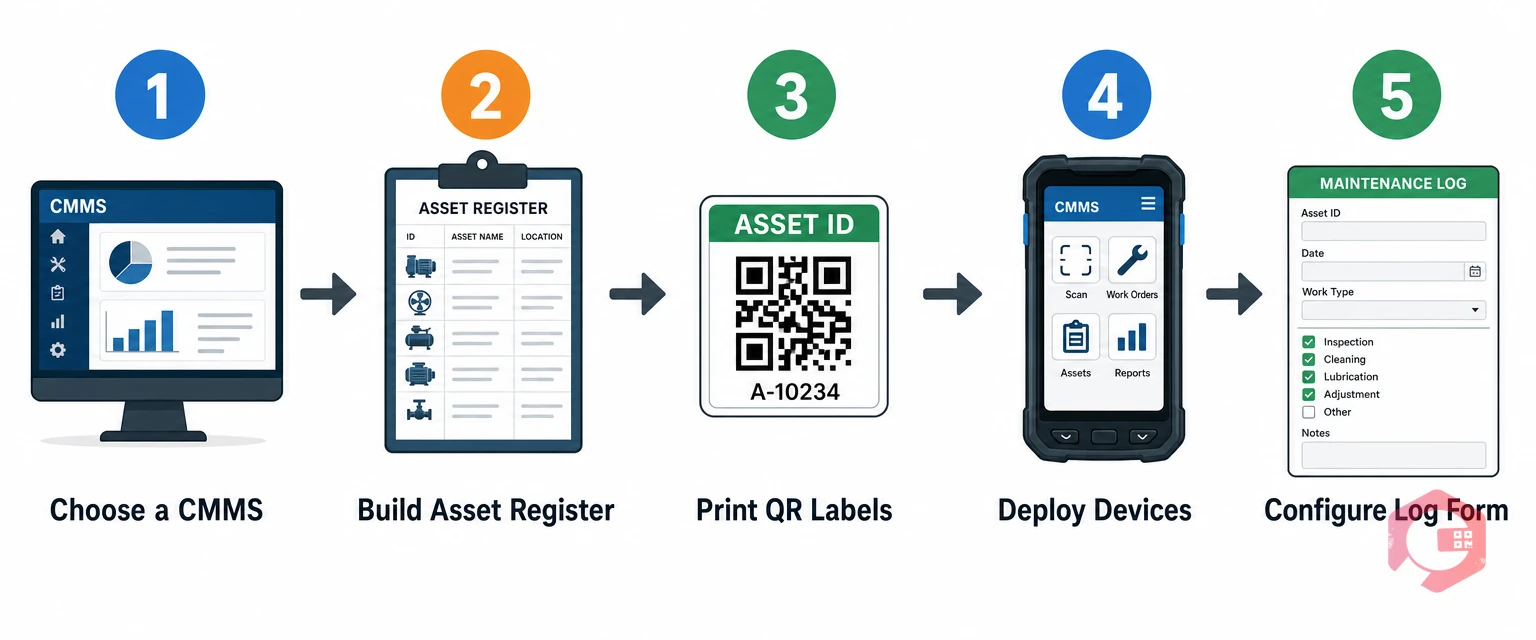
Getting started with QR maintenance logging doesn’t require a long IT project. Most facilities can have their first assets labelled and scanning within a week.
The real power of QR maintenance logging comes when the log entry is connected to the rest of your CMMS — not sitting in isolation. When a technician submits a log entry flagging an issue, it should automatically create a draft corrective work order, notify the relevant supervisor, and update the asset’s maintenance status. When parts are recorded as used, inventory levels should decrement in real time. When a log entry is submitted, it should feed the asset’s KPI data — MTBF, MTTR, availability percentage — without any manual aggregation. That closed loop between log entry and operational data is what separates a QR logging tool from a true preventive maintenance platform.
Cryotos CMMS is built around the premise that maintenance data should be captured at the source — on the floor, at the machine, by the person doing the work. The QR code scanning feature in Cryotos is one of the clearest expressions of that philosophy.
When a technician scans an asset’s QR code in the Cryotos mobile app, they immediately see the asset’s full profile: open work orders, the last 10 log entries, attached manuals and SOPs, warranty status, and the next scheduled PM. From the same screen, they can submit a new log entry, raise a work order, update asset condition, or request parts — all without typing a single asset ID or navigating through menus.
Cryotos also supports public work requests via QR code, so non-technical staff — operators, supervisors, or even facility visitors — can scan an asset label and submit a fault report directly to the maintenance queue. The entry appears in the planner’s work order list with the asset pre-identified, the reporter’s name captured, and a timestamp attached. No phone calls, no sticky notes on the machine.
For teams with compliance requirements, every log entry in Cryotos carries an immutable audit trail. Supervisors can filter and export the full maintenance log for any asset, date range, or technician — formatted as a PDF or spreadsheet — in under a minute. Cryotos customers report a 30% reduction in unplanned downtime and 25% faster repair times after implementing digital maintenance logging. Learn more at cryotos.com.
You can use QR codes to link to Google Forms or simple web forms without a CMMS, but the result is a collection of disconnected entries rather than a true maintenance log. Without a CMMS behind it, you lose asset history, inventory integration, work order creation, and KPI reporting. For small facilities just getting started, a basic CMMS with QR support is inexpensive enough that the standalone form approach rarely makes sense beyond a short pilot.
QR-based logs create an immutable, timestamped record for every maintenance action linked to a specific asset and user. When an auditor requests proof of maintenance for a specific piece of equipment, you can pull a filtered export in seconds — covering every inspection, repair, and sign-off with date, technician ID, and findings. This is far more defensible than a paper binder where entries can be backdated or pages can go missing.
Modern CMMS mobile apps — including Cryotos — support offline mode. The scan loads the asset data from a locally cached copy, the tech completes the log entry, and the submission is queued on the device. When connectivity is restored, the entry syncs automatically to the cloud. The timestamp reflects when the log was submitted on-device, not when it synced — so the record remains accurate.
Standard paper labels won’t survive a factory floor for long. For industrial use, choose polyester or polypropylene labels with a UV-resistant laminate for outdoor or high-light environments, aluminium labels for high-heat applications (above 150°C), and epoxy-coated labels for wet or oil-exposed areas. Most industrial label suppliers offer test samples — run a 30-day durability trial in your harshest zone before rolling out to the full asset list.
RFID readers can detect tags without line-of-sight and at longer ranges, which makes them useful for automated tracking in high-throughput environments. But RFID infrastructure — readers, antennas, tag programming hardware — costs significantly more than QR labels and a smartphone. For maintenance logging specifically, where a technician is already standing at the asset to perform the work, QR codes deliver the same data capture capability at a fraction of the cost. RFID makes more sense for automated inventory counting or asset tracking in transit; QR makes more sense for on-asset maintenance logging.
Paper maintenance checklists have had a long run. But the costs — in lost time, transcription errors, compliance gaps, and invisible asset histories — are too high for any facility serious about reliability and uptime. QR code maintenance logs replace all of that with a process that’s faster, more accurate, always searchable, and built for audit readiness from day one.
The switch doesn’t require a long implementation project. With the right CMMS, you can have your first assets labelled and your first digital log entries flowing within a week. Start with your ten highest-criticality assets, run a one-month pilot, and measure the time saved against your baseline. The numbers will make the case for rolling it out facility-wide.
If you’re looking for a CMMS that makes QR-based maintenance logging simple — from label generation to real-time supervisor dashboards to one-click compliance reports — Cryotos is built exactly for that. Explore the asset management module or request a demo to see the full QR log workflow in action.

A QR code maintenance log is a digital record of maintenance activity captured when a technician scans a unique QR code attached to an asset. Instead of writing on a paper form, the scan opens a pre-filled digital entry on the technician’s mobile device — recording the asset ID, location, timestamp, and task details automatically. According to a Plant Engineering maintenance survey, facilities that still rely on paper-based maintenance records lose an average of 30 minutes per technician per shift to manual data entry alone. QR code maintenance logs eliminate that waste entirely — and do much more.
A QR code maintenance log is a digital record created when a field technician scans a QR code label attached to a physical asset — a pump, conveyor, HVAC unit, or any piece of equipment that requires regular upkeep. The scan triggers a structured digital form on the technician’s mobile device. The tech fills in findings, actions taken, and parts used. That entry is then saved to a central database, timestamped, and linked permanently to that specific asset’s history.
Think of it as a paper maintenance checklist that can never be lost, misfiled, or illegibly filled in — because it was never paper to begin with.
Paper checklists are filled in by hand at the machine, carried back to an office or supervisor, manually transcribed into a spreadsheet or CMMS, and then filed in a binder. Every step in that chain introduces delay, error, and the risk of data loss. A QR-based log collapses all of that into a single scan. The moment the tech submits the entry, the record is live — visible to supervisors, searchable in reports, and ready for compliance review.
Each scan-triggered log entry typically captures:
The cost of paper-based maintenance logging isn’t just the paper itself. It’s the compounded inefficiency across every person who touches that form — from the technician filling it in to the planner trying to extract useful data from a stack of handwritten sheets at month-end.
A McKinsey analysis on digital maintenance transformation found that manual data capture and re-entry accounts for up to 20% of a maintenance team’s total working hours. For a team of 10 technicians, that’s two full-time-equivalent roles doing nothing but copying data from paper to screen. Beyond time:
Regulatory bodies like OSHA and ISO 55001 require accurate, traceable maintenance records. Paper logs present three specific compliance vulnerabilities: they can be backdated or altered, they offer no audit trail showing who made a change and when, and gaps in a paper log sequence are easy to miss until an inspector points them out. Digital QR-based logs are immutable once submitted — every entry carries a timestamp, a user ID, and a device fingerprint that creates a court-admissible audit trail.

Setting up QR code maintenance logging is more straightforward than most teams expect. Here’s the end-to-end workflow from label to report.
Every asset in scope gets a unique QR code generated by your CMMS or asset management software. The code encodes the asset’s unique ID — nothing more. All the asset data (name, specs, history, assigned PMs) lives in the database; the QR code is just the key that unlocks it. Print the labels on polyester or metal-foil stock for industrial environments where heat, oil, and UV exposure would destroy a standard paper label. Affix the label to a clearly visible, scannable surface on the machine.
The technician opens the CMMS mobile app and taps the scan icon — or simply uses their phone camera if the system supports browser-based scanning. Pointing it at the QR code for under a second pulls up the asset profile: current condition, open work orders, last inspection date, attached manuals, and the log entry form for today’s task. No typing the asset ID, no risk of logging against the wrong machine.
The log form pre-fills the asset name, location, technician name, and timestamp automatically. The tech fills in the inspection findings — using structured condition fields, free-text notes, or a quick photo attachment — and submits. If connectivity is limited on the shop floor, modern CMMS apps store the entry in offline mode and sync it automatically when the device reconnects to the network. No entry is lost.
The submitted log appears in the supervisor’s dashboard in real time. If the tech flagged an issue — say, unusual bearing vibration — the supervisor can immediately escalate to a corrective work order from the same screen. Every action from that point — work order creation, assignment, completion — is appended to the asset’s log history automatically, building an unbroken maintenance chain from routine inspection to repair to sign-off.
Not all log entries need to be identical, but the following fields should appear in every standard QR maintenance log template. Use this as your starting point when configuring your CMMS forms:

Here’s how the two approaches stack up across the dimensions that matter most to maintenance managers:

The efficiency gain from eliminating paper is real — but the deeper value of QR maintenance logs comes from what digital records enable downstream.
Every time a technician scans the QR code on a machine, they see not just the current task — they see the complete maintenance history for that asset. When was the last inspection? What parts were replaced six months ago? Has this bearing flagged an issue before? That context helps techs make better decisions on the floor without calling the office or hunting through binders. A plant that switched to QR-based logging with Cryotos asset management can give every technician access to years of maintenance data from a three-second scan.
When asset ID, location, technician name, and timestamp are auto-filled by the system, the number of fields a human can get wrong drops to near zero. The remaining human input — condition notes and observations — can be validated with structured drop-downs and mandatory fields that prevent blank submissions. A Reliable Plant study on maintenance data quality found that manual transcription introduces errors in up to 1 in 5 records — errors that compound over time and lead to incorrect predictive maintenance decisions.
Maintenance managers no longer need to wait for end-of-day reports to know what happened on the floor. QR log submissions appear in the supervisor dashboard the moment they’re submitted. If a technician marks a compressor as “needs attention,” the supervisor can spin up a corrective work order in Cryotos before the tech has walked back to the workshop. That kind of real-time loop is simply not possible with paper.
ISO 55001, OSHA, and most industry-specific regulatory frameworks require maintenance records to be accurate, complete, and tamper-proof. QR-based log entries are timestamped at submission, linked to verified user accounts, and stored immutably in the system — no one can go back and alter the record after the fact. When an auditor asks for all maintenance records for a specific asset over the past two years, you pull a filtered report in under a minute. With paper, that same task takes most teams half a day.
One of the most common objections to going digital is connectivity: “Our shop floor has dead zones — we can’t rely on a mobile app there.” Modern CMMS mobile apps like Cryotos handle this by storing log entries locally on the device when there’s no network connection. The moment the tech walks into a Wi-Fi zone or steps outside, the queued entries sync automatically to the cloud. The log is captured in real time — the upload just happens slightly later. You get the discipline of paper (always works regardless of signal) with all the benefits of digital.

Getting started with QR maintenance logging doesn’t require a long IT project. Most facilities can have their first assets labelled and scanning within a week.
The real power of QR maintenance logging comes when the log entry is connected to the rest of your CMMS — not sitting in isolation. When a technician submits a log entry flagging an issue, it should automatically create a draft corrective work order, notify the relevant supervisor, and update the asset’s maintenance status. When parts are recorded as used, inventory levels should decrement in real time. When a log entry is submitted, it should feed the asset’s KPI data — MTBF, MTTR, availability percentage — without any manual aggregation. That closed loop between log entry and operational data is what separates a QR logging tool from a true preventive maintenance platform.
Cryotos CMMS is built around the premise that maintenance data should be captured at the source — on the floor, at the machine, by the person doing the work. The QR code scanning feature in Cryotos is one of the clearest expressions of that philosophy.
When a technician scans an asset’s QR code in the Cryotos mobile app, they immediately see the asset’s full profile: open work orders, the last 10 log entries, attached manuals and SOPs, warranty status, and the next scheduled PM. From the same screen, they can submit a new log entry, raise a work order, update asset condition, or request parts — all without typing a single asset ID or navigating through menus.
Cryotos also supports public work requests via QR code, so non-technical staff — operators, supervisors, or even facility visitors — can scan an asset label and submit a fault report directly to the maintenance queue. The entry appears in the planner’s work order list with the asset pre-identified, the reporter’s name captured, and a timestamp attached. No phone calls, no sticky notes on the machine.
For teams with compliance requirements, every log entry in Cryotos carries an immutable audit trail. Supervisors can filter and export the full maintenance log for any asset, date range, or technician — formatted as a PDF or spreadsheet — in under a minute. Cryotos customers report a 30% reduction in unplanned downtime and 25% faster repair times after implementing digital maintenance logging. Learn more at cryotos.com.
You can use QR codes to link to Google Forms or simple web forms without a CMMS, but the result is a collection of disconnected entries rather than a true maintenance log. Without a CMMS behind it, you lose asset history, inventory integration, work order creation, and KPI reporting. For small facilities just getting started, a basic CMMS with QR support is inexpensive enough that the standalone form approach rarely makes sense beyond a short pilot.
QR-based logs create an immutable, timestamped record for every maintenance action linked to a specific asset and user. When an auditor requests proof of maintenance for a specific piece of equipment, you can pull a filtered export in seconds — covering every inspection, repair, and sign-off with date, technician ID, and findings. This is far more defensible than a paper binder where entries can be backdated or pages can go missing.
Modern CMMS mobile apps — including Cryotos — support offline mode. The scan loads the asset data from a locally cached copy, the tech completes the log entry, and the submission is queued on the device. When connectivity is restored, the entry syncs automatically to the cloud. The timestamp reflects when the log was submitted on-device, not when it synced — so the record remains accurate.
Standard paper labels won’t survive a factory floor for long. For industrial use, choose polyester or polypropylene labels with a UV-resistant laminate for outdoor or high-light environments, aluminium labels for high-heat applications (above 150°C), and epoxy-coated labels for wet or oil-exposed areas. Most industrial label suppliers offer test samples — run a 30-day durability trial in your harshest zone before rolling out to the full asset list.
RFID readers can detect tags without line-of-sight and at longer ranges, which makes them useful for automated tracking in high-throughput environments. But RFID infrastructure — readers, antennas, tag programming hardware — costs significantly more than QR labels and a smartphone. For maintenance logging specifically, where a technician is already standing at the asset to perform the work, QR codes deliver the same data capture capability at a fraction of the cost. RFID makes more sense for automated inventory counting or asset tracking in transit; QR makes more sense for on-asset maintenance logging.
Paper maintenance checklists have had a long run. But the costs — in lost time, transcription errors, compliance gaps, and invisible asset histories — are too high for any facility serious about reliability and uptime. QR code maintenance logs replace all of that with a process that’s faster, more accurate, always searchable, and built for audit readiness from day one.
The switch doesn’t require a long implementation project. With the right CMMS, you can have your first assets labelled and your first digital log entries flowing within a week. Start with your ten highest-criticality assets, run a one-month pilot, and measure the time saved against your baseline. The numbers will make the case for rolling it out facility-wide.
If you’re looking for a CMMS that makes QR-based maintenance logging simple — from label generation to real-time supervisor dashboards to one-click compliance reports — Cryotos is built exactly for that. Explore the asset management module or request a demo to see the full QR log workflow in action.
Cryotos AI predicts failures, automates work orders, and simplifies maintenance—before problems slow you down.