

PLC data in maintenance is the run states, fault codes, counters, runtimes, and condition values that programmable logic controllers already record, used to detect equipment problems and trigger the right repair. The goal is not to send every alarm to maintenance. It is to turn the signals that matter into qualified work orders with context attached.
A PLC already knows when a motor runs hot or a pump trips. What it lacks is a clean path into your Computerized Maintenance Management System. Below are six steps to build that path, plus the KPIs that keep it trustworthy.
Key Takeaways
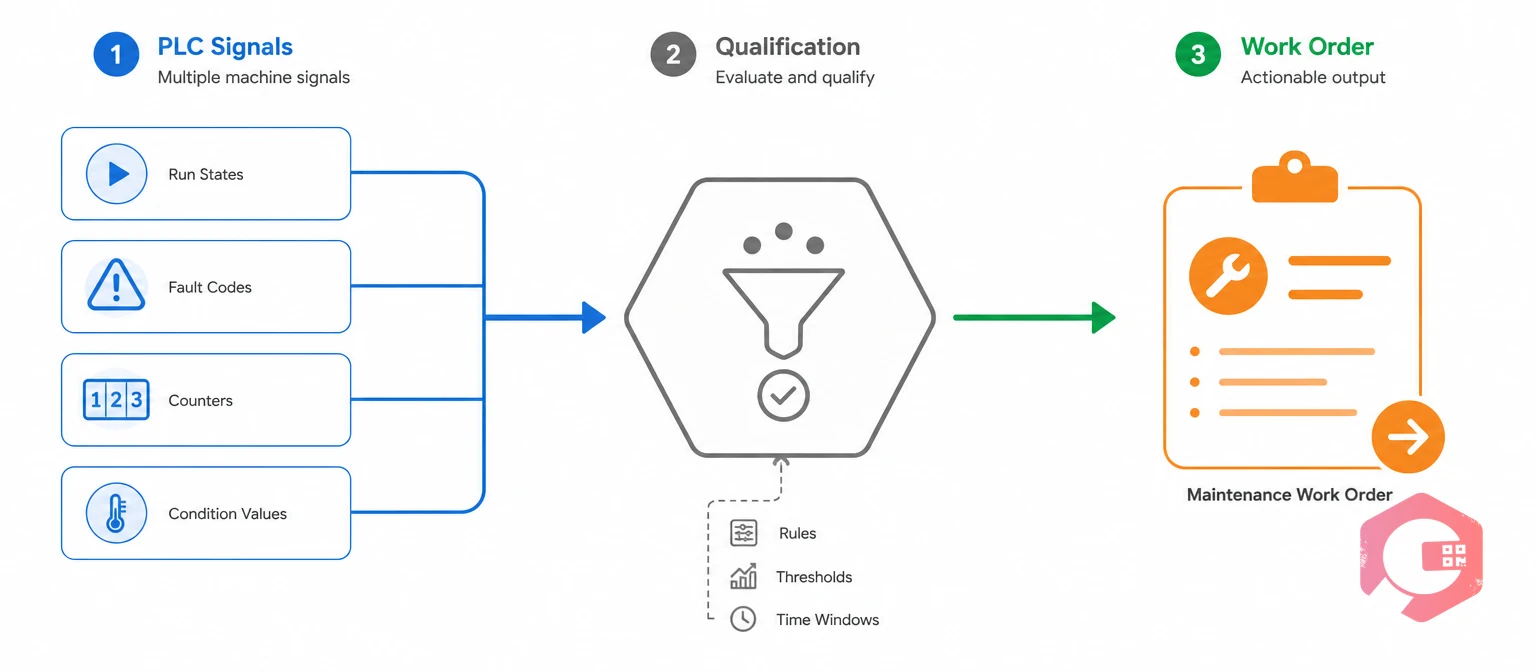
PLC data in maintenance is machine data from the control layer that teams use to find and fix equipment problems. A raw tag is not yet a maintenance event. It becomes one only after it is linked to an asset and checked against how the machine is running.
Most PLCs expose four types of signals that matter to maintenance:
The ISA-95 standard describes how control systems and business systems like a CMMS should exchange this data. It fits reliability programs built on RCM and FMEA, since each PLC rule should map to a known failure mode.
PLCs often feed a SCADA system, and either can act as the source. The takeaway: PLC data is evidence, not a work order, until it has asset and operating context.
Machine signals don't automatically become work orders because PLCs and a CMMS do different jobs. PLC logic keeps a machine running safely in milliseconds, while a CMMS plans human work over hours and days.
A fault bit can chatter, clear on its own, or fire at every changeover. If every change of state creates a work order, you get:
The ISA-18 alarm management standards solve this in the control room, and maintenance needs the same discipline. The takeaway: the aim is accurate conversion of machine evidence, not maximum automation.
Want PLC readings to reach maintenance without custom middleware? See how Cryotos handles IoT integration with SCADA, PLC, and edge devices.
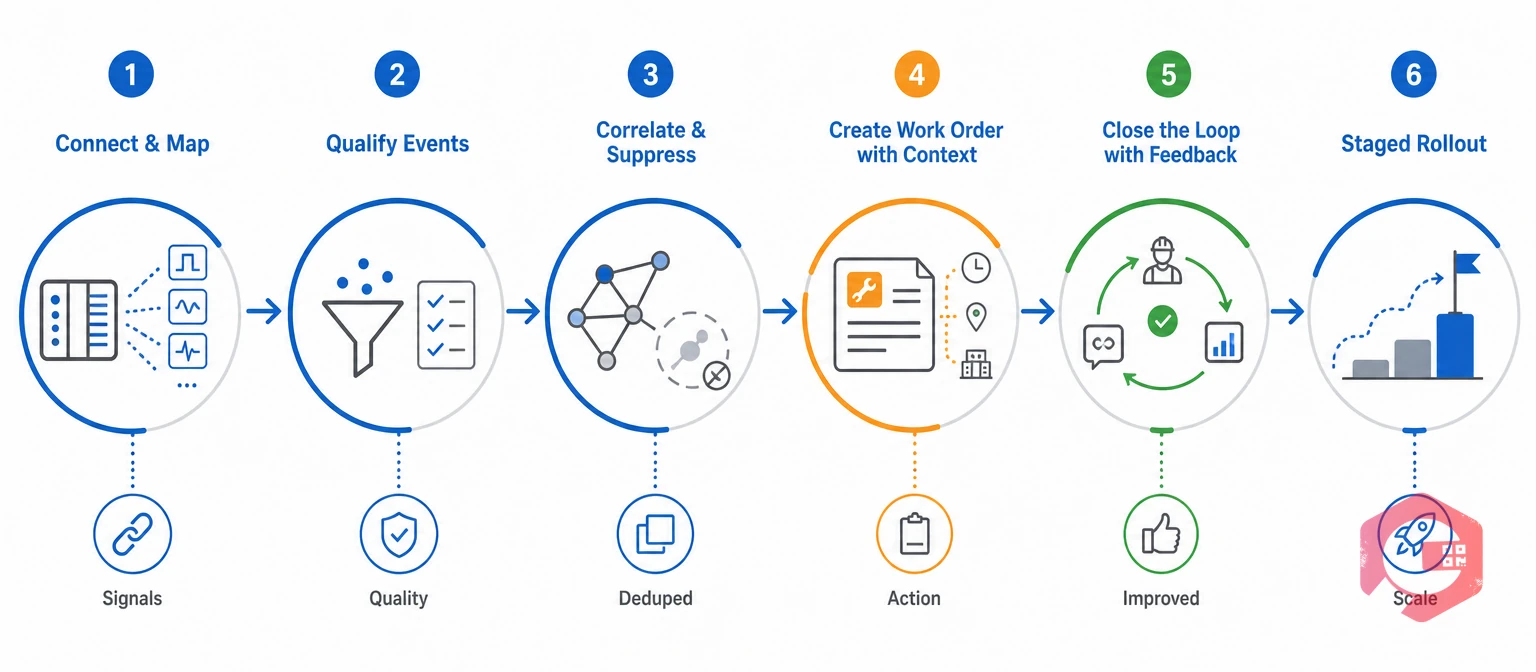
Every PLC data in maintenance project starts by reading only the values you need through an approved interface, then linking each tag to the right asset in your CMMS. OPC UA, an edge gateway, or a plant historian are the usual paths, and each keeps timestamps and signal quality.
Mapping is where many projects go wrong. A correct signal on the wrong asset sends technicians to the wrong machine. Build a tag dictionary that records:
Keep the PLC data in maintenance path read-only and separate from the control network. NIST SP 800-82 guidance on OT security calls for least-privilege access and authenticated connections for this reason.
This mapped, read-only layer is the base of any IIoT maintenance program. The takeaway: check every tag-to-asset link against drawings and field labels first.
Qualify each candidate event before it touches the CMMS, so normal machine behavior never turns into maintenance work. A qualified event is a machine condition that has passed persistence, context, and signal-quality checks.
Apply these checks in order:
Here's an example. On conveyor motor MTR-204, bearing temperature stays above its approved limit for ten minutes while RUN = 1, with good signal quality. That is a qualified event, not a passing spike.
The takeaway: persistence and operating context filter out most noise before any work is created.
Before creating new work, check what else is happening on the asset. Correlation confirms the problem is real, and duplicate checks stop parallel tickets.
Duplicate suppression is the practice of updating an open work order instead of creating a new one for the same problem. For MTR-204, the rule checks three things:
If an open job exists, the new event adds its trend data to it. The takeaway: one problem should mean one work order, however many signals report it.
Create the work order with everything the technician needs to diagnose the fault fast. A blank "check motor" ticket wastes the signal.
Structured work order management fills these fields automatically and pushes the job to mobile. Maintenance teams using Cryotos have reported up to 30% reduction in unplanned downtime and 25% faster repair turnaround.
The takeaway: context turns a machine alarm into a job a technician can start right away.
Close the loop by sending each work order's outcome back to the rule owner. Rules drift when no-fault-found results and confirmed causes never reach them.
On MTR-204, the technician confirms coupling misalignment, realigns the drive, and records the temperature drop. A reliability engineer then:
Parts and labor can sync to finance through ERP integration, tracking cost by asset and failure mode. The takeaway: every closed work order should make the next rule smarter.
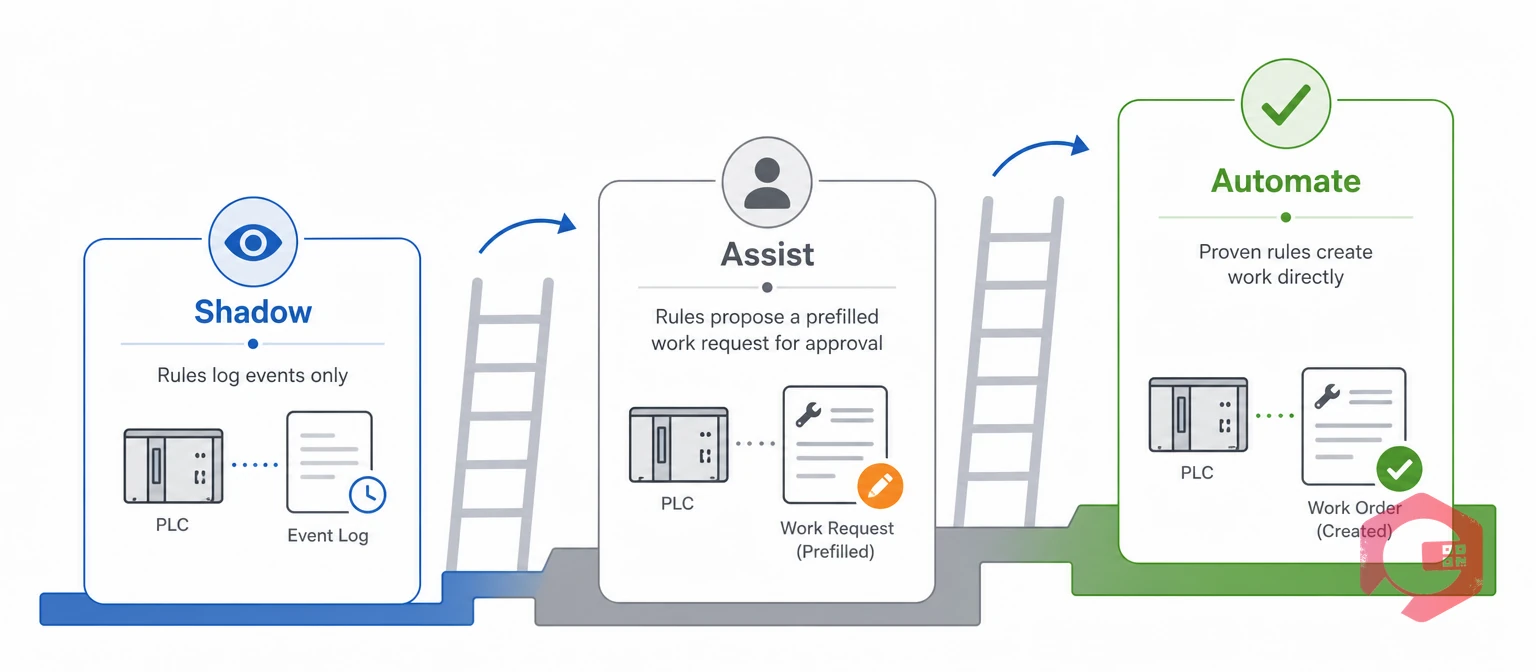
Roll out PLC data in maintenance automation in stages, so each rule earns trust before it runs on its own. Shadow mode is a test phase where rules log candidate events without creating any work.
The Shadow-Assist-Automate Ladder:
Start with a few critical assets where the PLC exposes a reliable signal and a clear repair action exists. Baseline failures, downtime, and emergency work first to prove the gain later.
Move a rule up a rung only when its false-work-order rate stays low for weeks. The takeaway: prove precision in shadow mode before you let a rule create work alone.
A PLC-driven program needs its own scorecard, because standard KPIs like MTTR won't show whether your rules are accurate. Track these next to MTBF and emergency work percentage.
| KPI | Formula | What It Reveals | Healthy Trend |
|---|---|---|---|
| Signal availability | Valid samples received ÷ expected samples × 100 | Whether the data feed can be trusted | Rising, close to 100% |
| Qualified-event rate | Qualified events ÷ raw candidate events × 100 | How much noise your filters remove | Stable after tuning |
| False-work-order rate | PLC work orders closed as no fault found or duplicate ÷ PLC work orders closed × 100 | Rule precision and technician trust | Falling |
| Duplicate suppression rate | Events merged into open work ÷ candidate work-order events × 100 | How well parallel tickets are prevented | Stable |
| Detection-to-work time | Total event-to-work-order time ÷ accepted PLC work orders | How fast the team responds | Falling |
| Repeat failure rate | Repeat repairs, same asset and failure mode ÷ completed corrective work orders × 100 | Whether fixes address root causes | Falling |
Segment each metric by asset class, line, and rule. For ROI, count only benefits finance has checked against a baseline.
The takeaway: a falling false-work-order rate is the clearest sign that your PLC data in maintenance rules are ready to automate.
Most failed PLC data in maintenance projects fail on data and process, not software. A common mistake is treating the link as an IT connection rather than a maintenance workflow.
The takeaway: keep the path read-only, tie rules to context, and prove benefits against a baseline before you claim ROI.
PLC data comes from the machine's own controller, so it carries run states, fault codes, and cycle counts tied to machine logic. Add-on IoT sensors measure what the PLC may not see, such as vibration on an older motor. A sound PLC data in maintenance setup feeds both into the same asset record.
Yes, but not for every alarm. An integration layer should first check each event for persistence, operating state, and signal quality, then look for open work on the asset. Only then should it create or update a work order.
It is safe when the connection is read-only and runs through approved interfaces such as OPC UA or a historian. Separate OT and business networks, use authenticated connections, and log every access. Never let the maintenance link write to controllers.
Start with critical assets that have a known failure mode and a PLC signal that already tracks it. Conveyor motors, pumps, and compressors are common first choices. Run their rules in shadow mode before creating live work.
PLC signals only pay off when they reach the right technician with the right context. Schedule a free demo to see how Cryotos turns qualified machine events into prioritized work orders with trend data attached.



Cryotos AI predicts failures, automates work orders, and simplifies maintenance—before problems slow you down.



