

Saved dashboard filters cut decision time for maintenance managers by letting teams skip repetitive data sorting and jump straight to the metrics that matter. Instead of rebuilding the same report every morning, a maintenance manager can open their CMMS dashboard and instantly see filtered views of open work orders, overdue PMs, or assets by line — all pre-configured and ready to act on. According to a McKinsey report on manufacturing operations, teams that reduce information retrieval friction cut operational decision cycles by up to 25%. That's not a minor improvement — it's the difference between catching a problem before shutdown and learning about it after.

A saved dashboard filter is a stored view configuration inside your maintenance management software. When you apply filters — say, all work orders assigned to Line 3, with a status of "In Progress," due this week — a saved filter lets you store that exact combination and pull it back up any time without rebuilding it from scratch.
Think of it like a saved search in your email inbox. You set the criteria once. From then on, one click shows you exactly what you need.
In a CMMS context, these filters typically span multiple data dimensions:
Once saved, these views become part of your daily workflow — not a one-off lookup. Managers no longer need to rebuild filter combinations from memory. They just click the filter they named "Morning Priority Check" or "Overdue PMs – Facility 2" and get exactly what they need.

Most maintenance managers don't lose time on the decision itself — they lose it getting to the right data. A 2023 study by Plant Engineering found that maintenance professionals spend an average of 23 minutes per shift just locating and formatting information before they can act on it. That's nearly two full hours per week, per manager, consumed by data retrieval — not problem-solving.
Here's where the time typically disappears:
Without saved filters, managers start each day by re-applying the same criteria they used yesterday. Open the CMMS. Filter by facility. Filter by status. Filter by date. Sort by priority. That process takes 5–10 minutes — and it happens multiple times a day across shift handovers and mid-shift check-ins.
A maintenance manager often needs different views for different conversations: one showing technician workloads for a team standup, another showing overdue assets for the plant director's review, and a third showing spare parts consumption for procurement. Without saved filters, building each view on-demand pulls focus and adds friction to every interaction.
When pulling a live, filtered view takes effort, managers sometimes rely on the last report they ran — even if it's hours old. That lag can mean missed escalations, delayed approvals, or overlooked breakdowns that were already flagged in the system but never surfaced in time.
Saved dashboard filters work by eliminating the data setup phase entirely. Instead of arriving at a decision after navigating through raw data, managers arrive at the decision-ready view directly. Here's what that looks like in practice.
A maintenance manager at a mid-sized food processing plant used to spend the first 15 minutes of each shift manually filtering their work order management dashboard to see what came in overnight and what was still open from the previous shift. After configuring a saved filter titled "Shift Start — All Open + Overdue," they reduced that review to under 60 seconds. Same data. Zero setup time.
When a piece of equipment flags a failure, the clock starts immediately. A manager who has to spend 8 minutes rebuilding their escalation view before they can assess severity is already behind. Saved filters for high-priority and critical-asset views mean the relevant data is one click away, not eight minutes away. That gap matters when unplanned maintenance events occur mid-shift.
Shift handovers are one of the highest-risk moments in maintenance operations. Outgoing and incoming supervisors need to align quickly on what's open, what's overdue, and what needs immediate attention. Saved filters — shared across team members — give both sides the same view instantly, reducing the margin for miscommunication. A Reliable Plant analysis found that inconsistent shift handover communication contributes to up to 40% of post-handover maintenance errors.
Saved filters aren't just for operational views. Managers can save filter configurations that feed directly into KPI tracking — MTTR by asset group, PM completion rate by team, overdue work orders by facility. Those views stay consistent from week to week, making trend comparison accurate and meaningful. Cryotos's BI Dashboard supports exactly this: drill-down from org level to asset level, with filter configurations that can be retained across sessions.

Not all saved filters are equal in terms of impact. The ones below consistently generate the highest time savings and decision quality improvements across maintenance operations.
A filter that surfaces every preventive maintenance task that has passed its due date, grouped by asset criticality. This is the single most-used saved filter in most CMMS environments because overdue PMs compound quickly — each missed task increases failure risk for the next cycle.
A view that shows all work orders rated urgent or high, filtered by specific production lines or asset groups. This is the go-to filter for managers who need to make resource allocation decisions quickly — who goes where, and when.
A saved filter showing active work orders by assigned technician, sorted by due time. This view supports workload balancing — spotting when one technician is overloaded while another has capacity. Paired with asset tracking data, it also helps managers confirm technicians are physically near their assigned assets.
A rolling filter showing all logged downtime events from the past week, by asset or department. This view powers root cause conversations — when the same asset appears three times in a single week's downtime log, that's a pattern worth escalating.
Regulatory compliance tasks have hard deadlines and real consequences for misses. A saved filter showing upcoming inspections, certifications, and safety checks — filtered by due date and compliance category — keeps those obligations visible without requiring a separate manual audit. This pairs well with Cryotos's maintenance checklists feature, which links inspection tasks directly to the relevant assets.
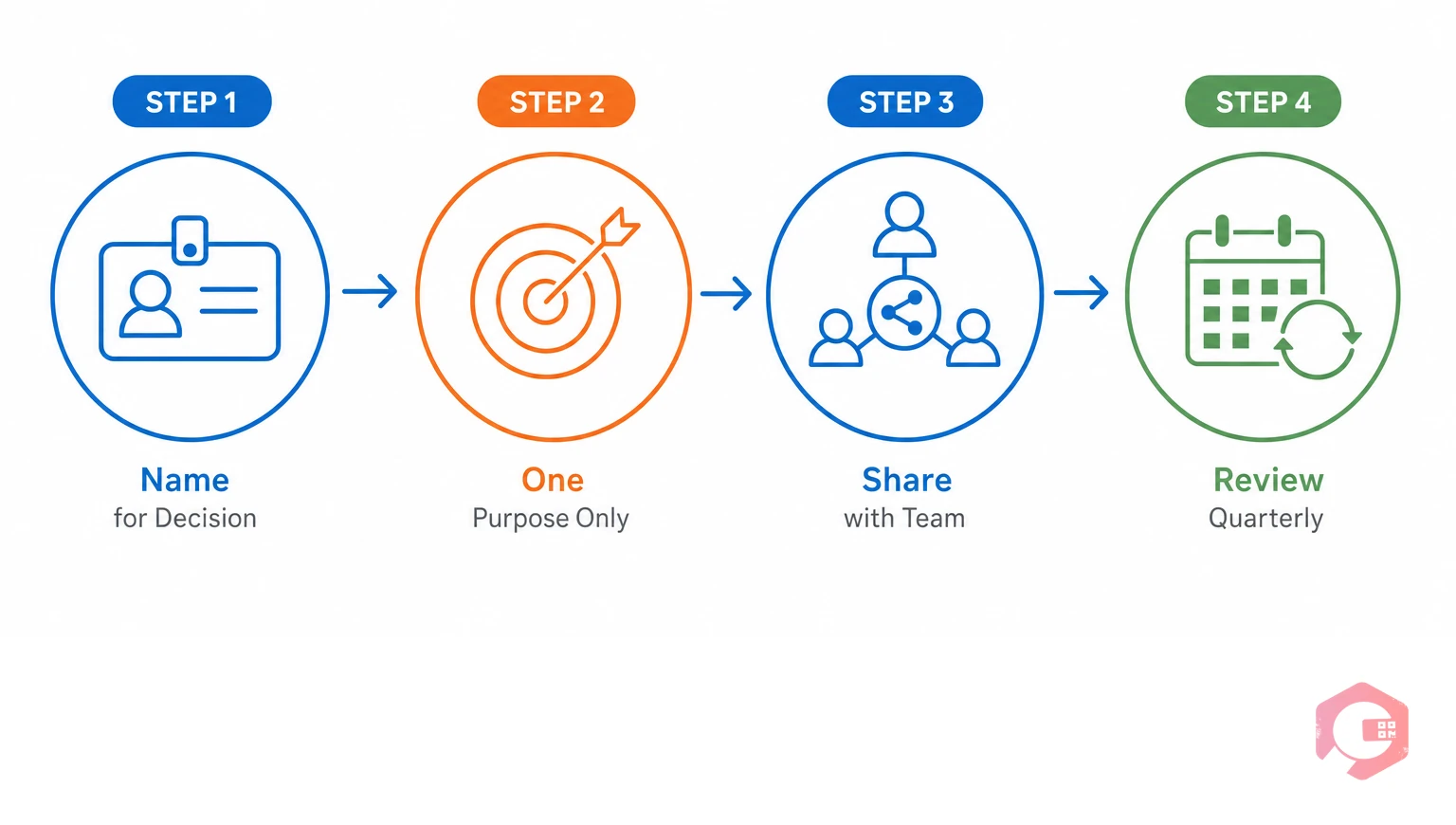
A saved filter is only as useful as its design. Poorly named or too broadly scoped filters create noise instead of clarity. Here's what a well-structured saved filter setup looks like.
The best filter names describe what you're going to do with the view, not what's in it. "Open WOs — Line 4" is less useful than "Line 4 Shift Start Review." The first tells you what data it shows. The second tells you when and why to use it. Name your filters to match the workflow moment they support.
Filters that try to show everything — all assets, all statuses, all priorities — end up showing nothing useful. Each saved filter should answer one specific operational question. "What's overdue right now?" is a good filter question. "What's going on across the whole facility?" is not — it's too broad to act on.
Individual saved filters only help one person. Shared filters — visible to all supervisors and technicians on a given team — create a common operational language. When an incoming supervisor and an outgoing supervisor are both looking at the same "Shift Handover Review" filter, the handover conversation starts from the same baseline.
Saved filter libraries get cluttered over time. A filter created for a shutdown event six months ago may still appear in the sidebar, adding visual noise. Schedule a quarterly review of your filter library — retire anything that hasn't been used in 90 days, rename filters that have drifted from their original purpose, and add new ones as workflows evolve. Cryotos supports this through its report builder, which lets managers build, save, and manage custom views without needing IT involvement.
The time savings from saved filters are real and measurable. Here's a conservative estimate based on typical maintenance team usage patterns:
That recovered time doesn't disappear — it goes toward higher-value work: mentoring technicians, improving maintenance procedures, analyzing failure trends, or training on new equipment. According to research published by Gartner, maintenance operations teams that actively reduce administrative overhead see a 15–20% improvement in work order completion rates within six months — not because they work harder, but because they're spending time on execution instead of data preparation.
The downstream effects extend further. Faster decisions mean fewer escalation delays, shorter unplanned downtime windows, and more consistent preventive maintenance compliance — all of which directly impact equipment availability and production output.
Cryotos's BI Dashboard is built for exactly this kind of operational speed. Maintenance managers can configure filtered views across work orders, asset health, downtime events, and PM schedules — then save those views for instant recall. The system supports drill-down from organization level all the way to individual asset level, so a manager can start with a facility-wide view and click into a specific machine's history without rebuilding their filters.
Cryotos also includes over 50 predefined reports through its report builder, many of which can be saved, scheduled, and automatically delivered to email — so decision-ready data doesn't just wait to be pulled, it arrives proactively. For teams managing compliance obligations, the maintenance audit checklist feature ensures inspection data is always accessible and audit-ready, without manual aggregation.
Teams using Cryotos have reported 30% reductions in unplanned downtime and 25% faster repair times — outcomes that start with faster, better-informed decisions at the manager level. If your team is still rebuilding the same reports every day, the opportunity is straightforward: set up saved filters, align your team around shared views, and let your CMMS do the data work so your managers can focus on the maintenance work.
A saved dashboard filter is a stored view configuration in your CMMS that preserves a specific combination of data filters — such as asset group, work order status, priority, and date range — so you can reload that exact view with one click instead of rebuilding it manually each time.
Most maintenance managers spend 20–30 minutes per shift on manual data retrieval. Saved filters typically reduce that to 3–5 minutes. For a team of three managers, that translates to 230–390 hours recovered annually — time that can be redirected toward higher-value maintenance work.
Yes, most CMMS platforms — including Cryotos — allow filters to be shared across users or teams. Shared filters are especially useful for shift handovers, where both incoming and outgoing supervisors need to start from the same operational view.
The highest-impact saved filters typically cover: overdue preventive maintenance tasks, high-priority open work orders by asset, technician workload views, rolling downtime event logs, and upcoming compliance inspections. Each filter should answer one specific operational question to remain actionable.
When managers spend less time building data views, they spend more time analyzing them. Saved filters reduce cognitive load and context-switching, which leads to sharper pattern recognition, faster escalation decisions, and more consistent KPI tracking — all of which improve decision quality over time, not just decision speed.
If your maintenance team is still rebuilding the same dashboard views every shift, every morning, and every stakeholder meeting — that's a solvable problem. Cryotos CMMS gives maintenance managers the tools to configure saved filters, share them across teams, and act on live data in seconds rather than minutes. Explore how Cryotos can help your team cut decision time and keep operations running at full efficiency.


Cryotos AI predicts failures, automates work orders, and simplifies maintenance—before problems slow you down.



