

Shift configuration is the setup that tells your maintenance system when each team works: the working days, the number of shifts, each shift's start and end time, and the calendar they follow. Once shifts are configured, every work order, work request, and PM can be tied to the crew that was on duty. That turns one plant-wide pile of data into clear answers about each team.
Without it, reports mix the day crew's work with the night crew's, and nobody can tell which team is stretched. This guide explains what shift configuration covers, the 8 team insights it reveals, a setup template you can copy, and how a Computerized Maintenance Management System (CMMS) turns shift data into staffing and planning decisions.
Key Takeaways
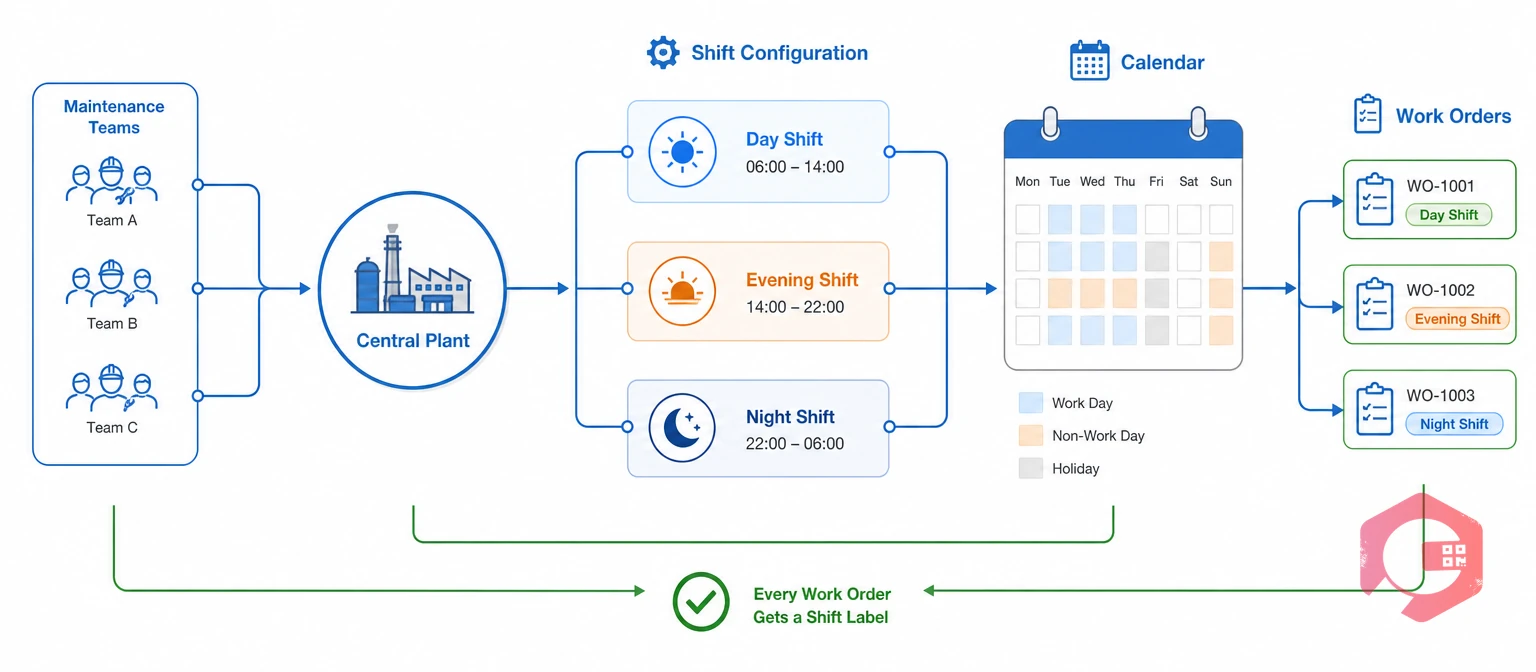
Shift configuration is the set of rules that defines when each maintenance team is on duty at a location. It gives every timestamp in the system a shift label, so work can be grouped by the crew that did it.
Most maintenance systems capture the same core settings in a shift configuration:
A shift roster is the list of people assigned to each shift on a given day. Shift configuration defines the time windows, and the roster fills those windows with names. Rostering is one part of workforce management, but it can't produce team insights on its own.
Maintenance frameworks already expect this view. Total Productive Maintenance (TPM) asks every shift to own its equipment care, and ISO 55000 asks organizations to match people and resources to asset needs. Both assume you can see work by shift, and shift configuration is what makes that possible.
Shift configuration shapes team insights because a metric is only fair when it is measured against the hours a team was on duty. A plant-wide average hides which crew is carrying the load.
Take a three-shift plant that logs 300 work orders in a month, with an average response time of 39 minutes. That looks healthy. Split by shift, the picture changes:
The night crew takes almost four times longer to respond, with a third of the day crew's headcount. That isn't a people problem. It is a coverage gap that the monthly average never showed.
Production teams already read overall equipment effectiveness by shift, so maintenance should read its own team data the same way. A maintenance KPI dashboard with a shift filter puts all three crews side by side. Team insights start with correct shift boundaries, not with more reports.
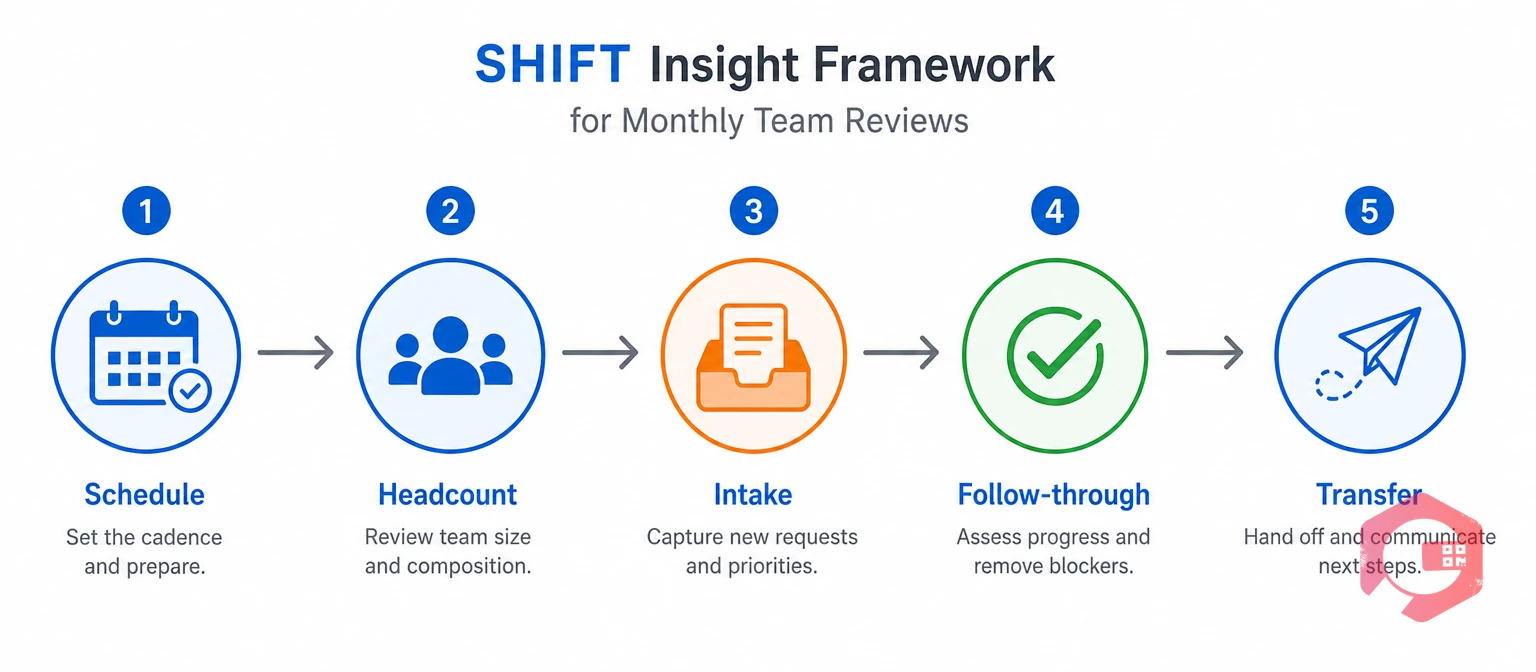
The SHIFT Insight Framework is a five-part way to read team data once shift configuration is in place. Each letter points to one question a maintenance manager should ask about every crew, every month.
The SHIFT Insight Framework:
Run the review in that order. Schedule comes first because every other number depends on correct shift boundaries. Headcount and Intake show the load, while Follow-through and Transfer show how each team copes with it.
Want a quick baseline before you change anything? Try the free Cryotos wrench time calculator for each crew and compare the results.
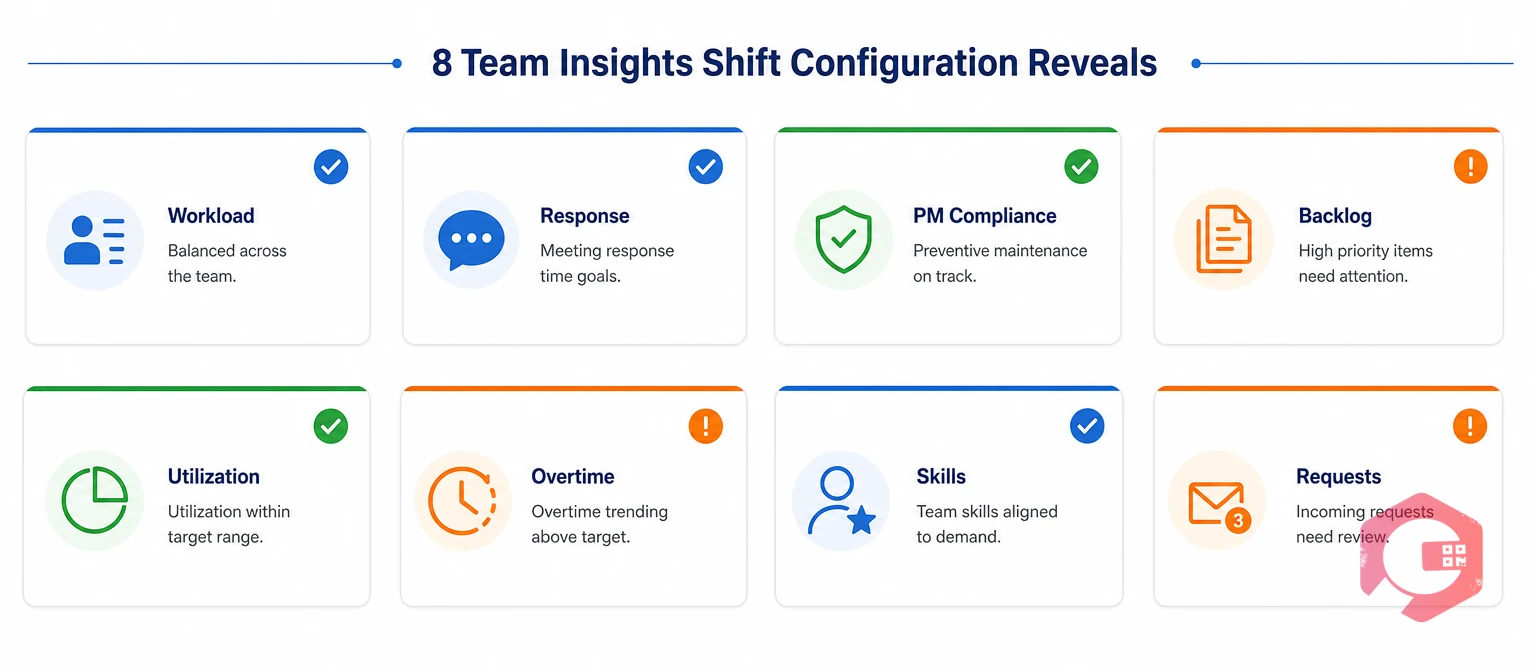
Shift configuration reveals team insights that stay hidden in plant-wide reports. These are the eight that maintenance managers use most often in monthly reviews.
Workload balance compares how many jobs and labor hours each shift handles per technician. A crew carrying 30% more jobs per head than the others will tire first, and quality usually drops before anyone complains.
Response time by shift shows how quickly each crew starts work on a new breakdown or request. Night and weekend crews often respond slower because fewer people cover the same area.
Shift-wise PM compliance is the share of preventive jobs finished on time by the shift they were scheduled in. It shows whether a crew has room for planned work or keeps losing it to breakdowns.
With shift windows in place, preventive maintenance software can place each PM in the crew's window that fits it best.
Backlog carryover is the open work that one shift passes to the next at handover. A little carryover is normal. A shift that hands over more than it receives, week after week, is short of time, skills, or parts.
Crew utilization is the share of a shift's paid hours spent on logged maintenance work. Low utilization rarely means idle people. It usually points to time lost waiting for permits, parts, tools, or instructions.
Work logged outside configured shift hours shows where overtime and callouts are building up. Long and irregular hours raise fatigue and error risk, which OSHA's guidance on worker fatigue links to extended shifts.
Skill coverage shows whether each shift has the trades it needs, such as an electrician, a PLC technician, or a permit issuer. When one shift keeps passing the same fault types to the next, it usually lacks a skill, not effort.
Request intake by shift shows which crews and operators raise the most issues. A production shift that reports many small faults early is often doing good autonomous maintenance. A shift that reports few faults but suffers more breakdowns may be missing the early signs.
Each insight points to a crew, a cause, and one clear action, which is what makes shift data useful for team decisions.
A shift configuration template lists every shift at a location with its timings, working days, and focus. Use this example as a starting point and adjust it to your own site.
| Shift | Start | End | Working Days | Break | Typical Crew Focus |
|---|---|---|---|---|---|
| Shift A | 06:00 | 14:00 | Mon to Sat | 30 min | Start-up support and breakdowns |
| Shift B | 14:00 | 22:00 | Mon to Sat | 30 min | Breakdowns and planned PMs |
| Shift C | 22:00 | 06:00 | Mon to Fri | 30 min | Line-stop PMs and on-call cover |
| General | 09:00 | 17:30 | Mon to Fri | 60 min | Planning, stores, and reliability |
Four setup rules keep the template accurate:
A template that matches the real roster is the base for every team insight in this guide.
Shift configuration changes team reports from plant-wide totals into crew-level answers. The table shows the difference for the reports most maintenance managers review.
| Report Area | Without Shift Configuration | With Shift Configuration |
|---|---|---|
| Workload | Total jobs for the whole team | Jobs and labor hours per technician on each shift |
| Response time | One plant-wide average | Separate response time for each crew |
| PM compliance | Share of PMs done in the month | Share of PMs done by the shift that owned them |
| Handover | Verbal updates and notebooks | Open work counted at the end of every shift |
| Overtime | Found later in payroll | Visible as work logged outside shift windows |
| Staffing decisions | Based on opinion and complaints | Based on load, skills, and results per shift |
The data behind both columns is the same. Only the shift boundaries change, and that is what turns records into team decisions.
The most common mistake is setting up shifts once and never updating them when the roster changes. Within a few months, work lands in the wrong shift and every team metric drifts.
Each of these is a setup or process gap. Fixing them makes shift data something every crew leader trusts.
Cryotos links each location's shift configuration to the work records your teams already create, so shift-level reports come from system data instead of spreadsheets.
Maintenance teams using Cryotos have reported up to 30% reduction in unplanned downtime and 25% faster repair turnaround. Shift-level visibility shows which crew those gains should start with.
Because shift data sits on the same record as the job itself, work order management becomes the one place to see how each team performs on every shift.
Shift configuration is the setup that defines when each maintenance team works at a location, including working days, number of shifts, and start and end times. The software uses it to tag every work order and request with a shift. That lets you compare crews instead of looking only at plant-wide totals.
It splits workload, response time, PM compliance, and open work by the crew that was on duty. A manager can then see which shift is overloaded, which one responds slowly, and which one carries the most backlog. Each finding points to a clear staffing or planning action.
Start with work orders per technician, response time, PM compliance, and backlog carried over at handover. Then add crew utilization, overtime outside shift hours, and escalations by trade. The SHIFT Insight Framework gives a simple order for the review.
An overnight shift should belong to the day it starts. For example, work at 02:00 on Tuesday during a 22:00 to 06:00 shift counts as Monday's night shift. Setting this rule once keeps night work in one place in every report.
Yes. A CMMS with location shift calendars tags each work order with its shift and shift date as work happens. It can then show workload, response time, and PM compliance by shift on dashboards and scheduled reports, without manual sorting.
Clear team insights start with shift boundaries that match how your crews really work. Schedule a free demo to see how Cryotos uses your shift configuration to show workload, response time, and PM compliance for every crew.



Cryotos AI predicts failures, automates work orders, and simplifies maintenance—before problems slow you down.



