Cross movement of stock - moving inventory from one warehouse or location to another - is one of the most underused tools in ecommerce operations. When a product runs low at one fulfillment center, the instinct is to raise a new purchase order. But in many cases, the faster, cheaper answer is already sitting in your own network. According to a McKinsey supply chain report, companies that actively rebalance inventory across nodes reduce stockout frequency by up to 30% without increasing procurement spend.
Most ecommerce teams have no clear rule for when to move stock vs. when to raise a PO. This guide gives you exactly that - a practical decision model, a cost comparison, and the five triggers that tell you a cross movement is the right call.
What Is Cross Movement of Stock in Ecommerce?
Cross movement of stock is the process of transferring existing inventory from one storage location to another within the same business network - between warehouses, fulfillment centers, retail locations, or distribution hubs - without raising a new purchase order from an external supplier. Also called a lateral replenishment, internal stock transfer, or stock transfer order (STO).
In ecommerce, cross movements are used to:
Prevent localized stockouts - when one location runs low but another holds surplus inventory of the same SKU
Balance demand across regions - shifting stock closer to high-demand fulfillment zones to reduce shipping times and costs
Clear overstock at slow-moving locations - redirecting dead stock to locations where it sells faster
Support seasonal surges - pre-positioning inventory before peak demand without waiting on supplier lead times
Unlike a purchase order, a cross movement doesn't add new units to your total inventory - it redistributes what you already own. That distinction matters because it changes the cost profile, timeline, and approval process involved.
What Is the Difference Between a Stock Transfer and a Purchase Order?
A stock transfer order (STO) moves inventory you already own between your own locations. A purchase order (PO) instructs an external supplier to produce or deliver new inventory to you. They look similar on paper - both move product into a location - but the operational, financial, and time implications are very different.
Key Differences at a Glance
This table breaks down how they compare across the dimensions that matter most:
Dimension
Stock Transfer (Cross Movement)
Purchase Order (PO)
Source of inventory
Internal - your own stock
External - supplier or manufacturer
Lead time
Hours to 1-2 days (domestic)
Days to weeks (or months for imports)
Cost
Freight/handling only
Unit cost + freight + PO admin cost ($50-$500 per PO)
Cash flow impact
No new capital outlay
New payment obligation to supplier
Total inventory change
Unchanged - redistribution only
Increases total inventory
Best used when
Surplus exists elsewhere in your network
Total network stock is genuinely low
Approval process
Internal operations sign-off
Procurement + finance approval required
The key insight: if your total network inventory for a SKU is adequate but unevenly distributed, a cross movement solves the problem faster and cheaper than a PO. A PO is only the right call when your entire inventory position is genuinely insufficient to meet projected demand.
When Does Moving Stock Beat Raising a New PO?
The decision to move stock instead of ordering new comes down to one core question: does the inventory already exist somewhere in your network? If the answer is yes and it can reach the right location in time, a cross movement almost always wins.
The 5 Triggers That Signal a Cross Movement
Trigger 1 - Location-level stockout, network-level surplus: One warehouse falls below its reorder point while another location holds more than 60 days of supply for the same SKU. That's the clearest signal for a cross movement. You're not short on inventory - you're short on inventory in the right place.
Trigger 2 - PO lead time exceeds stockout window: If your supplier's lead time is 14 days but you'll run out of stock in 5 days, a PO can't save you. If a nearby warehouse can get stock to the affected location in 2 days, the transfer prevents the stockout entirely.
Trigger 3 - Seasonal demand spike at a single node: A regional sales event, promotion, or weather-driven demand surge at one fulfillment center can drain local stock without affecting total network inventory. Pre-position inventory via cross movement before the spike hits - don't wait until the reorder alert fires.
Trigger 4 - Slow-moving stock at one location: If a SKU hasn't moved in 45+ days at Location A but has a 7-day sell-through rate at Location B, a cross movement converts dead stock into active inventory. No new PO needed, no new capital outlay.
Trigger 5 - Small replenishment quantity below supplier MOQ: If you need 50 units but your supplier's minimum order quantity (MOQ) is 500, raising a PO creates overstock. If a nearby location has 80 units of surplus, a cross movement of 50 units is a cleaner, leaner solution.
The Real Cost of Raising Unnecessary Purchase Orders
Most ecommerce operations teams underestimate the true cost of a purchase order. The unit cost gets attention; the administrative overhead rarely does. According to the APQC's procurement benchmarking data, the median cost to process a single purchase order ranges from $50 to over $500 when you account for staff time, approval cycles, supplier communication, receiving, and reconciliation.
When you raise a PO for a situation that could have been resolved with an internal transfer, you pay:
The PO processing cost - staff time across procurement, finance, and warehouse receiving
Supplier lead time cost - the revenue lost during the days or weeks you wait for new stock to arrive
Overstock risk - if the PO quantity exceeds actual demand, you carry the holding cost (typically 20-30% of inventory value per year)
Cash flow impact - new capital tied up in inventory that didn't need to be purchased
Meanwhile, a cross movement costs freight and handling - often a fraction of a PO's total cost. Gartner research on supply chain efficiency consistently shows that companies with active internal replenishment programs carry 15-20% less inventory while maintaining equivalent or better service levels.
How to Build a Stock Movement Decision Framework
A decision framework removes the guesswork from the move-vs-order question. Instead of relying on individual judgment in the moment, you codify the logic once and let your team - or your inventory software - execute it consistently.
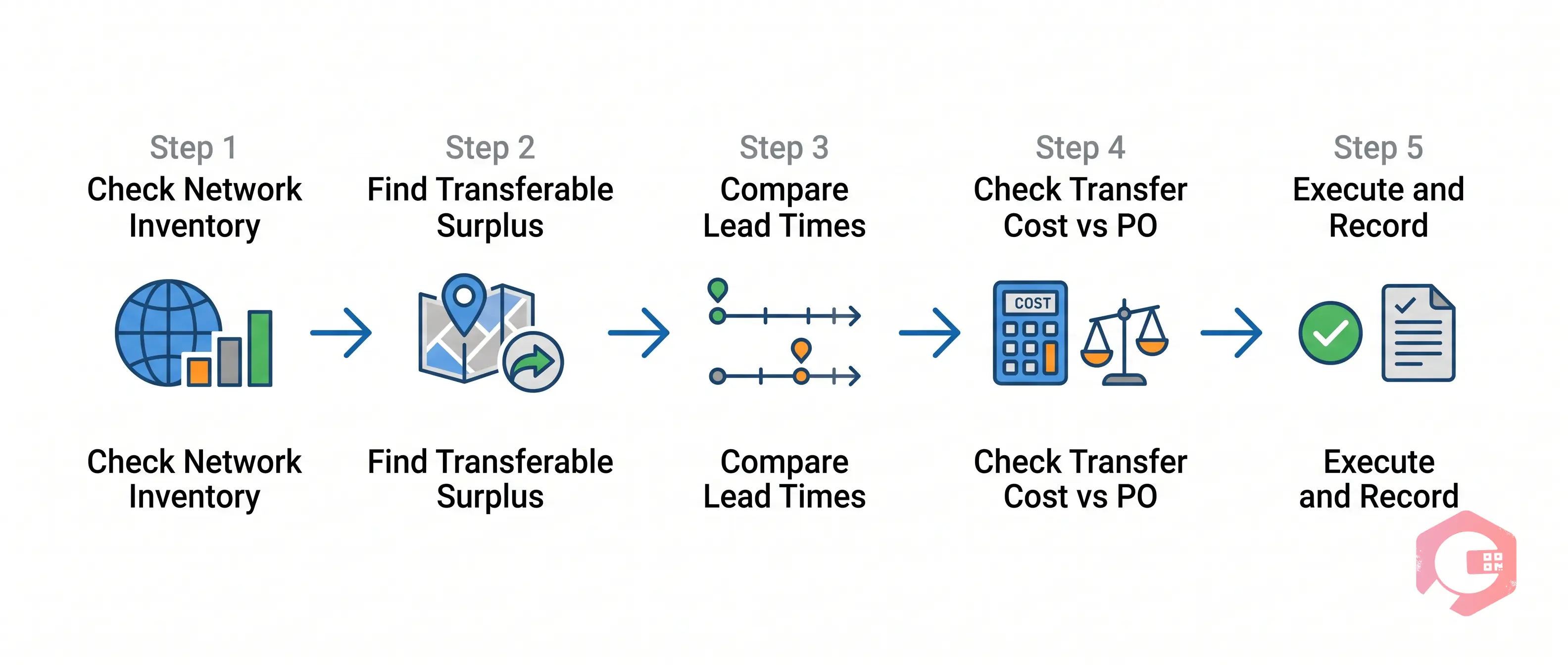
Run through these five steps in sequence:
Step 1 - Check total network inventory: Pull the total available quantity across all locations for the SKU in question. If total network stock is below your safety stock threshold, a PO is required. If total network stock is adequate, move to Step 2.
Step 2 - Check for transferable surplus: Identify any location with inventory above its own maximum stock level or with 60+ days of cover. That surplus is a candidate for cross movement.
Step 3 - Compare transfer lead time vs. PO lead time: If the transfer can arrive before the affected location reaches zero stock, it's the preferred option. If it can't, evaluate whether you need both a transfer and a PO in parallel.
Step 4 - Check transfer cost vs. PO unit economics: If the freight cost of the transfer exceeds the cost savings vs. a PO (e.g., transferring 10 units of a low-value item across the country), the PO may be more cost-effective despite the lead time.
Step 5 - Execute and record: Document the reason for the cross movement (not just the transfer itself) so you can identify recurring imbalances and fix the root cause - often a demand forecast or safety stock setting that needs updating.
The Stock Movement Decision Matrix
Scenario
Network Stock
Surplus Location Exists?
Recommended Action
One location low, others have surplus
Adequate
Yes
Cross movement only
All locations low, total stock near zero
Low
No
Raise PO immediately
One location critically low, transfer too slow
Adequate
Yes, but distant
Transfer + expedite PO in parallel
One location low, transfer cost exceeds PO savings
Adequate
Yes, but expensive
Raise PO, fix stock imbalance root cause
Seasonal surge incoming at one node
Adequate
Yes
Pre-emptive cross movement
Common Mistakes Ecommerce Teams Make with Internal Transfers
Cross movements sound straightforward, but most teams make a few predictable errors that reduce their effectiveness or create new problems.
Transferring without checking the source location's own cover: Moving 500 units from Location A to Location B sounds helpful until Location A runs out two weeks later. Always verify that the source location can sustain the transfer without falling below its own safety stock threshold.
No real-time inventory visibility across locations: You can't make a cross movement decision if you can't see accurate, live stock levels at every location. Teams still relying on daily or weekly inventory reports are always making decisions with stale data. According to Deloitte's supply chain visibility research, companies with real-time inventory visibility are 2.5x more likely to prevent stockouts vs. those relying on periodic reporting.
Treating every transfer as a manual process: If your team has to manually spot the imbalance, calculate the transfer quantity, create the stock transfer order, and update inventory records - they won't do it consistently or quickly enough. The decision needs to be partially or fully automated.
Ignoring transfer costs in the decision: A cross movement has a cost. Freight, handling, receiving time, and updated system records all add up. For low-value SKUs or small quantities, the cost can outweigh the benefit. Build the cost comparison into your decision logic.
Not recording the reason for each transfer: If you don't log why a transfer happened, you can't identify patterns - like a SKU that consistently undersells at one location and oversells at another, which is a signal to change your initial allocation model rather than keep transferring reactively.
How Inventory Management Software Automates the Decision
The move-vs-order decision is exactly the kind of rule-based, data-driven logic that inventory management software handles well. The right system removes the decision from individual judgment and makes it systematic, fast, and consistent.
Real-time multi-location visibility: The system maintains live inventory counts across every warehouse, fulfillment center, and storage location. When any SKU breaches a reorder threshold at any location, the system flags it immediately - not at the end of the day.
Automatic surplus detection: Before triggering a PO, the system checks whether another location in the network holds surplus inventory for the same SKU. If it does, it proposes a cross movement first.
Transfer cost vs. PO cost calculation: The system compares the freight cost of a proposed transfer against the unit cost and processing cost of a PO, and recommends the more cost-effective option.
Automated stock transfer orders: Once the decision is made, the system generates the STO, updates inventory records at both locations in real time, and triggers the relevant picking, packing, and shipping workflows - all without manual data entry.
Critical stock notifications: Systems like Cryotos CMMS send alerts via mobile, email, or WhatsApp when stock at any location falls below minimum thresholds, giving your team time to act before a stockout occurs rather than after.
Cryotos's inventory and warehouse management module provides real-time stock visibility with QR codes and barcodes, warehouse structure mapping down to individual bins, and critical stock notifications at minimum thresholds - giving ecommerce operations teams the data they need to make the move-vs-order decision quickly and correctly. When you combine live visibility with automated alert workflows, you spend less time firefighting stockouts and more time managing inventory proactively.
Frequently Asked Questions
What is cross movement of stock?
Cross movement of stock is the transfer of existing inventory from one location within your own business network to another - such as between two warehouses or fulfillment centers - without purchasing new units from an external supplier. Also called a lateral replenishment, internal stock transfer, or stock transfer order (STO). The total inventory count remains unchanged; only its distribution across locations shifts.
When should I move stock instead of creating a purchase order?
Move stock instead of creating a PO when: your total network inventory for the SKU is adequate but unevenly distributed; a location with surplus stock can deliver to the affected location before a stockout occurs; and the cost of the transfer is less than the PO processing cost plus the revenue lost during supplier lead time. If total network stock is genuinely insufficient to meet demand, a PO is necessary regardless.
How does stock transfer reduce ecommerce stockouts?
Stock transfers reduce ecommerce stockouts by resolving inventory imbalances faster than new purchase orders can. When one fulfillment location runs low but another holds surplus, a cross movement can replenish the affected location in hours or 1-2 days - far faster than the 7-30+ day lead times typical of supplier POs. This speed advantage is especially critical during seasonal demand spikes or unexpected regional surges.
What's the difference between a stock transfer order and a purchase order?
A stock transfer order (STO) moves inventory you already own between your own locations. A purchase order (PO) instructs an external supplier to produce and deliver new inventory to you. STOs are faster, involve no new capital outlay, and require only internal approval. POs involve supplier lead times, payment obligations, and procurement cycles. Use an STO when the stock exists in your network; use a PO when total inventory needs to increase.
Can inventory software automate stock movement decisions?
Yes. Modern inventory management systems monitor stock levels across all locations in real time, detect surplus at one node when another falls below its reorder point, calculate the cost comparison between a transfer and a new PO, and automatically generate a stock transfer order - all without manual intervention. This automation turns cross movement from an ad hoc fix into a systematic, proactive replenishment strategy.
If your ecommerce operation runs across multiple warehouses or fulfillment locations, the move-vs-order decision is one you'll face repeatedly. Setting up the right visibility, decision logic, and automation tools - like those built into Cryotos's inventory management software - means you make that decision correctly every time, not just when someone happens to notice the imbalance. Explore how Cryotos helps ecommerce teams maintain real-time stock visibility and automate internal replenishment workflows at cryotos.com.