

An ad hoc 5S audit is an unscheduled workplace inspection that any authorized user can start on demand, assign to the owner of a zone, and score the same day. It closes the gap between monthly or quarterly audits, so clutter, spills, and missing labels get fixed in days instead of weeks.
Most plants run 5S on a fixed calendar. That works until a line turns messy on day three of a month-long wait. A surprise 5S audit lets a manager walk a zone the moment something looks wrong, record a score, and trigger a fix. This guide covers how it works, who should trigger one, and what to record.
Key Takeaways
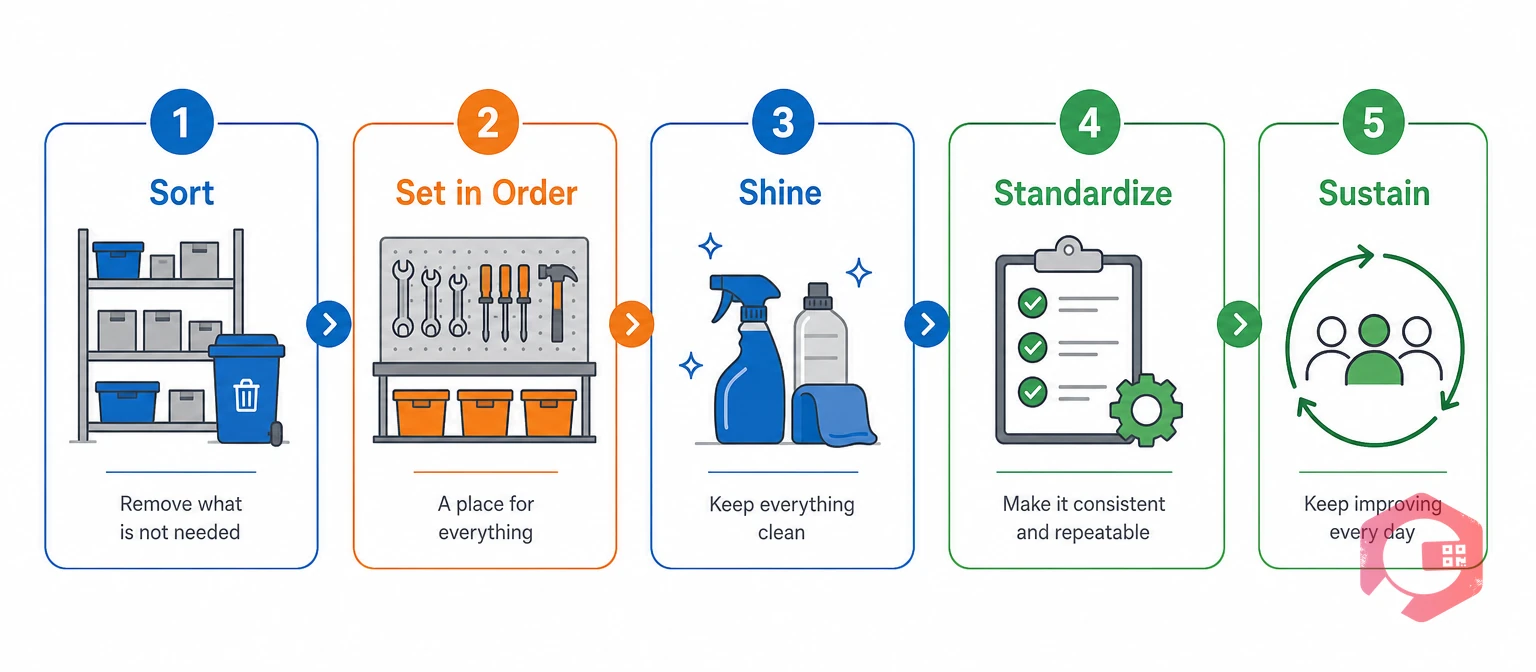
An ad hoc 5S audit is an unscheduled inspection of a zone, started on demand instead of on a calendar. It uses the same five checks as a routine audit: Sort, Set in Order, Shine, Standardize, and Sustain.
The 5S methodology came out of Japanese manufacturing. It keeps a workplace organized, clean, and consistent. OSHA sets a similar baseline: 29 CFR 1910.22 requires workplaces and passageways to be kept clean, orderly, and sanitary.
A surprise 5S audit is an ad hoc audit run without advance notice to the zone owner. The audit type changes when you inspect, not what you inspect.
An ad hoc 5S audit differs from a scheduled one in trigger, notice, and speed. Scheduled audits follow a calendar, while ad hoc audits follow a need.
Most facilities need both. Scheduled audits build the habit, and ad hoc audits test whether the habit holds between visits.
| Factor | Scheduled 5S audit | Ad hoc 5S audit |
|---|---|---|
| Trigger | Calendar date, monthly or quarterly | Manager, supervisor, or any authorized user, on demand |
| Notice to the zone | Known in advance | None or minimal |
| Gap between checks | 30 to 90 days | Hours or days after a concern appears |
| Best for | Baseline trends and compliance records | Catching drift and following up on complaints |
| Main risk | Zones tidy up right before the audit | Feels like policing if the rules are unclear |
Treat the two as a pair: the schedule sets the standard, and surprise checks prove it holds.
Monthly and quarterly 5S audits leave gaps because a workplace can slip a long way between two dates. A zone that passes on the first of the month can fail by the tenth.
Maintenance teams often see the same pattern. A big cleanup happens before the audit, then habits drift back, and the same findings return by the next visit.
Many total productive maintenance (TPM) programs treat 5S as a foundation, so housekeeping drift often shows up later as equipment trouble. A calendar checks the workplace on set days, while an ad hoc audit checks it on the days that matter.
Want the checklist side handled for you? Build scored 5S templates with Cryotos maintenance checklists and reuse them for every zone.
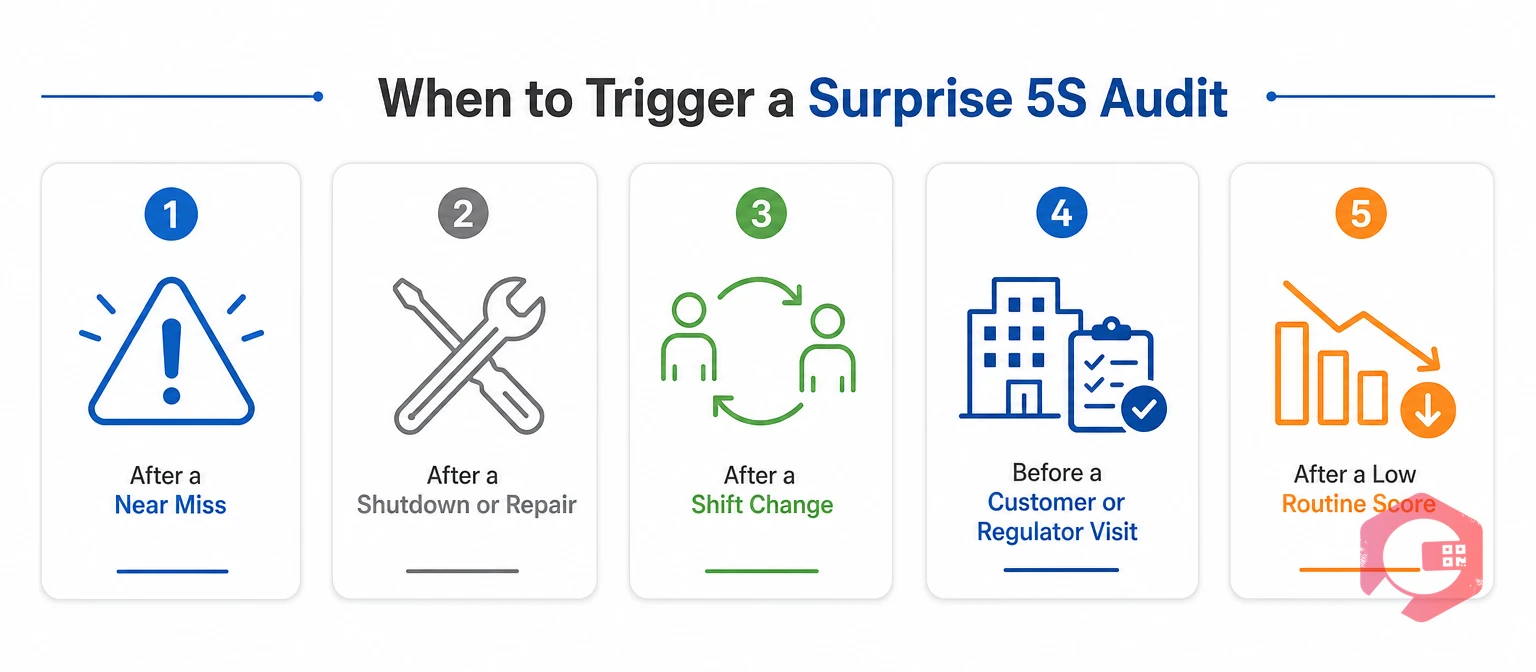
Trigger a surprise 5S audit when something signals that standards may have slipped, not on a whim.
A clear trigger list keeps surprise audits fair, because everyone knows why a walk happened.

To run an ad hoc 5S audit, register the audit, assign it to the zone owner, walk the zone with a scored checklist, and turn every failure into an action. The best teams keep it short enough to finish in one gemba walk.
The Trigger-to-Closure Process:
If you need a starting point for the questions, the maintenance audit checklist shows how to structure scored items. Keep the walk focused on what you can see, count, and photograph.
An ad hoc 5S audit register should capture ten fields: who audited, which zone, when, which checklist, what score, and what happened next.
Some fields come from the user, and others fill in automatically so the data stays clean.
| Field | Data type | System behavior | Example |
|---|---|---|---|
| Audit ID | Auto-generated text | Creates a unique tracking code for each audit | 5S-ADHOC-2026-001 |
| Audit Type | System constant | Fixed to Ad-Hoc so reports separate it from routine audits | Ad-Hoc |
| Target Location | Dropdown or QR scan | Mandatory. The user picks or scans the zone | Line 3 Packing Area |
| Auditee (Location Incharge) | Auto-filled text | Mandatory. Looks up the zone owner and assigns them | Owner of Line 3 |
| Auditor | Dropdown or user session | Mandatory. Records the manager running the walk | Plant Manager |
| Audit Date & Time | Timestamp | Locks the exact moment the audit was opened | 29-Sep-2026 10:30 |
| Checklist Version | System constant | Pulls the 100-point template for that location type | 5S-PROD-100 v1.0 |
| Total Score | Calculated number | Adds the points from every checklist tab, up to 100 | 70 |
| Result Status | Conditional text | Pass at or above the threshold, Fail below it | Fail |
| Action Plan / Work Order ID | Linked ID | On Fail, creates and links a corrective work order to the auditee | WO-5S-ADHOC-2026-001 |
Locking the audit type to Ad-Hoc keeps these records apart from scheduled audits, so you can compare what surprise checks find against what routine ones find. For zones with machines, pair the 5S checklist with an equipment inspection checklist.
Many teams split a 100-point checklist into five tabs of 20 points, one for each S, and the total decides Pass or Fail. A pass mark of 80 is a common starting point.
Set the pass mark once and apply it to every zone, and the results stay comparable across shifts and sites.
Any authorized user can register an ad hoc 5S audit, and the system then assigns the zone's owner as the auditee. A 5S auditee is the location incharge who owns the zone being audited. That link between zone and owner turns a finding into an action.
Open registration works best with clear roles, because anyone can spot a problem but only a defined group should score it.
The most common mistake is running surprise audits without a shared standard, which turns each walk into an opinion.
Fix these five and ad hoc audits become a habit builder instead of a burden.
A Computerized Maintenance Management System (CMMS) automates ad hoc 5S audits by tying the audit, the zone, the owner, and the corrective work order together. With Cryotos, the manual steps shrink to two: pick the zone and score it.
Tracked, owned work is where the gains come from, and work order management keeps every failed audit visible until it closes. Maintenance teams using Cryotos have reported up to 30% reduction in unplanned downtime and 25% faster repair turnaround.
An ad hoc 5S audit is a workplace inspection you start when you need it, not when the calendar says so. A person registers the audit, picks the zone, scores the checklist, and the result decides whether action is needed.
A routine audit follows a set schedule and the zone knows the date. A surprise audit has little or no notice, so it shows how the zone looks on a normal day. Both use the same five checks.
There is no fixed rule. Many teams run one when a concern appears, after a major change, or on a light rotation so every zone gets a few surprise checks a year. Pace them so they stay useful and do not cause fatigue.
The auditee should be the location incharge who owns the zone. That person answers for the score and receives any corrective action, which keeps ownership clear.
A failed audit should create a corrective work order and assign it to the auditee. The team fixes the findings, closes the work order, and can then re-audit the zone to confirm the score.
Clean, organized zones should not depend on a calendar date. Schedule a free demo to see how Cryotos lets any authorized user register an audit, assign it to a zone owner, and close the loop with a work order.



Cryotos AI predicts failures, automates work orders, and simplifies maintenance—before problems slow you down.



