

A CMMS inspection checklist is a structured digital form built inside your Computerised Maintenance Management System that guides technicians through facility audits — capturing pass/fail results, photos, and corrective actions in real time. Unlike paper forms that get lost or back-filed before anyone acts on them, a CMMS-native checklist automatically triggers work orders when items fail, timestamps every entry, and generates audit-ready reports at the click of a button. According to a McKinsey analysis of industrial operations, facilities that shift from paper-based to digital inspection workflows reduce compliance-related rework by up to 25%.
If your team is still printing inspection forms, chasing technicians for sign-offs, or scrambling to compile audit evidence before a regulator arrives, this guide is for you. We cover what goes on a CMMS inspection checklist, how to build one, and how to wire it up so your facility stays audit-ready every day — not just during inspection season.
Key Takeaways

A CMMS inspection checklist is a reusable digital form — built inside your maintenance management platform — that standardises how technicians inspect assets, spaces, and systems across a facility. Each checklist item captures a specific observation (pass/fail, numeric reading, or text note), and the CMMS records who completed it, when, and what was found. That data flows directly into your platform, feeding dashboards and compliance reports without any manual re-entry.
This is different from a work order, which describes a repair task. An inspection checklist is a systematic observation tool — it identifies whether something needs a work order in the first place.
These two are closely related but serve different purposes. A preventive maintenance checklist tells a technician what to do — lubricate bearings, replace filters, test torque. An inspection checklist tells a technician what to look at and record. In practice, many PM tasks include an embedded inspection step, but auditors treat inspection records as their own evidence category. Your CMMS should support both as distinct template types.
Paper forms introduce four failure points that digital checklists eliminate. First, illegible handwriting creates disputed records. Second, forms get lost in transit between the floor and the file room. Third, there is no automatic escalation — if a technician marks "fail" on a fire damper, nothing happens until someone manually reviews the sheet. Fourth, compiling audit evidence from paper files takes days of admin work. OSHA inspection data consistently shows that recordkeeping failures are among the top citation categories — and most of those failures trace back to paper-based systems.

One of the most underused capabilities of a modern CMMS is its ability to house every inspection type in one place — not just equipment checks, but safety walkthroughs, compliance audits, and environmental rounds. Here are the four main types facility teams run.
These cover fire suppression systems, emergency exits, spill containment, PPE availability, and lockout/tagout station readiness. Safety inspections typically run on a weekly or monthly cadence and must produce timestamped evidence for OSHA 300 logs. A CMMS lets you assign safety rounds to specific technicians by zone, ensuring nothing is missed when shifts change.
Compliance inspections are driven by external standards — ISO 55001, OSHA 1910, EPA environmental regulations, or industry-specific frameworks like HACCP for food facilities. These checklists often include mandatory photo evidence, sign-off requirements, and corrective action deadlines. A CMMS automatically links each compliance record to the asset it covers, making regulatory submissions faster and more defensible.
Equipment inspections go deeper than a PM task list. Technicians record vibration levels, temperature readings, visual wear indicators, and fluid condition. When a CMMS is integrated with IoT sensors, threshold breaches can automatically trigger an inspection checklist — so your team investigates before a failure occurs, not after.
These cover cleanliness standards, waste disposal compliance, spill response readiness, and air/water quality checks. They are especially critical in pharmaceutical, food processing, and chemical manufacturing. A CMMS ties housekeeping inspection outcomes to facility zones, so recurring failures in specific areas surface clearly in management dashboards.
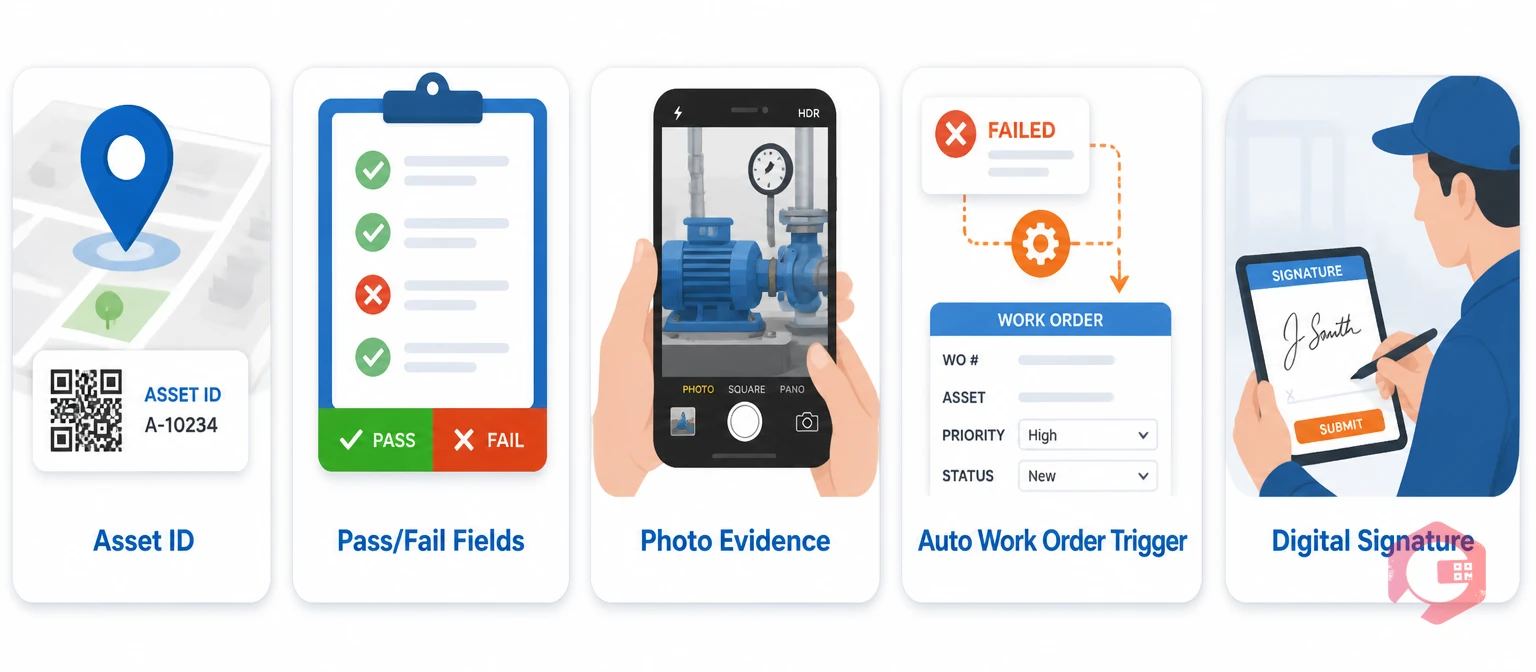
A well-built facility inspection checklist covers eight core elements. Expand or narrow this list based on your industry and regulatory obligations.
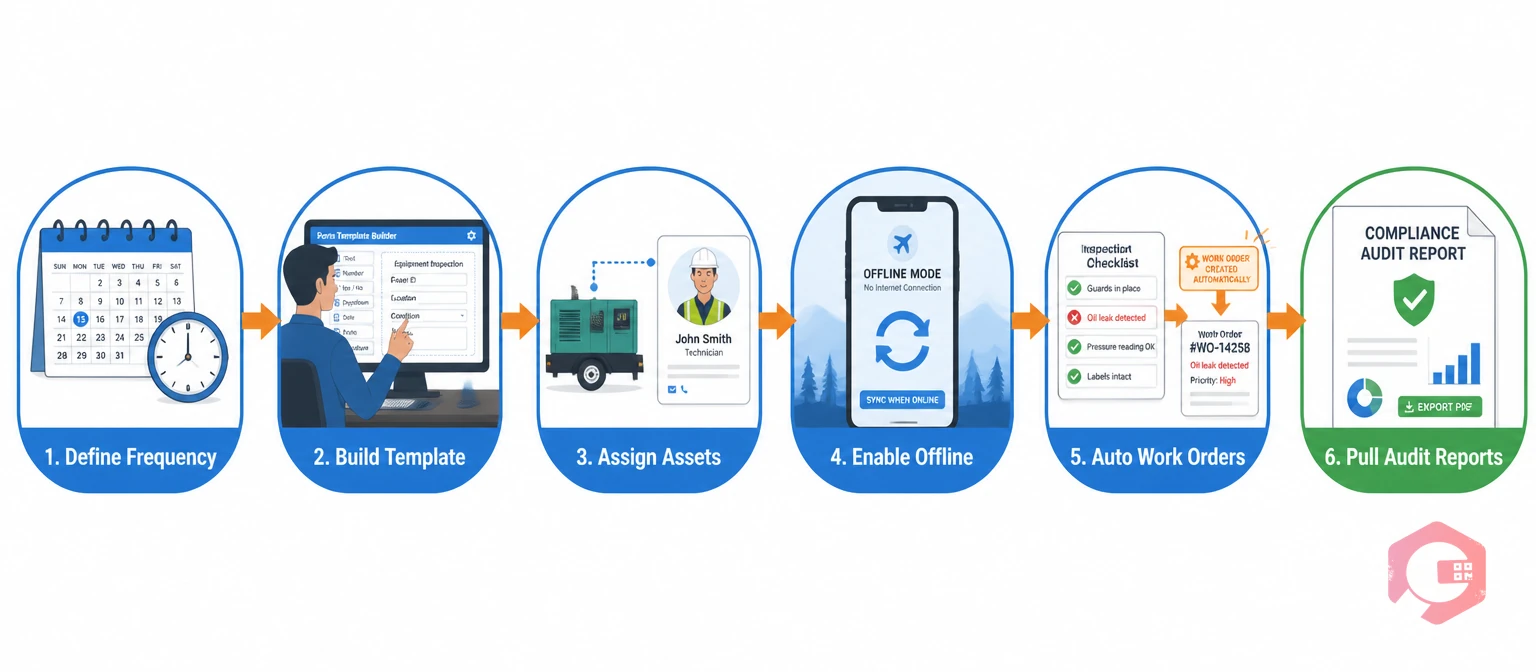
Most CMMS platforms let you build inspection checklists in under 30 minutes once you know the six steps. Here is how to do it correctly the first time.
Decide whether this checklist runs on a fixed schedule (every Monday at 07:00) or a dynamic trigger (every 250 hours of machine runtime, or when an IoT sensor crosses a threshold). Fixed-interval inspections suit safety and compliance rounds. Dynamic inspections suit equipment condition monitoring. Set both cadences in your CMMS scheduler from the start — do not leave frequency as an afterthought.
Create your checklist template in the CMMS using the eight-element framework above. Group related items into sections — electrical, structural, safety systems — so technicians can complete one zone at a time without skipping around. Keep each checklist item to a single, unambiguous question. "Is the fire extinguisher pressure gauge in the green zone?" beats "Check fire extinguisher." Ambiguous questions produce inconsistent records that auditors challenge.
Link each checklist to one or more assets or locations in your asset register. Then assign default technician roles — not individuals — so the inspection stays active even when a specific person is absent. The CMMS will notify the right person based on shift, location, and skill level, eliminating the dependency on a single inspector.
Your technicians will not always have a reliable signal in plant rooms, basements, or outdoor compounds. Choose a CMMS with a mobile app that supports offline inspection capture and syncs automatically when connectivity is restored. This eliminates the gap between "inspection done" and "data recorded" — a gap that paper-based systems never close cleanly.
This is the step most facilities skip — and it is the one that makes the biggest operational difference. Configure a rule in your CMMS so that any failed inspection item immediately creates a work order, assigns it to the correct team, and sets a priority based on the severity of the failure. According to Plant Engineering research, facilities using automated work order creation from inspections resolve corrective actions 40% faster than those relying on manual handoffs.
Before your next audit, run a compliance report filtered by inspection type, date range, asset, or regulatory tag. A good CMMS exports this as a PDF or Excel file with timestamps, technician names, photo attachments, and corrective action status — everything a regulator or certifier needs in one document, generated in minutes rather than days. Reference the full maintenance audit checklist to verify your inspection template covers every required evidence category.
Manual compliance management is reactive by nature — you find out something was missed when an auditor flags it. A CMMS flips that dynamic entirely. Here is how the automation chain works in practice.
The CMMS scheduler sends inspection assignments to technicians' mobile devices on the configured cadence. The technician completes the inspection on-site using the digital checklist, capturing readings and photos. If any item fails, the CMMS instantly creates a corrective work order, notifies the responsible supervisor, and starts a clock on the resolution deadline. Every step is timestamped and stored against the asset record. When an auditor arrives, your compliance officer runs a single report that shows every inspection conducted, every failure found, every corrective action raised, and every resolution confirmed — with full traceability from finding to fix.
This continuous loop — inspect, capture, escalate, resolve, report — means your facility is always in an audit-ready state, not just during scheduled review periods. A U.S. EPA compliance guidance document on monitoring programmes emphasises that ongoing documented evidence — not periodic snapshots — is what regulators look for when assessing a facility's compliance culture. ISO 55001, which governs asset management systems, explicitly requires this kind of documented evidence chain — and a CMMS is the most practical way to maintain it at scale.
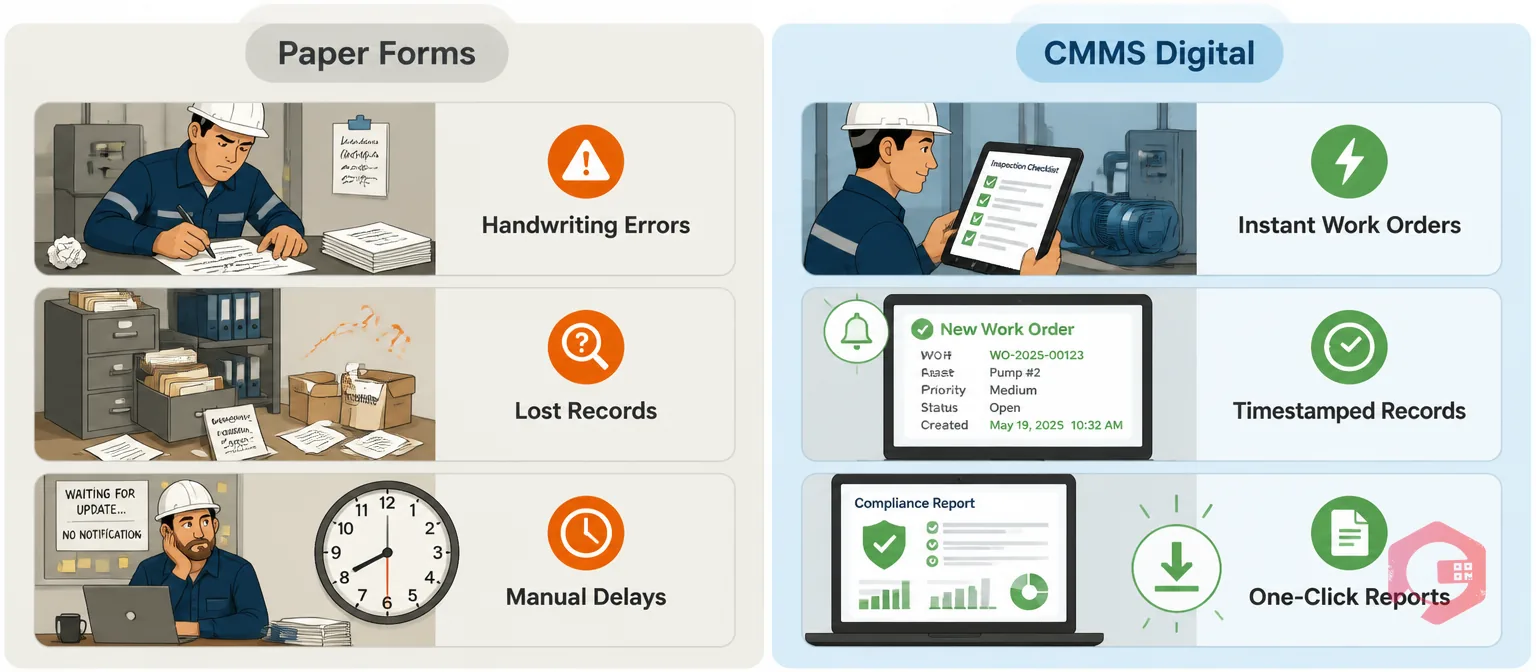
Here is how the two approaches compare across the criteria that matter most to facility managers and auditors.
| Criteria | Paper Forms | CMMS Digital Checklists |
|---|---|---|
| Data Accuracy | Subject to handwriting errors, illegibility, and incomplete fields | Mandatory fields, validated inputs, auto-populated timestamps |
| Corrective Action Speed | Manual handoff from inspector to supervisor, often delayed hours or days | Automatic work order creation on failed items; supervisor notified instantly |
| Audit Evidence Retrieval | Hours or days spent locating and collating filed forms | One filtered report generated in minutes |
| Mobile Usability | Works anywhere but produces no digital record | Works offline with automatic sync when back in range |
| Photo Evidence | Requires separate camera; manual attachment to file | Photos captured and attached directly from the mobile app during inspection |
| Regulatory Mapping | Manual cross-referencing with standards during audit prep | Each checklist tagged to the relevant standard; compliance reports auto-filtered |
| Trend Analysis | Not practical without significant manual data entry | Failure trends by asset, zone, technician, and time period visible in dashboards |
The compliance gap between paper and digital is not a matter of preference — it is a matter of evidence quality. Auditors operating under ISO 55001 and OSHA frameworks assess documentation completeness, not intention. A CMMS creates that documentation systematically. Use the asset and equipment inspections checklist as a starting template to map your inspection requirements against what your CMMS currently captures.
Building and running inspection checklists at scale requires a CMMS that connects the checklist to work orders, assets, and compliance reports without manual handoffs. Cryotos delivers that connection across five specific capabilities.
Maintenance teams using Cryotos report a 30% reduction in unplanned downtime and 25% faster repair response times — outcomes that flow directly from catching failures during inspections before they escalate into breakdowns.
Every facility inspection checklist should include an asset or location identifier, the inspection type and frequency, pass/fail or numeric capture fields, a photo evidence requirement for critical items, an automatic corrective action trigger for failures, the assigned technician's digital signature, a timestamp, and a regulatory reference tag. The exact checklist items vary by industry and the type of inspection — safety, compliance, equipment condition, or environmental.
A CMMS automates inspections by scheduling them on fixed or usage-based triggers, delivering digital checklists to technicians' mobile devices, capturing results in real time, and automatically creating corrective work orders when items fail. Reports are generated from the accumulated data, giving facility managers and auditors a complete, timestamped record without any manual compilation.
Yes — and in most regulated industries, replacing paper forms with a CMMS is not just an efficiency gain but a compliance improvement. A CMMS produces tamper-evident digital records with timestamps, photos, and technician signatures that are far more defensible in an audit than handwritten paper forms. Most modern CMMS platforms include a mobile offline mode, so technicians can complete inspections in areas without connectivity and sync automatically when they reconnect.
A safety inspection is an ongoing operational activity — technicians check specific equipment, systems, or zones on a recurring schedule to catch hazards before they cause incidents. A compliance audit is a periodic review, often triggered by a regulator or certifier, that verifies the facility meets a specific standard. In a CMMS, safety inspections produce the day-to-day evidence record that a compliance audit draws on. Running both through the same CMMS means your audit evidence is always current, not assembled from scratch each time a reviewer arrives.
Review and update your inspection checklists at least annually, after any regulatory change that affects your industry, and after any incident that reveals a gap in your current inspection coverage. Most CMMS platforms let you version checklists so you retain a history of what was in place at the time of each inspection — a requirement under ISO 55001 for documented change management.
If your facility is still relying on paper inspection forms or disconnected spreadsheets, the gap between your current process and a fully audit-ready operation is smaller than you think. Cryotos CMMS lets you build custom maintenance checklists, automate corrective work order creation, capture photo evidence from the mobile app, and generate compliance reports on demand — all from one platform. Book a free demo today and see how quickly your facility can move from reactive inspections to continuous audit readiness.




Cryotos AI predicts failures, automates work orders, and simplifies maintenance—before problems slow you down.



