

A digital 5S audit is a mobile inspection workflow that scores workplace zones against the five lean pillars, captures photo evidence for every finding, and auto-creates corrective work orders linked to specific assets. There is no paper. There is no post-audit data entry. There is no lag between finishing the audit and having results visible to management.
As the ASQ Five S tutorial defines it, 5S achieves "a place for everything and everything in its place." Paper checklists cannot keep that standard across multiple shifts, zones, or sites. Operations that switch from paper to digital reporting see audit times fall 30–40% and corrective action closure rates triple within two quarters. This guide compares both formats across every key dimension. It also shows you how to move from clipboard to CMMS using a clear five-level transition framework.
Key Takeaways
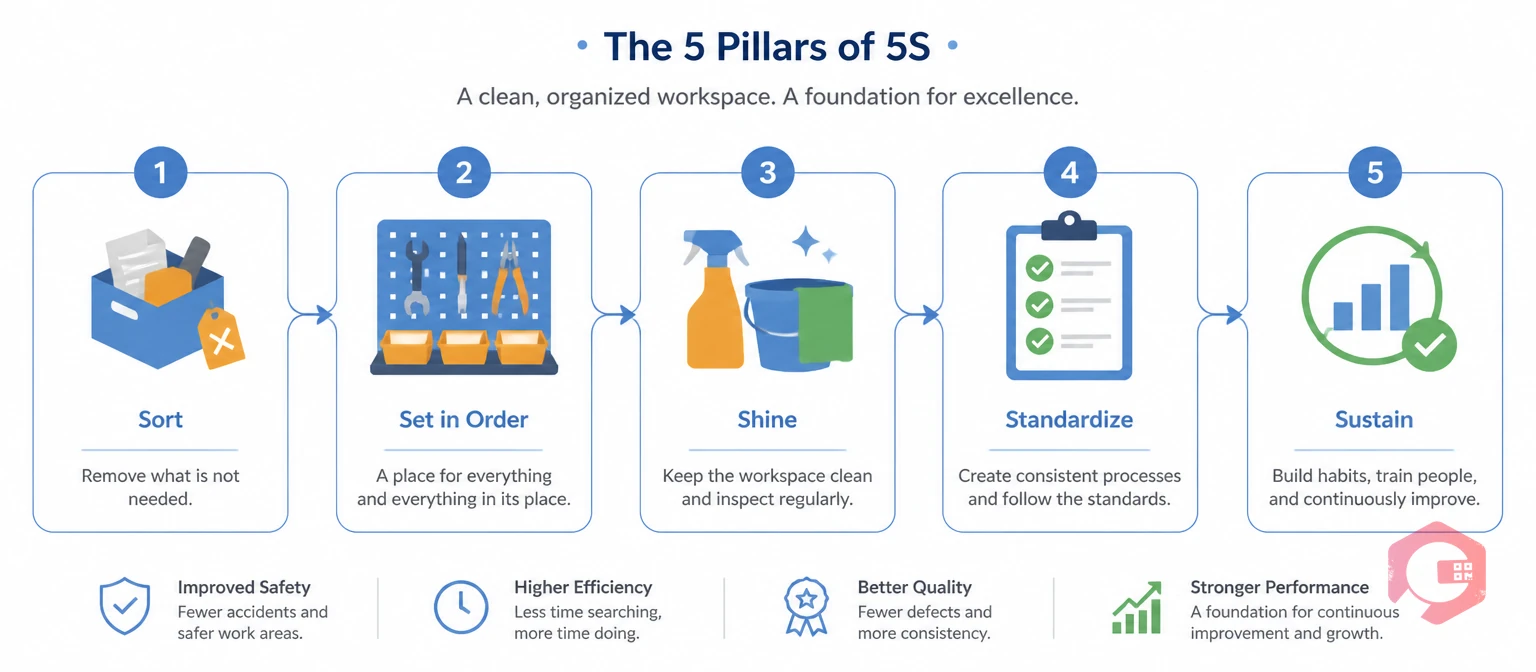
Lean 5S audit methodology is a scored workplace inspection against five pillars — Sort, Set in Order, Shine, Standardize, and Sustain — designed to find gaps and assign corrective actions before conditions worsen. Regular audits keep the 5S programme alive after launch. Without them, most workplaces drift back to pre-5S conditions within six to twelve months.
The format of the audit determines whether that momentum holds. The Lean Enterprise Institute points out that lean practices only hold when systems create real visibility and ownership. Paper checklists break both of those conditions. A score written on a clipboard is invisible to everyone else the moment the auditor walks away.
In multi-shift or multi-site operations, the format gap quickly becomes a compliance gap. Two auditors scoring the same zone on paper can produce results 20 points apart. They just have different ideas of what "acceptable" means. Audit frequency drops when no one tracks which zones are overdue. Corrective actions go untracked when a form gets separated from the person who should close it. The fifth S — Sustain — is the most consistently failed pillar in manufacturing. It is not because teams lack commitment. It is because paper systems cannot enforce it at scale.
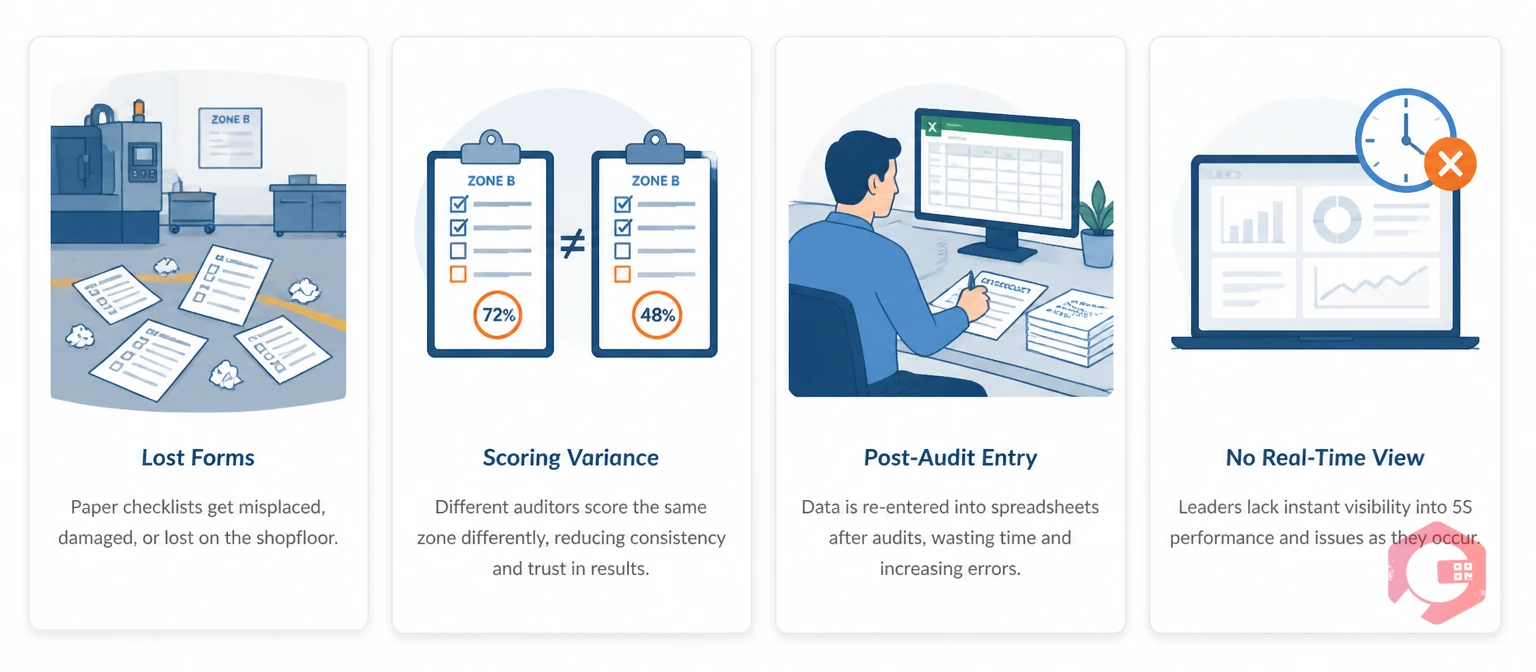
Paper 5S checklists fail at scale for three reasons: forms go missing, scoring is inconsistent, and post-audit data entry grows with every zone you add. Each problem is manageable in a single-zone pilot. At full-facility scale, they combine into an audit programme that consumes hours while producing unreliable data.
Maintenance teams running 5S on paper describe the same recurring problems:
The ASQ Lean resources library confirms that lean manufacturing is built on cutting non-value-adding work. Manual data transcription is exactly the kind of waste that digital systems remove. Most facilities that run paper and digital audits side by side for one quarter never return to paper.
There is also a hidden cost most teams overlook. Paper 5S results rarely reach the right people in time to drive action. A zone supervisor gets the audit scores two days after the audit ran. By then, the condition has changed. The team has moved on. The corrective action sits in an inbox. Digital systems send results the moment the audit closes — to every person who needs them.
There is a second hidden cost that is even harder to measure. When auditors know their results will be manually reviewed later and not tracked in real time, the rigour of each audit drops. They fill in checklists quickly. They skip borderline findings. They score generously to avoid generating corrective actions they know no one will follow up on. This is not a character flaw — it is a rational response to a system with no follow-through built in. Digital tools change that dynamic. When every finding creates a work order that lands in a named person's queue, the auditor and the asset owner both know the system is real. Audit quality rises on its own.
The table below compares digital and paper 5S audit systems across ten dimensions that operations and quality managers use most when choosing between formats.
| Dimension | Paper Checklists | Digital 5S Audit System |
|---|---|---|
| Audit Speed | Baseline | 40% faster — no transcription step |
| Evidence Capture | Written description only | Annotated photo at point of finding |
| Scoring Consistency | Auditor-dependent, high variance | Fixed criteria enforced by app |
| Corrective Actions | Written on form, manually reassigned | Auto-created and assigned to asset owner |
| Trend Analysis | Manual spreadsheet, 24–48 hour lag | Live dashboard, real-time visibility |
| Sharing Results | Physical handoff or manual email | Instant push to all stakeholders |
| Multi-Site Visibility | Impossible without centralised filing | All sites visible in one dashboard |
| Corrective Action Closure Rate | Low — actions get lost between shifts | 3x higher — tracked with auto-reminders |
| Audit Schedule Compliance | Relies on memory | Automated reminders, overdue alerts |
| Storage and Retrieval | Physical filing, hard to retrieve | Cloud-based, searchable by zone or date |
The gap is clearest in corrective action management. On paper, a finding in column 3 of an audit form depends on that form reaching the right person before the next cycle. In a digital system, the corrective action is created the moment the auditor marks the finding. It goes to the asset owner. It is tracked until it closes. Maintenance teams using Cryotos have reported up to 30% reduction in unplanned downtime and 25% faster repair turnaround. Those gains grow as closure rates improve over time.
Use the maintenance audit checklist to benchmark your current 5S process before picking a digital tool.
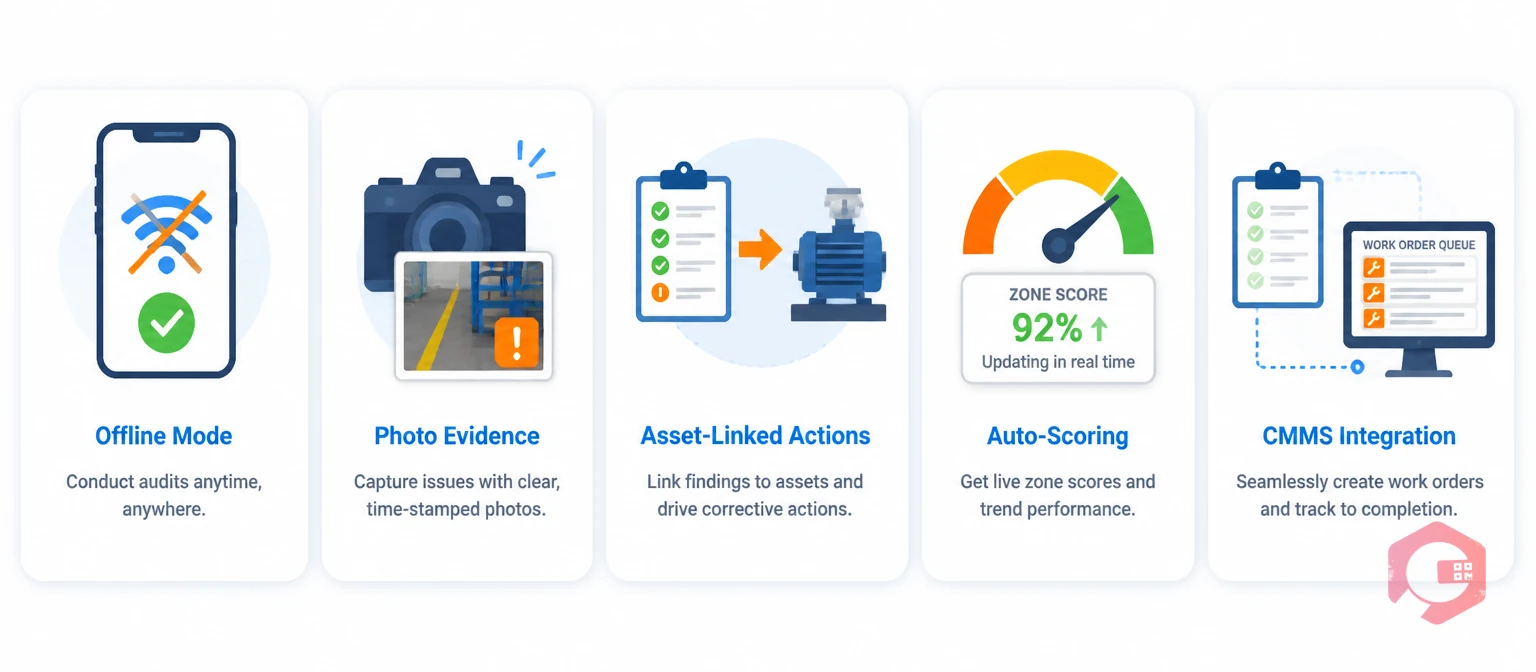
Digital 5S audit software is a mobile CMMS application that scores zones, captures photo evidence, and creates corrective work orders on its own. Not all tools deliver this in full. The market runs from static PDFs on a tablet to full CMMS modules with asset-linked actions and live trend dashboards. These five features separate a useful tool from a digital clipboard:
In most maintenance operations, teams that keep their 5S tool separate from the work order system see closure rates plateau around 50–60%. CMMS-integrated tools push past that ceiling every time. Verify this feature before selecting any platform.

Most facilities do not move from paper to fully integrated digital 5S in one step. The transition follows a clear five-level path. Knowing where you sit right now tells you what the next step looks like and what ROI to expect from it.
The Digital 5S Maturity Scale:
Most facilities reach Level 3 within three to four weeks using a CMMS with a built-in checklist module. Getting to Level 4 needs a CMMS that auto-creates work orders from checklist findings. That step delivers the highest measurable ROI of the entire transition. Use the asset and equipment inspection checklist as a starting template for your first digital cycle before migrating your paper templates.
Not sure which level you are at right now? Run a simple test. Pick your most-audited zone and ask three questions: How long does it take from the end of the audit to the corrective action reaching the right person? What percentage of corrective actions from the last three audit cycles were actually closed on time? Can you pull up a zone score trend for the last six months without opening a spreadsheet? If the answers are "more than one day," "less than 60%," and "no" — you are at Level 1 or 2. That is where most facilities honestly sit when they first assess themselves. The good news is that the step from Level 2 to Level 3 is the easiest and fastest move on the scale. It is also where the team starts to see the daily difference that digital tooling makes.
Paper 5S checklists are not always wrong. There are specific situations where a physical checklist is still the right call. Knowing these prevents over-engineering a simple process.
Paper works when your facility has a single audit zone on a single shift, with one auditor and a supervisor who reviews every form the same day. It also works in the first two weeks of a brand-new 5S programme. At that point, you want auditors focused on building observation skills — not learning a new app at the same time. In some EX-classified or cleanroom areas where mobile devices are not allowed, paper is the only option.
Paper fails when any of these conditions apply:
For most operations, the tipping point arrives at three or more zones. At that point, the overhead of paper auditing outweighs the simplicity of the format. Facilities that already use CMMS software for manufacturing maintenance typically find that adding digital 5S audits to the same platform is faster to adopt than running a separate paper quality process alongside an already-digital maintenance operation. The training time is lower. The system is the same. And the results feed into dashboards that already exist.
The smartest transition approach is not to go fully digital overnight. Start with one zone and one shift. Run paper and digital in parallel for two weeks. Compare the findings. In almost every case, the digital audit surfaces two to three additional findings per cycle that paper missed — either because the auditor skipped borderline items knowing no one would follow up, or because the structured digital prompts ask about conditions that the paper form left vague. After two parallel cycles, the case for switching the rest of the facility makes itself.
Cryotos handles digital 5S through its CMMS checklist module. It connects audit findings directly to the work order and asset management system — not a standalone quality tool. The workflow is simple. The auditor opens a 5S checklist on the Cryotos mobile app. They walk the zone, capture photo evidence per pillar, and score each item. Any item scored below standard auto-creates a corrective work order. The order goes to the asset owner with the photo attached and a due date based on severity.
The maintenance checklists module is fully customisable. Templates can be built from scratch or migrated from existing paper formats in a single afternoon. Results feed straight into the BI dashboard, where 5S scores trend by zone, shift, auditor, and time period. This sits alongside OEE, work order backlog, and asset availability in the same view. The full audit history is searchable and exportable for any reporting or compliance review — no manual data preparation needed.
In practice, this means a quality manager can pull up zone trend data for the last 90 days in under a minute. They can see which zones have repeat findings. They can check which corrective actions are still open and who owns them. And they can share the data directly from the dashboard without copying anything into a spreadsheet first.
A digital 5S audit captures findings with photos, scores zones automatically, and creates corrective work orders linked to specific assets — all in real time on a mobile device. A paper checklist records the same information by hand, requiring post-audit entry and manual corrective action assignment. The key difference is that digital systems close the loop between finding and fix on their own. Paper systems depend on the form reaching the right person before the next cycle — which is why paper closure rates are consistently lower.
Teams that switch from paper to digital typically complete individual audits 30–40% faster. They also cut 30–60 minutes of post-audit data entry per cycle entirely. In a facility running 10 zones weekly, that is 5–10 hours of recovered time per week. That time was previously spent on admin work with no operational value attached to it.
A CMMS with a built-in checklist module beats a standalone 5S app in most operations. The reason is corrective action integration. Standalone apps create actions in a separate system from the one technicians use for daily work. That is the main reason closure rates stay low even after switching to digital. CMMS-integrated audits push actions directly into the existing work order queue — same system, same mobile app, no extra login.
Most teams reach fully operational digital auditing within two to four weeks. The steps are: pick a tool with offline support, migrate your paper template into the digital system (one day for a standard 5S template), run one parallel audit cycle to check scoring, then switch fully. Auditor training takes about one hour of hands-on walkthrough per person.
A good 5S checklist needs scored items for all five pillars: Sort (items removed), Set in Order (everything in its place), Shine (area cleaned and maintained), Standardize (visual aids current), and Sustain (prior actions closed, audit frequency met). Each item needs a clear scoring scale — typically 0 to 3 — and a required photo for anything scored below standard. Vague criteria like "area is tidy" produce the highest auditor variance regardless of whether the format is paper or digital.
For a mid-sized plant running 8–12 zones weekly, the ROI comes from three places: recovered admin time (5–10 hours per week), better corrective action closure rates (which cut repeat failures and rework costs), and faster reporting. Most operations recover the cost of digital 5S tooling within 6–12 weeks of full deployment. The gains keep growing as the audit history builds and trend analysis reveals patterns that were invisible on paper.
Facilities that run consistent digital 5S cycles create compounding improvement. Each closed corrective action raises the facility's baseline. The next cycle starts with fewer findings. The audit itself gets faster because most zones score higher. Over time, the programme sustains itself without extra management effort — which is exactly what the fifth S, Sustain, was always supposed to achieve. Schedule a free demo to see how Cryotos connects digital 5S audits to your work order system for end-to-end compliance tracking and live BI dashboard trending.


Cryotos AI predicts failures, automates work orders, and simplifies maintenance—before problems slow you down.



