An electronic batch record (EBR) is a validated digital record of everything that happened while one batch was made, and maintenance data fits in as the proof that the equipment was fit for use. Calibration status, preventive maintenance, cleaning checks and repair history all support the batch story.
Most regulated plants keep that evidence in a different system from the EBR. This guide explains what an EBR contains, where maintenance data fits, and how a Computerized Maintenance Management System (CMMS) supplies equipment evidence to the batch record.
Key Takeaways
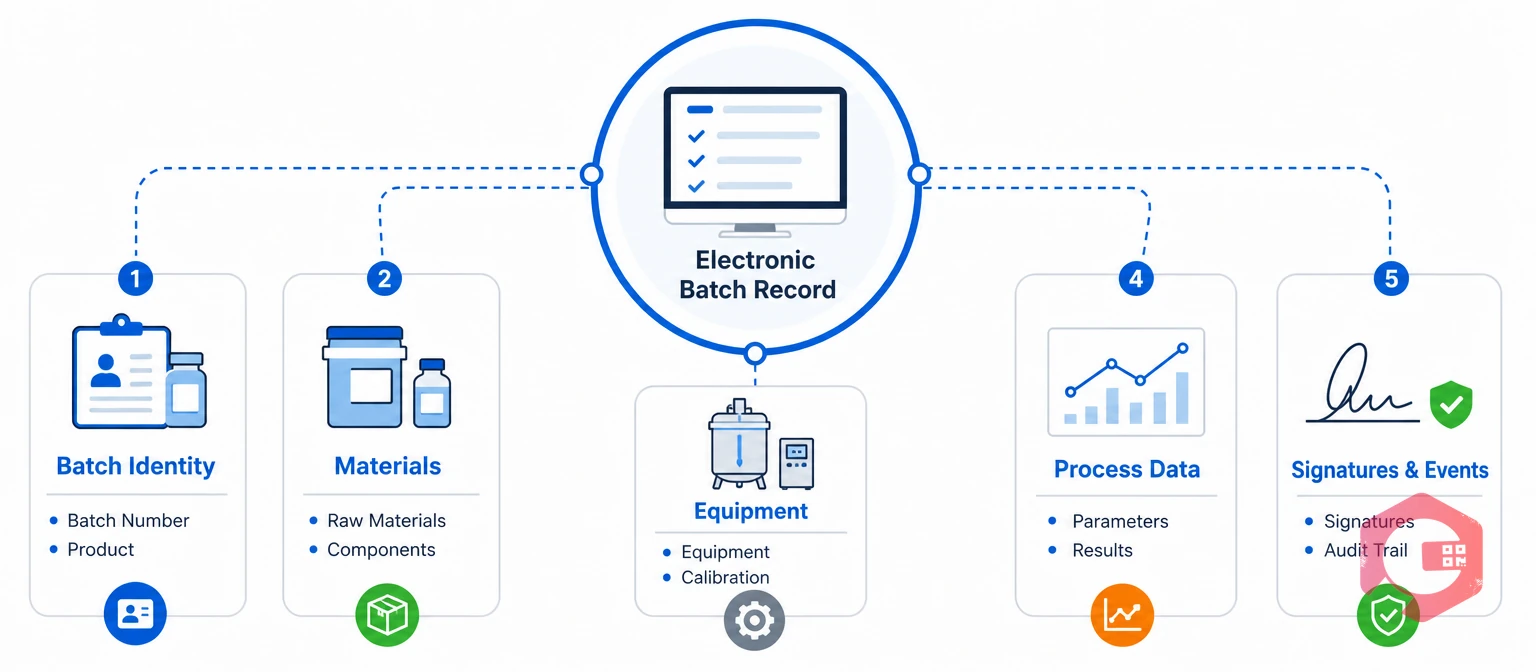
An electronic batch record (EBR) is a validated digital record of everything that happened while one batch was produced. It replaces the paper batch production record with guided, step-by-step electronic execution.
Most EBRs run inside a manufacturing execution system (MES) or a dedicated EBR tool. In the United States, 21 CFR Part 11 sets expectations for electronic records and signatures, and EU GMP Annex 11 covers computerized systems in Europe. An EBR is only as trustworthy as the data that feeds it, and equipment data is a major part of that.
An electronic batch record improves on paper by checking data at entry, flagging deviations and keeping a time-stamped audit trail. The table compares the two across six areas.
| Area | Paper batch record | Electronic batch record |
|---|---|---|
| Data entry | Handwritten and easy to miss | Guided entry with mandatory fields |
| Review | Page-by-page after the batch | Review by exception, with flagged deviations |
| Errors | Found late and corrected by hand | Checked at entry; changes carry a reason |
| Audit trail | Cross-outs and initials | Time-stamped, user-attributed trail |
| Equipment details | Equipment ID written in | Equipment looked up and checked against status |
| Release time | Slow, because of manual review | Faster, because data is complete and structured |
Review by exception is a major practical gain, because reviewers focus on flagged events instead of reading every page.
Maintenance data belongs in the batch record because regulators expect proof that equipment was maintained, cleaned and calibrated before use. Relevant sections include 21 CFR 211.67 on equipment cleaning and maintenance and 211.68 on automatic, mechanical and electronic equipment.
Maintenance teams in regulated plants see the same gaps again and again:
Each gap forces reviewers to search several sources, which slows batch release and weakens the story the record tells.
See how maintenance checklists capture cleaning and changeover checks with photos, readings and signatures.
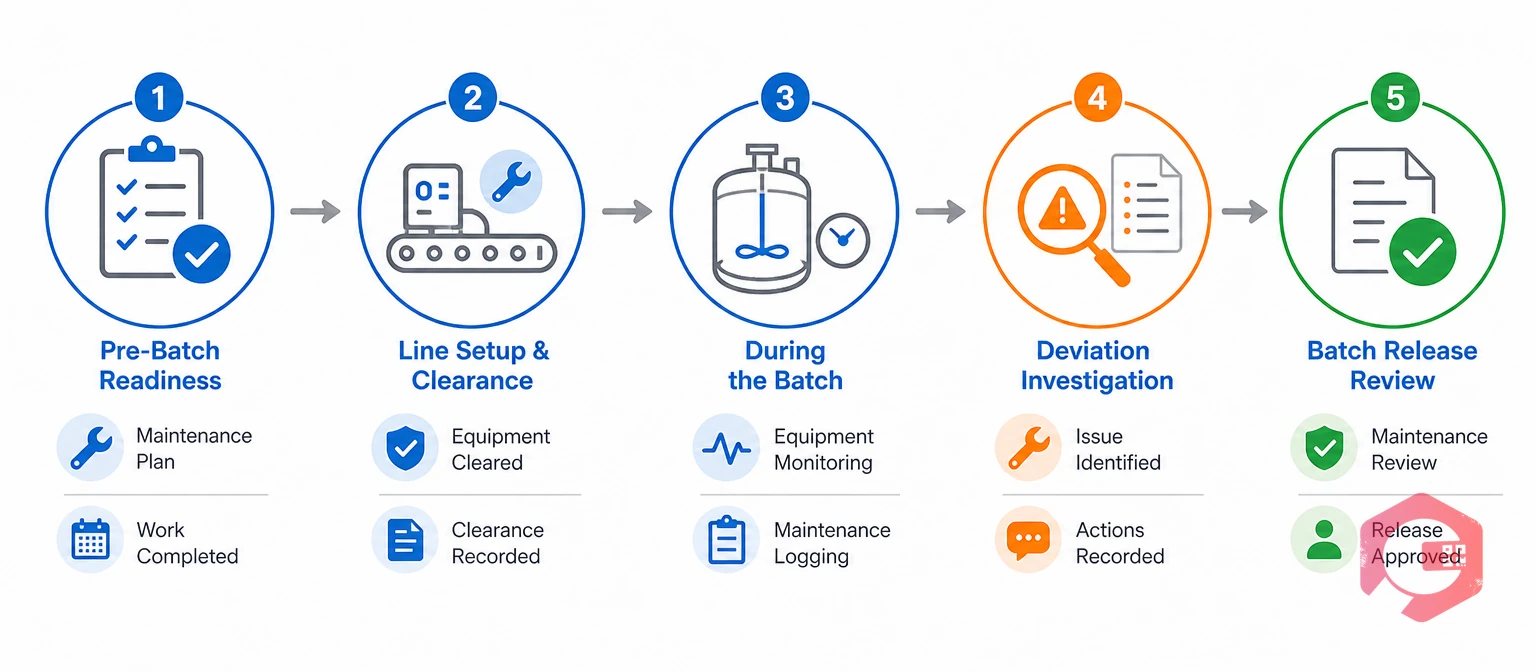
Maintenance data fits into an EBR at five points in the batch lifecycle.
Treating these five points as one flow keeps equipment evidence close to the batch it supports.

The Equipment Readiness Gate is a five-check test that confirms a machine is fit to run a batch before the batch starts. Most plants already run these checks informally, and the gate makes them explicit and recorded.
The Equipment Readiness Gate Framework:
Plants usually agree with QA which statuses block a batch and which only raise a warning. An equipment inspection checklist helps define what ready means for each machine type.
A connected batch shows how the pieces fit on a real line. This example uses a filling line; the steps are illustrative, and each plant sets its own rules.
The batch record now shows what happened to the equipment, not only what happened to the product.
A CMMS connects to an EBR or MES through three common patterns, and most plants combine them over time.
Most plants start with the review export, add a status lookup for critical equipment, and move to an event feed once the interface is validated.
The ALCOA+ framework is a set of principles that describes trustworthy, inspection-ready records. Maintenance records that feed a batch record should meet the same standard as the EBR.
Corrections should never overwrite the original entry. The system should keep the first value, record the new value, and capture who changed it, when and why.
Limit edit rights to named roles, and add a second review for any record that feeds a batch record.
Regulated teams also validate computerized systems under approaches such as GAMP 5. A vendor should say its software supports these controls only when it can back the claim with documents. A maintenance audit checklist is a useful way to test your own records before an inspection.
Cryotos gives regulated plants one searchable, user-attributed record of equipment care that an EBR or MES can rely on. Cryotos is a CMMS, not an EBR or MES, so it feeds the batch record instead of replacing it.
Maintenance teams using Cryotos have reported up to 30% reduction in unplanned downtime and 25% faster repair turnaround.
Regulated customers should confirm validation needs, audit trail controls and the MES interface with their QA team and with Cryotos before go-live.
The main challenges are inconsistent equipment IDs, uncontrolled edits and over-blocking, not the technology itself.
Teams that succeed start with one line and one equipment class, then expand.
An electronic batch record is the digital record of how one batch was made. It captures materials, equipment, process data, checks, deviations and signatures in one reviewable file.
Most EBRs run inside an MES or a dedicated EBR tool. The MES guides production on the floor, and the EBR is the record it produces for each batch. Maintenance data sits in neighboring systems and reaches the batch record through an interface or an export.
It proves the equipment was calibrated, maintained, cleaned and free of open faults when the batch ran. It also explains breakdowns and interventions that appear in the batch timeline.
Link calibration status, PM status, open work orders, cleaning and changeover checklists, and repair history for the batch window. Start with critical equipment and expand from there, using the same equipment IDs in every system.
No. A CMMS manages equipment care, while the EBR records how a batch was produced. The two work together, with the CMMS supplying equipment evidence.
Start with a review export of equipment history for one line. Then add a status lookup for critical equipment, and validate each step with QA.
Batch records are only as strong as the equipment evidence behind them. Schedule a free demo to see how Cryotos keeps calibration, PM and repair records ready for your batch review.


Cryotos AI predicts failures, automates work orders, and simplifies maintenance—before problems slow you down.