

On-premise vs. cloud-based CMMS software is one of the most consequential technology decisions a maintenance team will make. On-premise CMMS runs on servers your organization owns and manages in-house, while cloud-based CMMS is hosted by the vendor and accessed through a browser or mobile app. The right choice depends on your regulatory environment, IT capacity, budget model, and how your technicians work in the field.
According to a 2023 MarketsandMarkets report, the global Computerized Maintenance Management System market is projected to grow from $1.1 billion to over $1.8 billion by 2028 — and cloud deployments account for the majority of that growth. Still, on-premise solutions remain the right fit for specific industries and operating conditions.
This guide compares both deployment models across cost, security, scalability, mobility, and long-term fit — so you can make an informed decision for your maintenance operations.
Key Takeaways
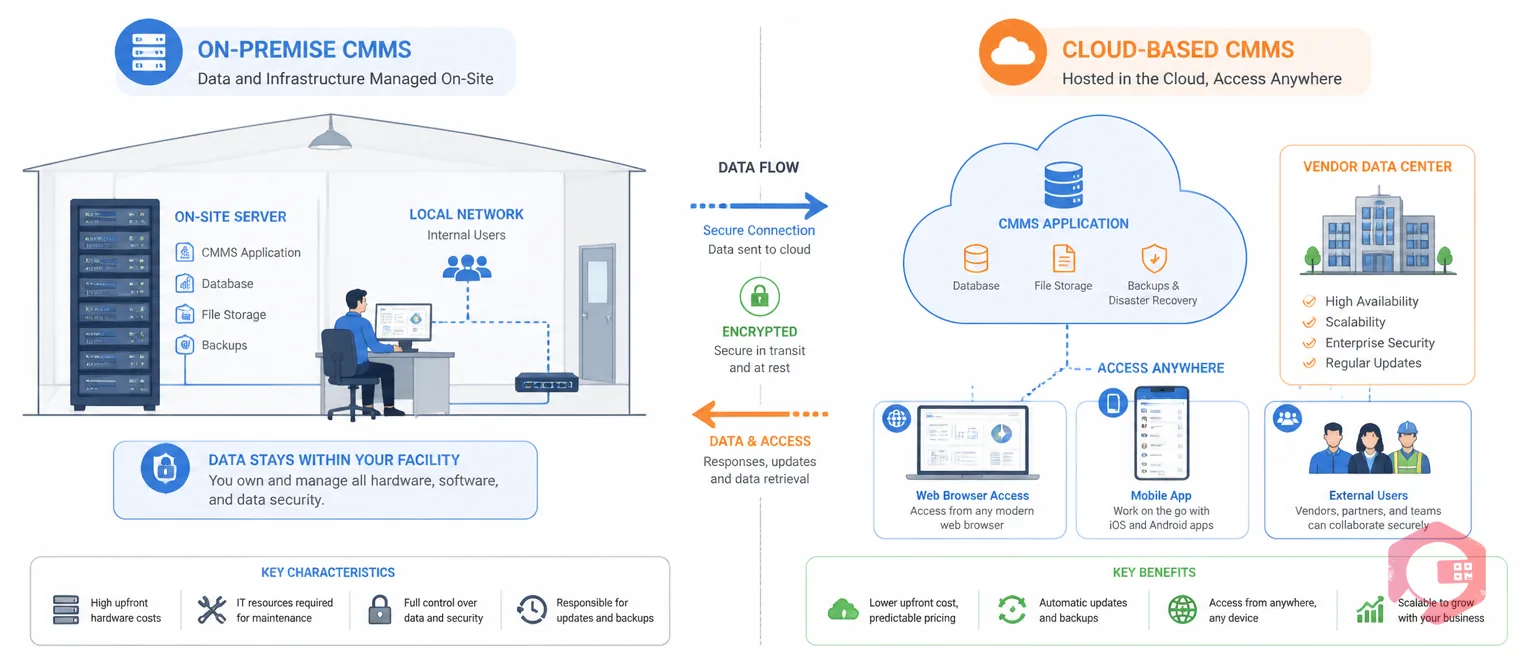
On-premise CMMS is maintenance management software installed on servers and hardware that your organization physically owns, operates, and maintains. You purchase a perpetual license, your IT team handles installation, and all data stays within your facility's walls.
For organizations in highly regulated industries — defense contractors, certain government agencies, or facilities operating under strict data sovereignty laws — on-premise deployments offer a level of physical control that cloud models can't replicate. Your data never leaves the building.
ISO 55000 asset management standards do not mandate a specific deployment model, but they do require that your system supports accurate, accessible maintenance records. On-premise can satisfy this — but so can cloud, with stronger audit trails in most cases.
Cloud-based CMMS, also known as SaaS (Software as a Service) CMMS, is maintenance software hosted on the vendor's servers and accessed entirely through a web browser or mobile application. There is no local installation. The vendor manages hosting, security, updates, and disaster recovery.
This model has become the default for most new CMMS implementations. The SMRP (Society for Maintenance and Reliability Professionals) notes that digital accessibility — especially mobile access for technicians — is now a baseline expectation for modern maintenance management, not a premium feature.
Maintenance teams using Cryotos have reported up to 30% reduction in unplanned downtime and 25% faster repair turnaround — improvements driven largely by the real-time mobile access that cloud deployment makes possible. With Cryotos's work order management, technicians can create, update, and close work orders from the field the moment a repair is complete.

The decision between on-premise and cloud-based CMMS comes down to how each model handles the six pillars every maintenance team depends on: cost, deployment speed, data security, accessibility, scalability, and integration.
| Factor | On-Premise CMMS | Cloud-Based CMMS |
|---|---|---|
| Cost Model | High upfront CapEx (license + hardware) | Predictable monthly/annual OpEx subscription |
| Deployment Speed | Weeks to months | Days to a few weeks |
| IT Overhead | High — your team manages patches, backups, uptime | Low — vendor manages all infrastructure |
| Data Control | Full physical control on your servers | Vendor-managed with contractual data ownership |
| Mobile Access | Limited — requires VPN; often laggy | Full — native mobile apps, real-time sync |
| Scalability | Requires new hardware purchases to scale | Scale up or down by adjusting subscription |
| Security | Your IT team's full responsibility | Enterprise-grade vendor security (ISO 27001, SOC 2) |
| Uptime Guarantees | Dependent on your IT infrastructure | 99.9%+ SLA from vendor data centers |
| Best For | Regulated industries, air-gapped environments | Multi-site operations, mobile teams, fast-growth orgs |
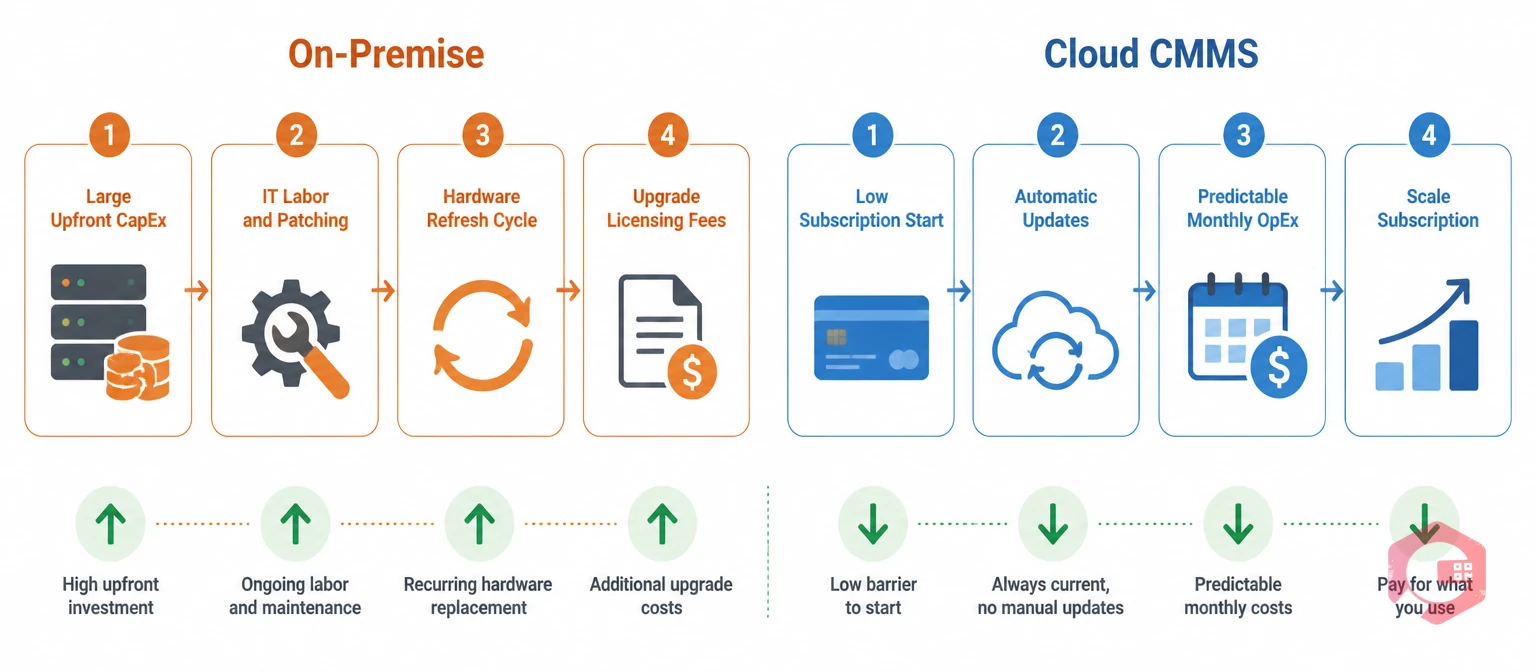
Cost is typically the first filter when evaluating CMMS deployment options, but the sticker price rarely tells the full story. Both models carry hidden costs that only surface 12 to 24 months into operation.
The upfront investment in on-premise CMMS includes software licensing, server hardware, storage, network infrastructure, and the IT labor to set everything up. For a mid-sized facility, this initial outlay can run from $50,000 to well over $200,000 before a single technician logs in.
Cloud CMMS eliminates hardware costs entirely. You pay a per-user or per-site subscription — typically ranging from a few hundred to a few thousand dollars per month depending on features and user count. Hosting, security, and updates are included in that fee.
For most maintenance teams, the 3-year total cost of a cloud CMMS runs lower than on-premise once you factor in hardware, IT labor, and upgrade cycles. Use Cryotos's downtime tracking module to quantify exactly what unplanned failures cost your operation — a number that justifies the investment in either model.
Security is the most emotionally charged dimension of the on-premise vs. cloud debate — and the most misunderstood. The assumption that local storage is inherently more secure than cloud storage is no longer supported by evidence.
On-premise CMMS gives your organization complete physical and logical control over your maintenance data. Nothing leaves your network without your explicit action. For organizations with classified data requirements or strict jurisdictional data residency laws, this physical control is genuinely non-negotiable.
The trade-off: your security posture is only as strong as your internal IT team. Most mid-sized facilities cannot match the security investment that enterprise cloud vendors make in intrusion detection, encryption, penetration testing, and 24/7 monitoring.
Reputable cloud CMMS vendors operate in data centers certified to ISO 27001, SOC 2, and often regional compliance frameworks. These facilities employ full-time security engineers, run continuous vulnerability scanning, and maintain geo-redundant backups that most on-premise setups cannot replicate.
The NIST Cybersecurity Framework notes that shared responsibility models — where vendors manage infrastructure security and customers manage access controls — routinely achieve higher security outcomes than siloed on-premise environments with limited security staffing.
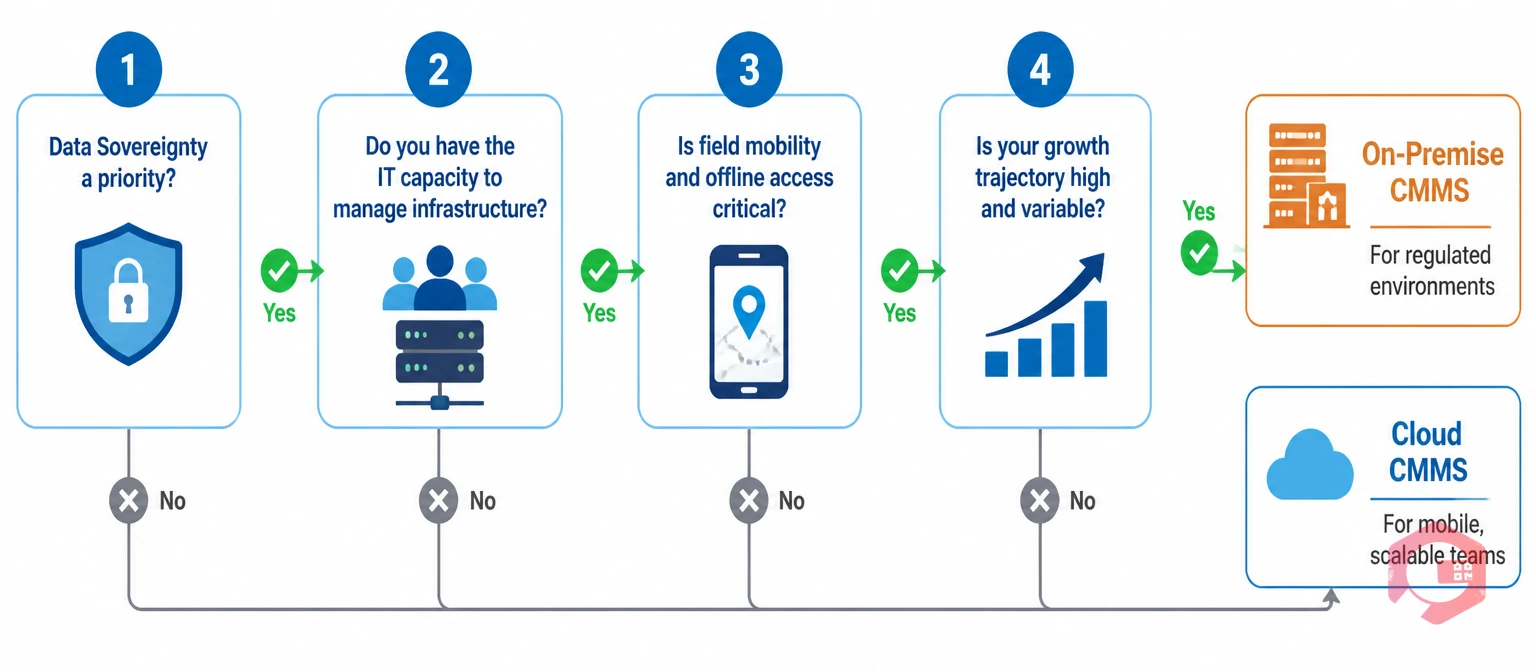
Rather than treating this as an abstract technology debate, run through these four questions. Your answers determine the right deployment model for your specific situation.
The CMMS Deployment Decision Framework:
If Questions 1 or 2 push you toward on-premise, that's the right call for your environment. If Questions 3 or 4 are your priority, cloud CMMS — specifically a mobile-first CMMS — gives your team capabilities that on-premise architectures weren't designed to deliver.

The single biggest operational difference between on-premise and cloud CMMS isn't security or cost — it's what happens when a technician is standing in front of a broken piece of equipment at 2 AM.
On-premise CMMS was built for desktop access on an internal network. Remote access is possible through VPN tunnels, but maintenance teams consistently report that VPN-based access is slow, prone to disconnection, and frustrating on mobile devices. In practice, many technicians skip the system entirely and rely on paper or phone calls — creating data gaps that compromise your maintenance records.
Cloud-based CMMS delivers full functionality through native mobile apps and responsive web interfaces designed specifically for field use. A technician can scan a QR code on a piece of equipment, pull up its full maintenance history, create a work order with photos, and submit it for approval — all from a smartphone, without ever touching a desktop computer.
Cryotos's preventive maintenance software schedules and assigns PMs automatically, sending mobile notifications to technicians when tasks are due — a workflow that depends entirely on real-time cloud connectivity to function as designed.
Maintenance operations don't stay static. You add facilities, onboard new asset classes, expand your technician workforce, and connect your CMMS to ERP and IoT systems. How each deployment model handles this growth matters.
Adding users or storage to an on-premise CMMS triggers a procurement process: spec new hardware, get budget approval, wait for delivery, configure the equipment, and migrate data. This process can take weeks or months. For fast-growing organizations, that lag creates operational gaps.
Cloud CMMS scales by adjusting your subscription tier. Adding 50 new users takes minutes in an admin panel. Adding a new facility means creating a new site record, not provisioning new servers. The vendor's infrastructure scales automatically to accommodate your growth.
Both deployment models have legitimate use cases. The right answer depends on your industry, IT infrastructure, and operational priorities — not on which technology sounds more modern.
For most manufacturing, facility management, healthcare, and field service organizations, cloud-based CMMS is the operationally superior choice in 2026 — not because on-premise is wrong, but because the cloud's mobility and scalability advantages directly reduce downtime and response time for the majority of maintenance teams.
Explore how Cryotos supports specific industries through its maintenance management software — built for cloud deployment with enterprise-grade security and a mobile-first experience.
Yes — reputable cloud CMMS vendors operate in data centers certified to ISO 27001 and SOC 2 standards, with encryption, redundancy, and 24/7 security monitoring that most individual facilities cannot match with on-premise infrastructure. Cloud security is a shared responsibility: the vendor secures the infrastructure, and you manage access controls and user permissions. Most manufacturing organizations find that cloud CMMS delivers stronger security outcomes than aging on-premise setups.
Yes, migration from on-premise to cloud CMMS is standard practice and well-supported by most vendors. The process typically involves exporting your existing data in a structured format (CSV or XML), mapping fields to the new system's schema, and running a data import with validation checks. Most migrations complete in days to a few weeks depending on data volume. Your historical work orders, asset records, and PM schedules transfer intact.
Enterprise cloud CMMS vendors operate on multi-region, geo-redundant infrastructure with 99.9%+ uptime SLAs. In the unlikely event of downtime, mobile apps with offline mode — like Cryotos — allow technicians to continue logging work order activity locally, with automatic sync when the connection restores. Your data is also backed up continuously in the vendor's infrastructure, with contractual data portability rights that let you export your data at any time.
A cloud CMMS implementation for a single facility typically takes 1 to 4 weeks, depending on how much data you're importing, how many custom workflows you need to configure, and the size of your team. On-premise implementations run longer — typically 2 to 6 months — because of the hardware procurement, server configuration, and network setup involved before software installation even begins.
On-premise CMMS carries ongoing costs for hardware maintenance, power consumption, IT labor for patching and upgrades, and eventual hardware refresh cycles every 5-7 years. Cloud CMMS consolidates all of that into a single predictable subscription fee that includes hosting, updates, support, and security. For most organizations, the 3-year total cost of cloud CMMS runs lower than on-premise once all operational overhead is accounted for.
On-premise CMMS remains the right choice for organizations with strict data sovereignty requirements, air-gapped network environments, or operations in locations without reliable internet connectivity. For the majority of industries — including manufacturing, healthcare, facilities management, and field service — cloud-based CMMS now delivers better mobility, faster updates, and lower total cost of ownership. The market reflects this: cloud deployments represent the majority of new CMMS implementations globally.
Your maintenance data model shapes every other decision in your maintenance operation. Schedule a free demo to see how Cryotos's cloud-based CMMS gives your team real-time mobile access, enterprise-grade security, and the scalability to grow without hardware constraints.




Cryotos AI predicts failures, automates work orders, and simplifies maintenance—before problems slow you down.



