

Unique asset identification codes are structured alphanumeric labels assigned to every piece of equipment in a facility, giving each asset a one-of-a-kind identity that never changes, regardless of location, department, or technician. In large facilities managing hundreds or thousands of assets, the absence of a consistent ID system leads directly to misrouted work orders, duplicate maintenance records, and technicians servicing the wrong equipment — errors that industry estimates value at $50,000 per hour of unplanned downtime. This guide explains what asset identification codes are, why large facilities need them, and how to build a system that integrates with your asset maintenance management software to eliminate confusion from day one.

An asset identification code — sometimes called an asset ID, equipment number, or asset tag — is a unique identifier permanently assigned to a physical asset. Unlike a serial number set by the manufacturer, an asset ID is created and controlled by your facility, built around your own naming logic, and stored in your asset lifecycle management system.
Good asset ID codes answer three questions at a glance: where is this asset located, what type of asset is it, and what is its individual number within that group? When every technician, supervisor, and work order references the same code, you eliminate the confusion that comes from one person calling a pump "Pump A," another calling it "P-2," and a third logging it as "Cooling Pump, 2nd Floor West."
A well-designed asset identification code typically includes:
A complete code might look like: MNF-B2-PMP-003 — meaning the third pump on the second floor of the manufacturing facility. Anyone reading that code immediately knows exactly which asset it refers to, without needing to check a map or ask a colleague.
The larger a facility, the more assets it manages — and the more people who interact with those assets. A hospital campus might track 8,000 pieces of medical and facilities equipment. A manufacturing plant can easily reach 3,000+ maintainable assets. Without a standardized identification system, you end up with one of the most damaging problems in maintenance management: no one is sure which asset they're talking about.
According to ISPE research on pharmaceutical asset management, facilities without standardized asset identification spend up to 30% more time on maintenance coordination due to ambiguous equipment references. That time compounds quickly across a large team.
When asset IDs don't exist or aren't used consistently, facilities experience a predictable set of problems:

Not all asset identification code systems are designed the same way. There are three main formats used in large facilities, each with different strengths depending on your facility's size, complexity, and CMMS capabilities.
| Format | Example | Best For | Limitation |
|---|---|---|---|
| Sequential | 001, 002, 003 | Simple, single-site facilities | No built-in context; meaningless without a lookup table |
| Hierarchical | MNF-B2-PMP-003 | Multi-site or multi-building facilities | Codes get long; requires discipline to maintain structure |
| Smart (Intelligent) | PMP-CW-B2-230V-003 | Complex assets with multiple attributes | Very long codes; prone to errors during manual entry |
For most large facilities, the hierarchical format offers the best balance — enough context to be self-explanatory without becoming unwieldy. The sequential format works for small operations. Smart codes are best reserved for industries where specific attributes (voltage, capacity, fluid type) must appear in the code itself, such as oil and gas or pharmaceutical manufacturing.
Building a reliable asset identification system isn't complicated, but it does require upfront decisions that need to stick. Changing your code structure after 2,000 assets are already registered is painful. Get these three steps right at the start.
Before writing a single code, map out the physical and organizational structure of your facility. How many sites do you manage? How many buildings per site? How many floors or zones per building? This hierarchy becomes the skeleton of your ID system. For example, a multi-site manufacturer might define: Site → Building → Floor → Asset Type → Asset Number. A single-site hospital might only need: Wing → Department → Asset Type → Asset Number. The key is to build one level deeper than you think you need — it's far easier to skip a level for simple assets than to add a level retroactively.
Once your hierarchy is defined, choose your abbreviation conventions. Keep each segment short — 2-4 characters — and document every valid value in a master reference list. Avoid ambiguous letters like O (vs. zero) or I (vs. one). Decide on a consistent separator: hyphens work best because they're readable and compatible with all CMMS import formats. Define your padding standard (001 vs 1) and stick to it.
Run an asset inventory using your asset and equipment inspection checklist and assign codes systematically, floor by floor, asset type by asset type. Record the code, asset name, location, make, model, and serial number in your CMMS simultaneously. Attach a physical label — a QR code label using the asset QR code scanning system links the physical label directly to the digital record, enabling technicians to pull up full asset history in seconds. After initial rollout, enforce a policy: no new asset enters service without a registered ID code.
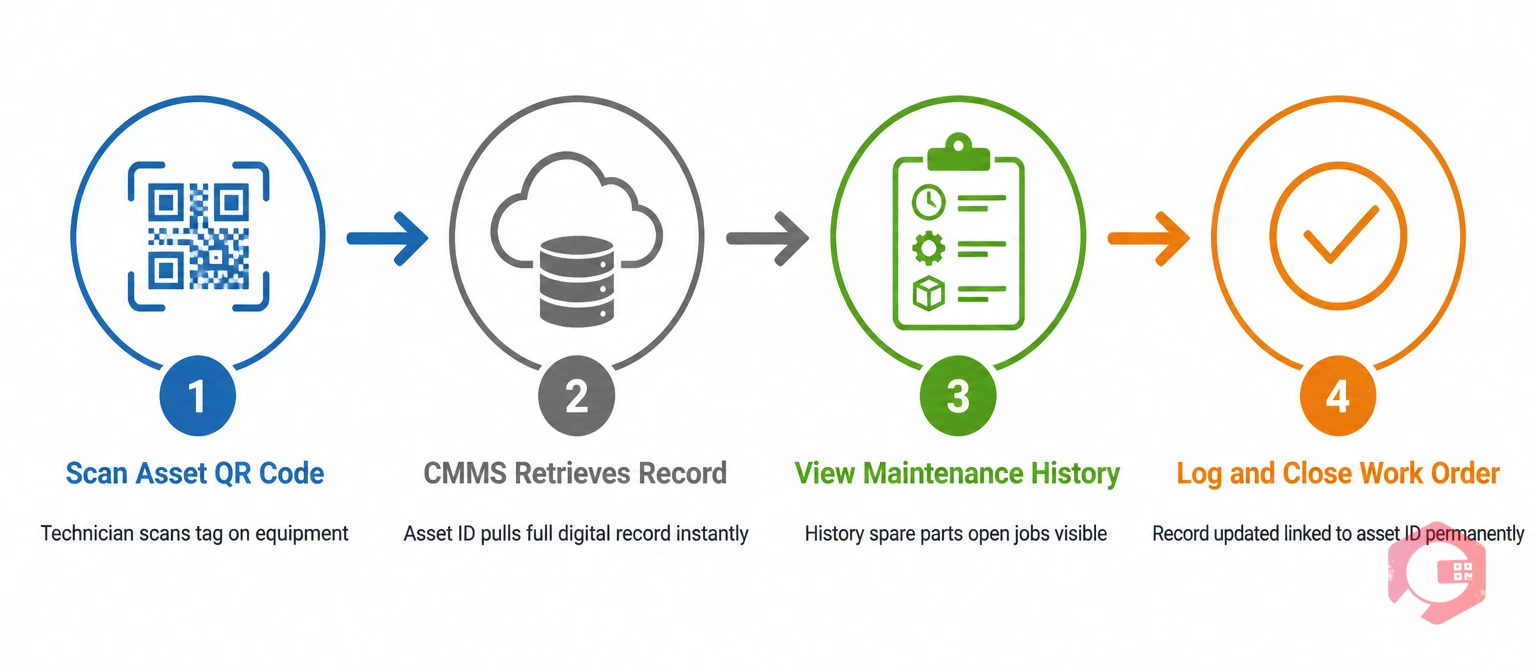
An asset identification code is only as powerful as the system it feeds into. The goal isn't just to label equipment — it's to create a direct, frictionless connection between a physical asset and every digital record associated with it: work orders, maintenance histories, inspections, spare parts, and compliance documents.
When your CMMS uses asset ID codes as the primary reference across all records, you get a single, unambiguous thread through every activity on that asset. No more searching by description. No more guessing which "Boiler 3" is the right one. The code resolves it instantly.
In a properly configured work order management system, the asset ID code is mandatory on every work order. When a technician scans the QR code on a pump, the CMMS instantly opens that asset's record — showing its full maintenance history, open work orders, last service date, attached documents, and associated spare parts. This eliminates the need to search by name or description, cutting work order creation time and reducing the risk of pulling the wrong asset record.
Cryotos CMMS uses asset ID codes and QR scanning to give technicians one-tap access to full asset tracking data. Teams using this approach report 25% faster repair times because technicians arrive at a job already knowing the asset's history, last failure mode, and required parts — before they touch a wrench.
Setting up your code system is step one. Maintaining its integrity over years of operations — through expansions, retirements, and staff turnover — is where most facilities fall short. Follow these practices to keep your system clean and reliable.
According to ISO 55001 asset management standards, traceability of assets throughout their lifecycle is a foundational requirement of any compliant asset management system. A structured identification code system is the most practical way to meet that requirement in large, complex facilities.
A serial number is assigned by the manufacturer and is specific to the production batch or unit — it identifies the equipment as a product. An asset ID is assigned by your organization and identifies the equipment as a maintainable asset within your specific facility. Two identical pumps from the same manufacturer will share a model number and have different serial numbers, but your facility assigns its own asset IDs based on where and how you use them.
Most facilities target 8-16 characters for a hierarchical code, including separators. Shorter codes risk being non-descriptive; longer codes increase manual entry errors. A format like XXX-XX-XXX-000 (site-location-type-number) covers most multi-site facilities without exceeding 15 characters.
Yes — and this is the most effective way to deploy them. The asset ID code becomes the data encoded in a QR code or RFID chip. When a technician scans the tag, the CMMS retrieves every record associated with that code instantly. Cryotos supports QR scanning via mobile app, enabling technicians to access full asset histories on-site without manual entry.
This is one of the key decisions in code design. If your code includes a location segment, moving an asset creates a mismatch between the code and the physical location. Many facilities handle this by updating the location field in the CMMS without changing the code itself, keeping the asset's history intact. Alternatively, some facilities assign a new code on relocation and link the old code to the new one as a predecessor record.
All maintainable assets should have an ID code — meaning any piece of equipment that receives scheduled maintenance, corrective repairs, or inspections. Small consumable items (light bulbs, gaskets) managed through inventory don't need individual asset IDs, but the equipment they're installed on does.
A poorly labeled facility is an expensive one. Every hour a technician spends confirming which asset they're dealing with is an hour not spent fixing it. Unique asset identification codes solve that problem directly — giving everyone in your maintenance team a common language for every piece of equipment, every work order, and every spare part decision. Cryotos CMMS is built around this approach, with QR-based asset identification, full work order integration, and real-time asset tracking that connects your physical assets to their complete digital records. See how Cryotos helps large facilities eliminate maintenance confusion — and start your asset identification rollout today.




Cryotos AI predicts failures, automates work orders, and simplifies maintenance—before problems slow you down.



