
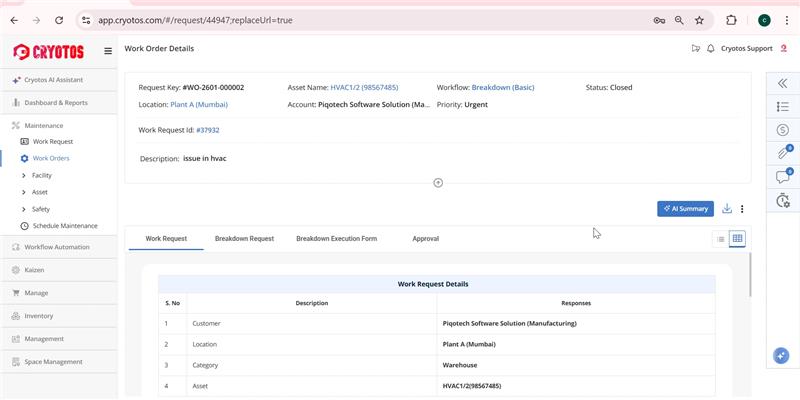
What changed? We have integrated AI directly into the Work Order and Scheduled Maintenance detail pages.
Why it matters: Reviewing complex maintenance requests can be time-consuming. With the new AI Summary button, Cryotos instantly generates a concise overview of the issue, helping technicians and managers grasp the context immediately without reading through long logs.
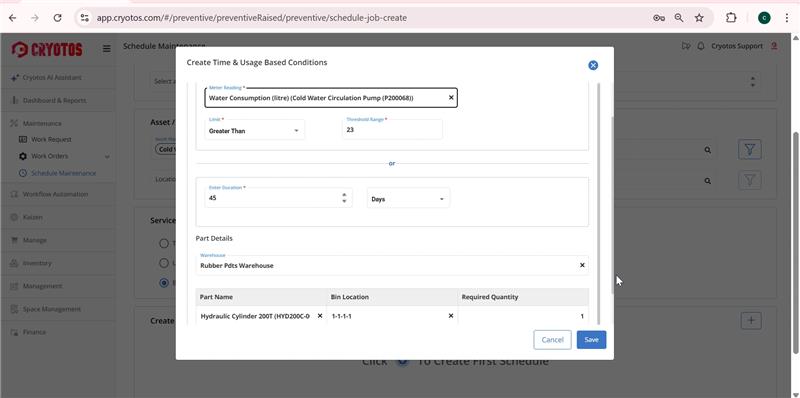
What changed? You can now allocate parts and inventory items while creating a Scheduled Maintenance (SM) task.
Why it matters: Previously, parts might have been allocated only when the work order was generated. By moving this to the scheduling stage, you ensure that the necessary inventory is reserved well in advance, reducing the risk of stockouts when the maintenance day arrives.
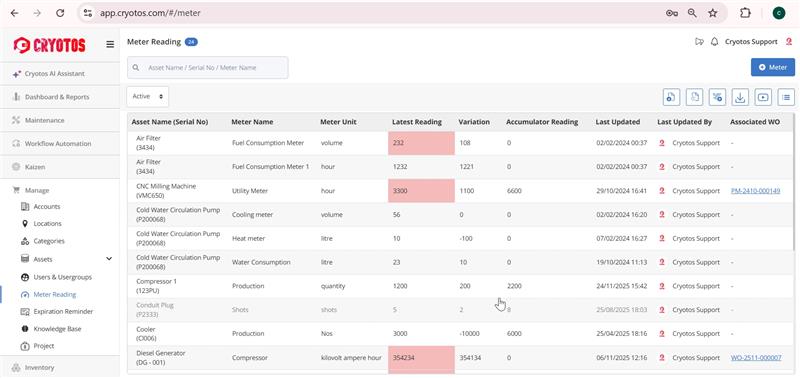
What changed? Meter names and their most recent readings are now visible directly on the main Meter List page.
Why it matters: This is a major time-saver. You no longer need to navigate inside every individual asset profile just to check a temperature, pressure, or usage reading. You get a high-level view of your asset health instantly.
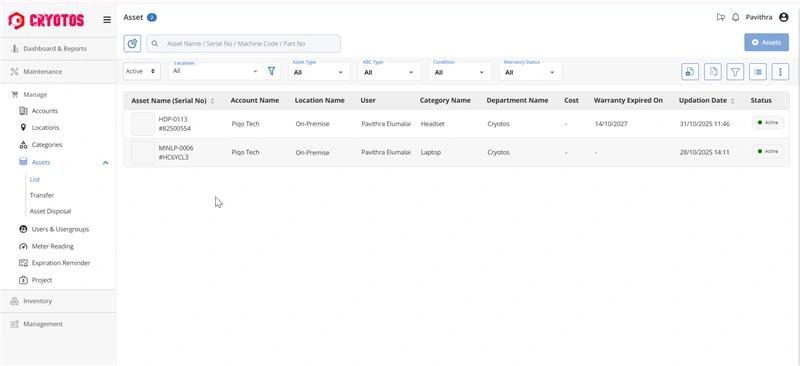
What changed? We have updated asset visibility permissions. Regular users will now only see what is necessary for their tasks, while Admin users retain full visibility.
Why it matters: This enhances your organization's data security. By restricting regular users from viewing the complete asset database or assets not associated with their tickets, we ensure sensitive equipment information is accessible only to authorized personnel.
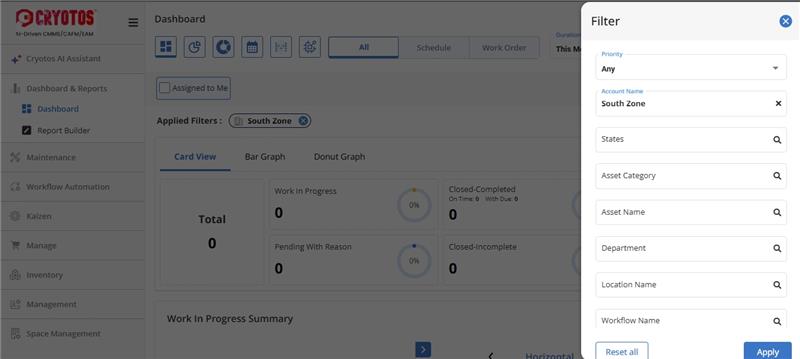
What changed? The General Dashboard now remembers your preferences. If you apply a specific filter (e.g., "High Priority Tickets" or "Electrical Department"), that filter will remain active even after you log out and log back in.
Why it matters: You shouldn't have to rebuild your workspace every morning. This "sticky filter" feature saves you clicks and lets you pick up exactly where you left off.
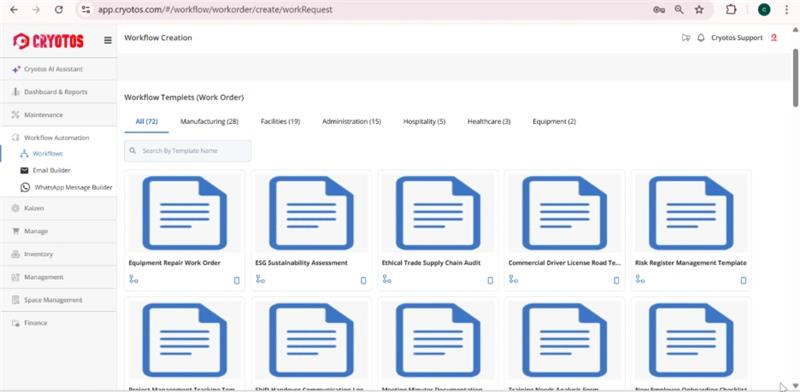
What changed? We have completely overhauled the Default Workflow Template List with a cleaner, more intuitive design.
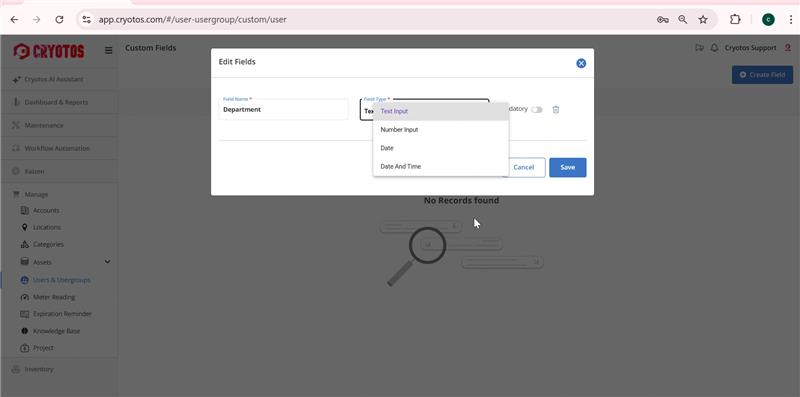
What changed? The User Module now supports Custom Fields.
Why it matters: Every organization tracks different employee data. Whether you need to record specific certifications, ID numbers, or shift preferences, you can now configure these fields to appear in user views, downloads, and imports seamlessly.
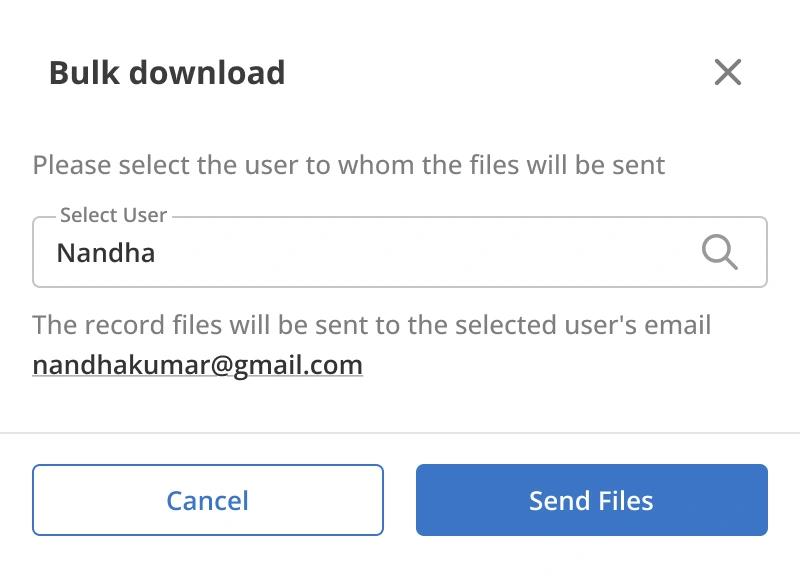
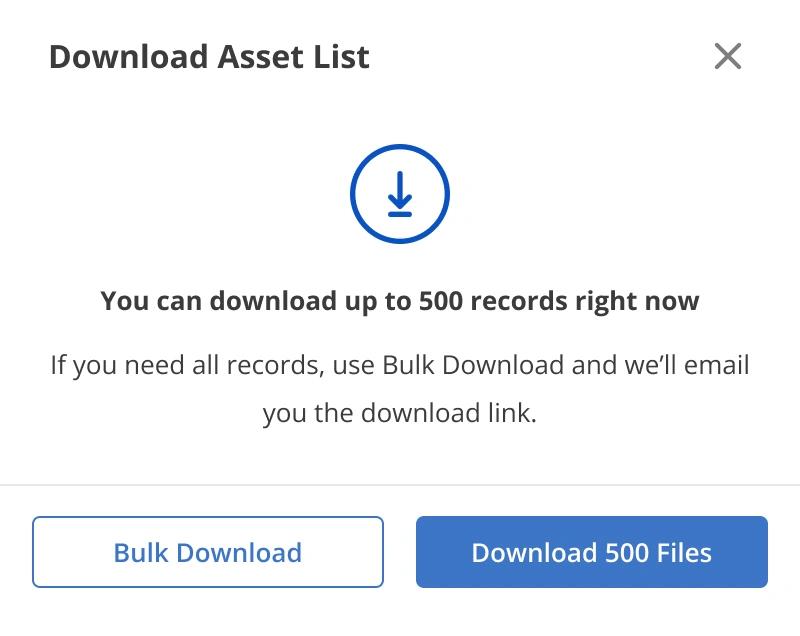
What changed? When exporting large lists of assets, the system now processes the file in the background and emails it to you when ready.
Why it matters: Downloading massive datasets via the browser can sometimes cause timeouts or slow performance. This email-delivery method ensures you get your complete data reliably, no matter how large the file size.
The best thing about Cryotos CMMS software is that it always tells me when something needs to be fixed - before it breaks and cost me a fortune!
The software is very user-friendly, and even if I don't know how to do something, the support team is always there to help me out.
Most importantly, unlike other such software, Cryotos is editable and hence the user can modify how the software works as per their need, we made several changes in the workflow & flowchart with the help of development team.
I don't know what I would do without Cryotos! I've been using it for years, and it has saved me so much time and money. I highly recommend it to anyone who wants to manage their assets efficiently.
Since we've been using Cryotos CMMS Software, our asset maintenance management has been running more smoothly than ever. We're able to track and optimize our preventive maintenance with ease, thanks to the customized process workflow. This has been a lifesaver for our team!
The Cryotos CMMS software has allowed us to manage our assets more effectively and efficiently. It has helped us to improve our asset utilization. The software is user-friendly and easy to navigate, and the support team is always quick to help with any questions we have. We're very happy with the results we've seen so far and we're confident that we'll continue to see improvements in our asset management as we use the Cryotos CMMS software.
Cryotos goes above and beyond when it comes to customer satisfaction. Planys Technologies use Cryotos for preventive/ corrective maintenance of our critical systems and not once did we face a problem that was not dealt with immediately. The team is extremely professional and helpful. We can rely on Cryotos when it comes to the operations and processes.
Thanks to the whole team for the amazing performance and thought leadership. It's rare to see teams that can put themselves in the customer's shoes and think from their perspectives - Cryotos team doesthat and more.
We recommend Cryotos if you are looking to put an end to your preventive maintenance problems and sign up with them!
Thanks to the team for an awesome job.
On behalf of Xpert FMS we would like to express our sincere appreciation for the excellent support Cryotos team have provided us for our building and facility management. Cryotos has always provided support that is timely and meets our expectations. Professionalism and quick response are the hallmarks of this team.
Sincere appreciation for the team's brilliant performance and wish them continued success. We highly recommend Cryotos as they have executed well on all assigned tasks and continue to outperform.
Thanks to all the hard work, our lives have become easier.

We are able to raised the workorder and tracking of these till the closure as helped us to provide better services our beneficiaries. Workflow-based work order management has helped us to define processes for each locations separatley. System provide notification once order is raised for assignment to engineer.
This CMMS software is top-notch! I can't believe how much it has helped me with my facilities maintenance management. Customized reports and business intelligence have been invaluable in making better decisions.
The software offers a great deal of customization for each organization's specific needs. They are always updating the software with new features and improvements, which is great. The support team is fantastic - they are always quick to help with any questions or problems we have. This software has definitely made my life a lot easier! It's so easy to use and it's really helped me keep track of all my maintenance tasks in one place. I would definitely recommend it to anyone looking for a CMMS platform.

Since we've started using Cryotos, our team has been able to stay on top of all the various SOPs. Checklists and safety procedures are now easily accessible to everyone, and we can quickly reference them whenever we need to. The software has definitely helped to improve our team's communication and efficiency. Plus, the fact that it's cloud-based means we can access it from anywhere, which is a big plus. It has been a great help in keeping everyone on the same page and up to date with the latest procedures.
At starting it felt some what difficult for scheduling but now it made to easy access.
Review from Capterra
What do you like best about Cryotos?
Easy to access and data collection,user friendly, the technical team and the supporting team is excellent the way they are solving the issues ontime and the continuous training given by supporting team. I would like to promote the cryotos APK to other industries to use.
What problems is Cryotos solving and how is that benefiting you?
Easily we came to know which machine is problem and what is the issue. And we got the exact data of spare parts stock. Using cryotos APK our machinery maintenance is increased and now we are getting less machines problem.
Review from G2

This CMMS software is top-notch! I can't believe how much it has helped me with my facilities maintenance management. Customized reports and business intelligence have been invaluable in making better decisions.
The software offers a great deal of customization for each organization's specific needs. They are always updating the software with new features and improvements, which is great. The support team is fantastic - they are always quick to help with any questions or problems we have. This software has definitely made my life a lot easier! It's so easy to use and it's really helped me keep track of all my maintenance tasks in one place. I would definitely recommend it to anyone looking for a CMMS platform.
I recently purchased Cryotos CMMS Software for asset management needs at my organization and after a few months of testing and monitoring, I'm incredibly pleased with the results. The software is user friendly, accessible and the design is very intuitive. It covers all the aspects of managing maintenance and repair, starting from preventive maintenance and standardizing operation cycles, to scheduling and streamlining workflows. I am highly satisfied with the performance and the range of features offered by Cryotos. Highly recommendable!
Read Review in G2
Before using Cryotos, asset management and maintenance seemed like an uphill task for my team. Manual processes laden with human errors did not work for us at all. We decided to go with Cryotos after checking out similar products in the market.
The user interface of the software is intuitive and easy to use, making it simple to navigate through the different features and functionalities. I particularly appreciate the ability to track all assets in real-time, allowing me to keep a close eye on their performance and maintenance needs.
Customized work order and workflow creation has reduced the needs to always follow a particular template. Depending on our needs we can create tailor made workflows to suit our requirements.
I highly recommend Cryotos to anyone who would like to unburden themselves of maintaining and managing their critical assets.
Read Complete Review on G2
As a customer of Cryotos CMMS software for asset management needs, I must say that I am thoroughly impressed with the features and functionality offered by the platform. Cryotos CMMS software has made managing my assets a breeze, and I no longer have to worry about missing maintenance or inspections.
One of the standout features of Cryotos CMMS software is the ability to generate work orders and schedule maintenance tasks. This has made it easy for me to stay on top of maintenance and repair tasks, ensuring that my assets are always in optimal condition.
The software also allows me to track inventory levels which has streamlined my inventory management process. The ability to generate reports and analyze asset performance data has also been invaluable in helping me make data-driven decisions about my assets. Overall, I would highly recommend Cryotos CMMS software to anyone looking for a reliable and efficient asset management solution.

What do you like best about Cryotos?
I am using this application right now for my service team, very good, user friendly, have lot of customisation in workflow and service reports. the team supported for initial implementation, They have good support team. Myself fully recommended this application.
What do you dislike about Cryotos?
Noting as of now seems all good
What problems is Cryotos solving and how is that benefiting you?
Cryotos application is solving our feild service team operations.
Read Complete Review on G2

What do you like best about Cryotos?
Excellent application for Maintenance activity like PPM,etc
Good team for develop our process as per our requirement like process,Standards,etc
Professional & very Supportive team.
Really appreciated for language change (English to Arabic).
What do you dislike about Cryotos?
There is no negative observation till now.
What problems is Cryotos solving and how is that benefiting you?
Scheduling & PPM for Maintenance Activity.
Read Complete Review on G2

What do you like best about Cryotos?
template are ready to use, minimal need for IT knowledge. support team are supportive in all aspects
What problems is Cryotos solving and how is that benefiting you?
We are still in the midst of experimenting all the functions in Cryotos, for now is the ease of using asset management and as a scheduler.
Read Complete Review on G2
What do you like best about Cryotos?
We used many maintenance CMMS and only in Cryotos is functionality to build your own workflows for work orders and scheduled maintenance. With this CMMS we not need some separate analyzing system like Power Bi, Cryotos have already built-in Metabase system where we can easily build reports and visualizations for reports.
What problems is Cryotos solving and how is that benefiting you?
CMMS help us control all machinery brekdowns and factory problem. CMMS collet all data about our historical data, its help analize deviations. With this system we build all necessary processes which we need in our factory, which are work autonomous.
Read Complete Review on G2
What do you like best about Cryotos?
Cryptos is very easy to use and user friendly which we can easily customise to our needs and while delivering the workprocess it's very convenient to use by the end user as well.
What problems is Cryotos solving and how is that benefiting you?
Cryotos saves our time and space thus act as a great inventory of data which will be accesed from anywhere any time and it helps us to track the work we have done all along it's a best CMMS software.
Read Complete Review on G2


