CMMS Audit Log: Track Who Created or Changed Work Orders, Assets & More

Article Written by:

Muthu Karuppaiah

Created On:

April 24, 2026

CMMS Audit Log: Track Changes to Work Orders, Assets & More

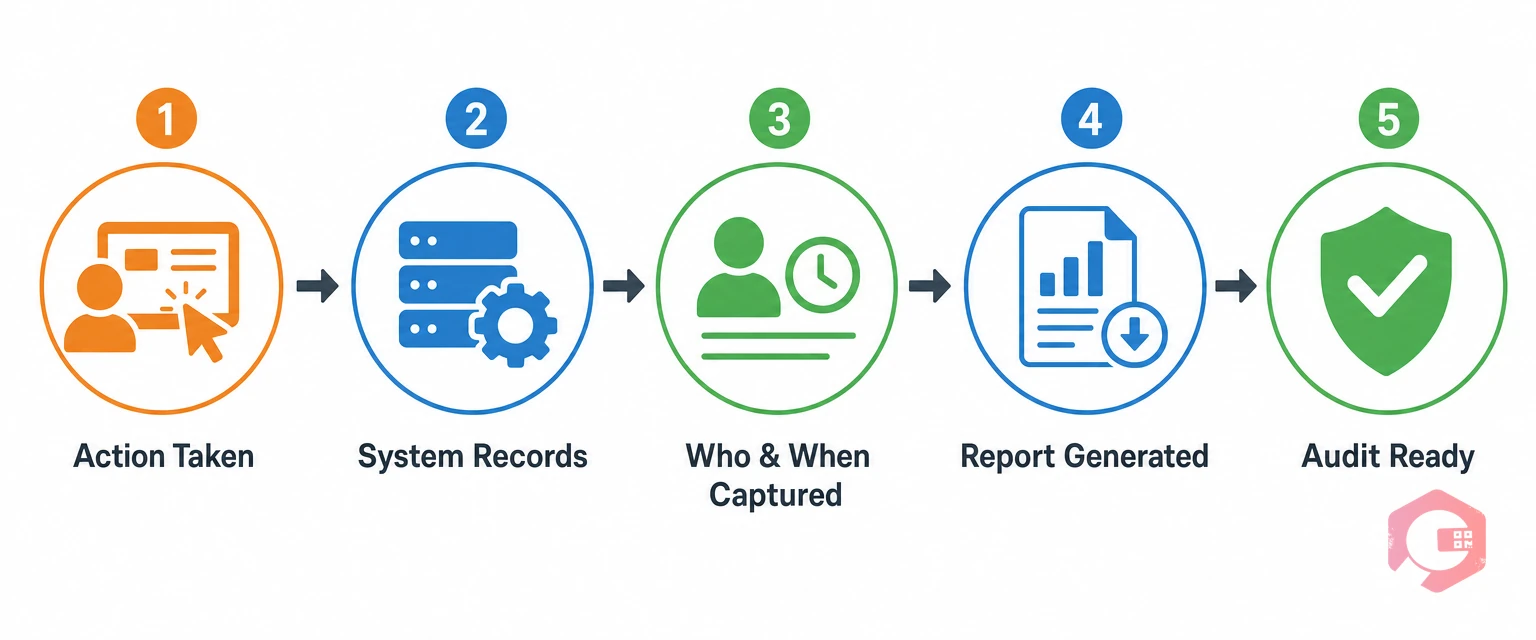
A CMMS audit log report is a time-stamped, user-attributed record of every action taken inside your maintenance software — who created a new asset, who updated a PM plan, who added a user, and who changed a workflow. It turns your CMMS from a task tracker into an accountability engine.

In maintenance operations, things change fast. A preventive maintenance schedule gets modified. An asset is created without anyone’s knowledge. A workflow step is removed. Without an audit log, these changes are invisible — and invisible changes create expensive problems.

  • Track creation events: Every new asset, work order, user, or workflow is logged with the creator’s name and timestamp.
  • Track update events: Every modification to assets, PM plans, workflows, or user permissions is captured with before/after details.
  • Audit-ready instantly: Pull a complete audit log report in seconds for compliance reviews, internal audits, or dispute resolution.

Table of Contents


What Is a CMMS Audit Log?

A CMMS audit log is an automated, tamper-proof record that captures every significant action performed within your maintenance management system. Think of it as a surveillance camera for your data — it never blinks, never forgets, and always records the who, what, and when of every change.

Unlike a simple activity feed, a true audit log is structured and searchable. You can filter by user, by date range, by event type, or by the specific asset or work order affected. This makes it possible to answer questions like “Who added this asset last Tuesday?” or “Which technician updated the PM schedule for the cooling tower?” — in seconds, not hours.

According to a Gartner report on data governance, organizations with complete audit trails experience 40% fewer compliance incidents than those relying on manual records.

Audit Log vs. Audit Trail — Key Difference

An audit trail is the broader concept — the overall evidence that a process was followed correctly. An audit log is the specific, system-generated record that creates that trail. In CMMS terms, the audit log is the raw data: timestamped entries, user names, field-level changes.

Why Audit Logs Matter in Maintenance Operations

Maintenance operations run on trust — trust that technicians completed what they logged, trust that schedules reflect actual plans, and trust that changes were made deliberately and by authorized personnel. Audit logs provide the evidence that turns trust into certainty.

The business case is strong. A single unauthorized change to a preventive maintenance schedule — say, extending a monthly inspection to quarterly — could go unnoticed for months. By that time, the equipment may have failed, a warranty may have been voided, or a safety incident may have occurred.

Accountability Without the Paperwork

In traditional paper-based maintenance environments, accountability depends on signatures — and signatures can be missed, forged, or lost. A CMMS audit log eliminates that dependency. Every action is automatically captured against the logged-in user’s account.

Compliance and Regulatory Readiness

For industries governed by OSHA regulations, ISO 9001 quality management standards, or FDA equipment maintenance requirements, audit logs are not optional — they are required.

What Does a CMMS Audit Log Track?

The most common misconception about CMMS audit logs is that they only track work order activity. In a well-built system, the audit log covers every significant entity in the platform.

Asset Creation and Updates

Every new asset entered into the system generates an audit log entry. The record captures who created it, when, and with what initial data. More importantly, every subsequent update to the asset — a change in location, a modification to specifications, a status update from active to retired — is logged individually.

  • New asset creation: Logged with creator name, timestamp, and initial field values.
  • Asset updates: Every change to asset name, location, category, or status is captured with before/after values.
  • Asset retirement or deletion: Logged with reason and authorizing user to prevent unauthorized removal.

Work Order Changes

Work orders are the heartbeat of maintenance operations. A strong audit log tracks every change — priority adjustments, reassignments, status updates, checklist completions, and closure notes — so the full lifecycle of a work order is always visible and defensible.

  • Work order creation: Who raised it, from which request, and when.
  • Status changes: Every move from Open to In Progress to Completed is logged with user and timestamp.
  • Reassignments: If a work order moves from one technician to another, the audit log captures both names and the reason for the change.

PM Plan Modifications

Preventive maintenance plans are the backbone of proactive maintenance strategies. A change to a PM plan’s frequency — even a well-intentioned one — can have cascading effects on equipment health, warranty validity, and regulatory compliance.

  • Schedule changes: Frequency modifications, trigger condition changes, and date adjustments are all captured.
  • Checklist updates: If a step is added or removed from a PM checklist, the audit log records who did it and when.
  • Plan activation or deactivation: Starting or stopping a PM plan leaves a clear record with the authorizing user.

New Users and Workflow Changes

User management and workflow configuration changes are among the highest-risk activities in a CMMS. Adding a new user with admin access, removing a user mid-project, or changing a workflow’s approval chain can have significant operational consequences.

  • New user creation: Username, role, and permissions are logged at the time of account creation.
  • Role changes: If a user’s access level is elevated or restricted, the change is captured.
  • Workflow modifications: Any change to workflow steps, conditions, or approval chains is logged with full detail.

How Cryotos Records Every Action — With Who and When

Cryotos CMMS is built around the principle that every action should be traceable. The Cryotos platform automatically generates audit log entries for every creation and update event across all major modules — no manual recording required, no possibility of omission.

Creation Events

Whenever something new is created in Cryotos — an asset, a work order, a user account, a PM plan, or a workflow — the system captures and stores a creation event with the name of the user who performed the action, the exact timestamp, the module affected, and the initial data values entered.

Update Events

Every modification to an existing record generates an update event. Cryotos captures field-level changes — meaning the log shows not just that something changed, but what the value was before and what it became after.

Cryotos’s work order management, asset management, and preventive maintenance modules all feed into the same centralized audit log, giving teams a single source of truth for every change made across the entire platform.

Real-World Scenarios Where Audit Logs Prevent Costly Mistakes

Scenario 1 — The Unauthorized PM Change: A well-meaning technician changes a monthly PM task to bimonthly to reduce workload. Three months later, a regulator asks for maintenance records. The audit log immediately shows the change, who made it, and when — allowing the manager to remediate before the inspection becomes a violation.

Scenario 2 — The Disputed Work Order: A client claims a specific HVAC repair was never completed. The CMMS audit log shows the exact time the work order was opened, the technician who closed it, the checklist items marked complete, and the digital signature timestamp. The dispute is resolved without escalation.

Scenario 3 — The Rogue User Account: A former contractor’s account is inadvertently left active. Two weeks later, someone notices a PM plan was modified. The audit log shows the contractor’s account made the change at 11 PM on a Saturday. The account is immediately deactivated, the change is reverted, and the security gap is closed.

According to a McKinsey analysis on industrial operations, facilities with real-time change tracking reduce unplanned downtime attributable to unauthorized or incorrect maintenance changes by up to 27%.

Audit Logs and Compliance: OSHA, ISO, and Industry Standards

OSHA’s maintenance documentation requirements under standards like 29 CFR 1910.147 require traceable records of equipment inspection and maintenance activities. ISO 9001 requires organizations to demonstrate control over their maintenance processes, including records of changes made to maintenance plans and asset configurations. FDA 21 CFR Part 11 requires electronic records and signatures that include audit trails showing the date and time of operator entries and actions that create, modify, or delete electronic records.

Cryotos’s CMMS platform generates compliance-ready audit log reports that can be exported, filtered by date range and user, and formatted for regulatory review.

How to Read and Use Your Audit Log Report

  • Timestamp: The date and time the action occurred. Use this to reconstruct timelines, identify after-hours activity, or correlate changes with equipment incidents.
  • User: The account that performed the action. Unexpected user activity on critical records is a red flag worth investigating immediately.
  • Action type: Whether the event was a creation, update, deletion, or status change.
  • Entity affected: The specific asset, work order, PM plan, user, or workflow that was changed.
  • Before/after values: The old and new values for every field that changed. This tells you not just that something changed, but exactly how it changed.

Best practice is to review your audit log report weekly for high-criticality assets and monthly for the full system.

Frequently Asked Questions

What is an audit log in CMMS?

A CMMS audit log is an automatically generated, tamper-proof record of every significant action taken inside the maintenance management system. It captures who performed each action, what changed, and when — for all events including asset creation, work order updates, PM plan modifications, user changes, and workflow edits.

What changes does a CMMS audit log record?

A comprehensive CMMS audit log records creation events (new assets, work orders, users, PM plans, workflows) and update events (any modification to existing records). Field-level logging shows the specific values that changed — both before and after.

How does an audit log help with compliance?

Audit logs provide the evidence that regulators require to verify that maintenance was performed as documented, changes were authorized, and records were not retroactively altered. They satisfy requirements under OSHA, ISO 9001, FDA 21 CFR Part 11, and similar standards.

Can I export the audit log report from Cryotos?

Yes. Cryotos allows maintenance teams to generate and export audit log reports filtered by date range, user, event type, or specific entity. Reports can be formatted for internal review, regulatory submission, or client-facing documentation.

Who can view the audit log in a CMMS?

Access to audit logs is typically governed by role-based permissions. In Cryotos, administrators and managers can view the full audit log, while technicians see only the records relevant to their assigned work.

Conclusion

A CMMS audit log report is one of the most underutilized features in maintenance software — and one of the most consequential. Every time an asset is created, a work order is updated, a PM plan is modified, or a new user is added, the audit log captures exactly who was responsible and when it happened.

For maintenance teams operating in regulated industries, the audit log is also the difference between passing and failing a compliance inspection. For operations managers dealing with multi-technician environments, it is the tool that eliminates blame and replaces it with facts.

Cryotos CMMS captures every creation and update event across assets, work orders, PM plans, users, and workflows — automatically, in real time, with field-level detail. If your team is ready to move beyond reactive accountability and build a maintenance operation with a complete, defensible audit trail, schedule a free Cryotos demo today and see how the audit log report works in your environment.

Want to Try Cryotos CMMS Today? Lets Connect!
Thank you! Your submission has been received!
Oops! Something went wrong while submitting the form.
Related Post

CMMS Audit Log: Track Changes to Work Orders, Assets & More

Calendar
Duration:
15 min read
calendar today
Published on
April 24, 2026
Featured Image

A CMMS audit log report is a time-stamped, user-attributed record of every action taken inside your maintenance software — who created a new asset, who updated a PM plan, who added a user, and who changed a workflow. It turns your CMMS from a task tracker into an accountability engine.

In maintenance operations, things change fast. A preventive maintenance schedule gets modified. An asset is created without anyone’s knowledge. A workflow step is removed. Without an audit log, these changes are invisible — and invisible changes create expensive problems.

  • Track creation events: Every new asset, work order, user, or workflow is logged with the creator’s name and timestamp.
  • Track update events: Every modification to assets, PM plans, workflows, or user permissions is captured with before/after details.
  • Audit-ready instantly: Pull a complete audit log report in seconds for compliance reviews, internal audits, or dispute resolution.

Table of Contents


What Is a CMMS Audit Log?

A CMMS audit log is an automated, tamper-proof record that captures every significant action performed within your maintenance management system. Think of it as a surveillance camera for your data — it never blinks, never forgets, and always records the who, what, and when of every change.

Unlike a simple activity feed, a true audit log is structured and searchable. You can filter by user, by date range, by event type, or by the specific asset or work order affected. This makes it possible to answer questions like “Who added this asset last Tuesday?” or “Which technician updated the PM schedule for the cooling tower?” — in seconds, not hours.

According to a Gartner report on data governance, organizations with complete audit trails experience 40% fewer compliance incidents than those relying on manual records.

Audit Log vs. Audit Trail — Key Difference

An audit trail is the broader concept — the overall evidence that a process was followed correctly. An audit log is the specific, system-generated record that creates that trail. In CMMS terms, the audit log is the raw data: timestamped entries, user names, field-level changes.

Why Audit Logs Matter in Maintenance Operations

Maintenance operations run on trust — trust that technicians completed what they logged, trust that schedules reflect actual plans, and trust that changes were made deliberately and by authorized personnel. Audit logs provide the evidence that turns trust into certainty.

The business case is strong. A single unauthorized change to a preventive maintenance schedule — say, extending a monthly inspection to quarterly — could go unnoticed for months. By that time, the equipment may have failed, a warranty may have been voided, or a safety incident may have occurred.

Accountability Without the Paperwork

In traditional paper-based maintenance environments, accountability depends on signatures — and signatures can be missed, forged, or lost. A CMMS audit log eliminates that dependency. Every action is automatically captured against the logged-in user’s account.

Compliance and Regulatory Readiness

For industries governed by OSHA regulations, ISO 9001 quality management standards, or FDA equipment maintenance requirements, audit logs are not optional — they are required.

What Does a CMMS Audit Log Track?

The most common misconception about CMMS audit logs is that they only track work order activity. In a well-built system, the audit log covers every significant entity in the platform.

Asset Creation and Updates

Every new asset entered into the system generates an audit log entry. The record captures who created it, when, and with what initial data. More importantly, every subsequent update to the asset — a change in location, a modification to specifications, a status update from active to retired — is logged individually.

  • New asset creation: Logged with creator name, timestamp, and initial field values.
  • Asset updates: Every change to asset name, location, category, or status is captured with before/after values.
  • Asset retirement or deletion: Logged with reason and authorizing user to prevent unauthorized removal.

Work Order Changes

Work orders are the heartbeat of maintenance operations. A strong audit log tracks every change — priority adjustments, reassignments, status updates, checklist completions, and closure notes — so the full lifecycle of a work order is always visible and defensible.

  • Work order creation: Who raised it, from which request, and when.
  • Status changes: Every move from Open to In Progress to Completed is logged with user and timestamp.
  • Reassignments: If a work order moves from one technician to another, the audit log captures both names and the reason for the change.

PM Plan Modifications

Preventive maintenance plans are the backbone of proactive maintenance strategies. A change to a PM plan’s frequency — even a well-intentioned one — can have cascading effects on equipment health, warranty validity, and regulatory compliance.

  • Schedule changes: Frequency modifications, trigger condition changes, and date adjustments are all captured.
  • Checklist updates: If a step is added or removed from a PM checklist, the audit log records who did it and when.
  • Plan activation or deactivation: Starting or stopping a PM plan leaves a clear record with the authorizing user.

New Users and Workflow Changes

User management and workflow configuration changes are among the highest-risk activities in a CMMS. Adding a new user with admin access, removing a user mid-project, or changing a workflow’s approval chain can have significant operational consequences.

  • New user creation: Username, role, and permissions are logged at the time of account creation.
  • Role changes: If a user’s access level is elevated or restricted, the change is captured.
  • Workflow modifications: Any change to workflow steps, conditions, or approval chains is logged with full detail.

How Cryotos Records Every Action — With Who and When

Cryotos CMMS is built around the principle that every action should be traceable. The Cryotos platform automatically generates audit log entries for every creation and update event across all major modules — no manual recording required, no possibility of omission.

Creation Events

Whenever something new is created in Cryotos — an asset, a work order, a user account, a PM plan, or a workflow — the system captures and stores a creation event with the name of the user who performed the action, the exact timestamp, the module affected, and the initial data values entered.

Update Events

Every modification to an existing record generates an update event. Cryotos captures field-level changes — meaning the log shows not just that something changed, but what the value was before and what it became after.

Cryotos’s work order management, asset management, and preventive maintenance modules all feed into the same centralized audit log, giving teams a single source of truth for every change made across the entire platform.

Real-World Scenarios Where Audit Logs Prevent Costly Mistakes

Scenario 1 — The Unauthorized PM Change: A well-meaning technician changes a monthly PM task to bimonthly to reduce workload. Three months later, a regulator asks for maintenance records. The audit log immediately shows the change, who made it, and when — allowing the manager to remediate before the inspection becomes a violation.

Scenario 2 — The Disputed Work Order: A client claims a specific HVAC repair was never completed. The CMMS audit log shows the exact time the work order was opened, the technician who closed it, the checklist items marked complete, and the digital signature timestamp. The dispute is resolved without escalation.

Scenario 3 — The Rogue User Account: A former contractor’s account is inadvertently left active. Two weeks later, someone notices a PM plan was modified. The audit log shows the contractor’s account made the change at 11 PM on a Saturday. The account is immediately deactivated, the change is reverted, and the security gap is closed.

According to a McKinsey analysis on industrial operations, facilities with real-time change tracking reduce unplanned downtime attributable to unauthorized or incorrect maintenance changes by up to 27%.

Audit Logs and Compliance: OSHA, ISO, and Industry Standards

OSHA’s maintenance documentation requirements under standards like 29 CFR 1910.147 require traceable records of equipment inspection and maintenance activities. ISO 9001 requires organizations to demonstrate control over their maintenance processes, including records of changes made to maintenance plans and asset configurations. FDA 21 CFR Part 11 requires electronic records and signatures that include audit trails showing the date and time of operator entries and actions that create, modify, or delete electronic records.

Cryotos’s CMMS platform generates compliance-ready audit log reports that can be exported, filtered by date range and user, and formatted for regulatory review.

How to Read and Use Your Audit Log Report

  • Timestamp: The date and time the action occurred. Use this to reconstruct timelines, identify after-hours activity, or correlate changes with equipment incidents.
  • User: The account that performed the action. Unexpected user activity on critical records is a red flag worth investigating immediately.
  • Action type: Whether the event was a creation, update, deletion, or status change.
  • Entity affected: The specific asset, work order, PM plan, user, or workflow that was changed.
  • Before/after values: The old and new values for every field that changed. This tells you not just that something changed, but exactly how it changed.

Best practice is to review your audit log report weekly for high-criticality assets and monthly for the full system.

Frequently Asked Questions

What is an audit log in CMMS?

A CMMS audit log is an automatically generated, tamper-proof record of every significant action taken inside the maintenance management system. It captures who performed each action, what changed, and when — for all events including asset creation, work order updates, PM plan modifications, user changes, and workflow edits.

What changes does a CMMS audit log record?

A comprehensive CMMS audit log records creation events (new assets, work orders, users, PM plans, workflows) and update events (any modification to existing records). Field-level logging shows the specific values that changed — both before and after.

How does an audit log help with compliance?

Audit logs provide the evidence that regulators require to verify that maintenance was performed as documented, changes were authorized, and records were not retroactively altered. They satisfy requirements under OSHA, ISO 9001, FDA 21 CFR Part 11, and similar standards.

Can I export the audit log report from Cryotos?

Yes. Cryotos allows maintenance teams to generate and export audit log reports filtered by date range, user, event type, or specific entity. Reports can be formatted for internal review, regulatory submission, or client-facing documentation.

Who can view the audit log in a CMMS?

Access to audit logs is typically governed by role-based permissions. In Cryotos, administrators and managers can view the full audit log, while technicians see only the records relevant to their assigned work.

Conclusion

A CMMS audit log report is one of the most underutilized features in maintenance software — and one of the most consequential. Every time an asset is created, a work order is updated, a PM plan is modified, or a new user is added, the audit log captures exactly who was responsible and when it happened.

For maintenance teams operating in regulated industries, the audit log is also the difference between passing and failing a compliance inspection. For operations managers dealing with multi-technician environments, it is the tool that eliminates blame and replaces it with facts.

Cryotos CMMS captures every creation and update event across assets, work orders, PM plans, users, and workflows — automatically, in real time, with field-level detail. If your team is ready to move beyond reactive accountability and build a maintenance operation with a complete, defensible audit trail, schedule a free Cryotos demo today and see how the audit log report works in your environment.

Let AI Take Control of Your Maintenance

Cryotos AI predicts failures, automates work orders, and simplifies maintenance—before problems slow you down.

Try AI-Powered CMMS
🡢