Asset transfer in maintenance management is the formal process of moving a physical asset — a machine, tool, vehicle, or piece of equipment — from one location, department, or custodian to another within an organisation. It includes updating ownership records, transferring maintenance history, and ensuring the receiving team has everything they need to operate and maintain the asset safely.
Without a structured asset transfer process, teams lose track of where equipment is, maintenance history gets orphaned, and compliance audits become a nightmare. Studies show that organisations without documented asset transfers spend up to 20% more time on unplanned maintenance simply because technicians lack the context they need.
This guide covers everything you need to know — from what asset transfers involve to how a CMMS makes the entire process faster, cleaner, and audit-ready.
An asset transfer is the official handover of a physical asset from one responsible party to another. In maintenance management, this goes beyond simply moving equipment from Point A to Point B — it means transferring accountability, maintenance records, warranty information, and operational responsibility along with the physical asset.
Think of it like handing over a car to a new owner. The transfer isn't complete until the logbook, service history, insurance papers, and keys are all passed on. The same principle applies to industrial assets. When a CNC machine moves from the fabrication department to the assembly floor, the receiving team needs to know its maintenance history, its next scheduled PM, any open work orders, and what consumables it requires.
A properly executed asset transfer protects three things:

Not every asset transfer looks the same. Understanding the type helps you determine the level of documentation and coordination required.
The asset moves between departments within the same facility — for example, from the production floor to the quality control lab. Both departments typically report to the same site manager, which makes coordination easier, but documentation is still essential to keep the asset register accurate.
The asset moves between different locations — say, from a manufacturing plant in Chennai to a warehouse in Pune. This type involves more complexity: logistics, insurance during transit, updated location tracking, and often regulatory paperwork, especially for high-value or specialised equipment.
The asset moves to a new custodian for a defined period, after which it returns or moves on. Temporary transfers require a return date, a condition-check record at both ends, and clarity on who handles maintenance during the loan period.
The asset is removed from the active register — either scrapped, sold, donated, or disposed of. While technically an “exit” rather than a transfer, the same documentation discipline applies: records must be closed out, warranties cancelled or transferred, and the asset removed from all PM schedules.
The asset moves from one legal entity to another — for example, when a business unit is sold or when leased equipment is returned to the vendor. This involves formal contracts, legal documentation, and finance sign-off in addition to the operational handover.
Most asset transfer problems don’t come from the physical move — they come from the paperwork and data side. Here are the most common failure points:
The originating department submits a formal transfer request that includes the asset ID, current location, proposed new location, reason for transfer, and requested transfer date. This creates a paper trail from the very start.
Depending on the asset’s value and the organisation’s policy, approvals may be needed from the maintenance manager, finance controller, and site operations lead. High-value or safety-critical assets typically require multi-level sign-off.
Before the asset moves, a technician inspects and documents its current condition — including any existing damage, consumable levels, calibration status, and safety certification validity. Photographs are taken and attached to the transfer record.
Review all open work orders linked to the asset. Decide whether they should be completed before the transfer, reassigned to the destination team, or closed if they are no longer relevant. Do not move an asset with unresolved safety-related work orders.
Update the asset register with the new location, new custodian, and transfer date. If you’re using a CMMS, this happens in real time — location, department, cost centre, and maintenance schedule all update simultaneously.
Execute the physical transfer. At the point of handover, both the outgoing custodian and the incoming custodian sign off on the asset’s condition. Any accessories, spare parts, manuals, and safety certificates travel with the asset.
Once the asset arrives at its new location, the receiving team conducts a second condition check to confirm it arrived in the documented state. Any damage identified in transit is recorded immediately.
Reconfigure preventive maintenance schedules at the new location — different operating hours, environmental conditions, or usage patterns may require schedule adjustments. Notify all relevant stakeholders: finance (cost centre update), procurement (spare parts location), and the new maintenance team.
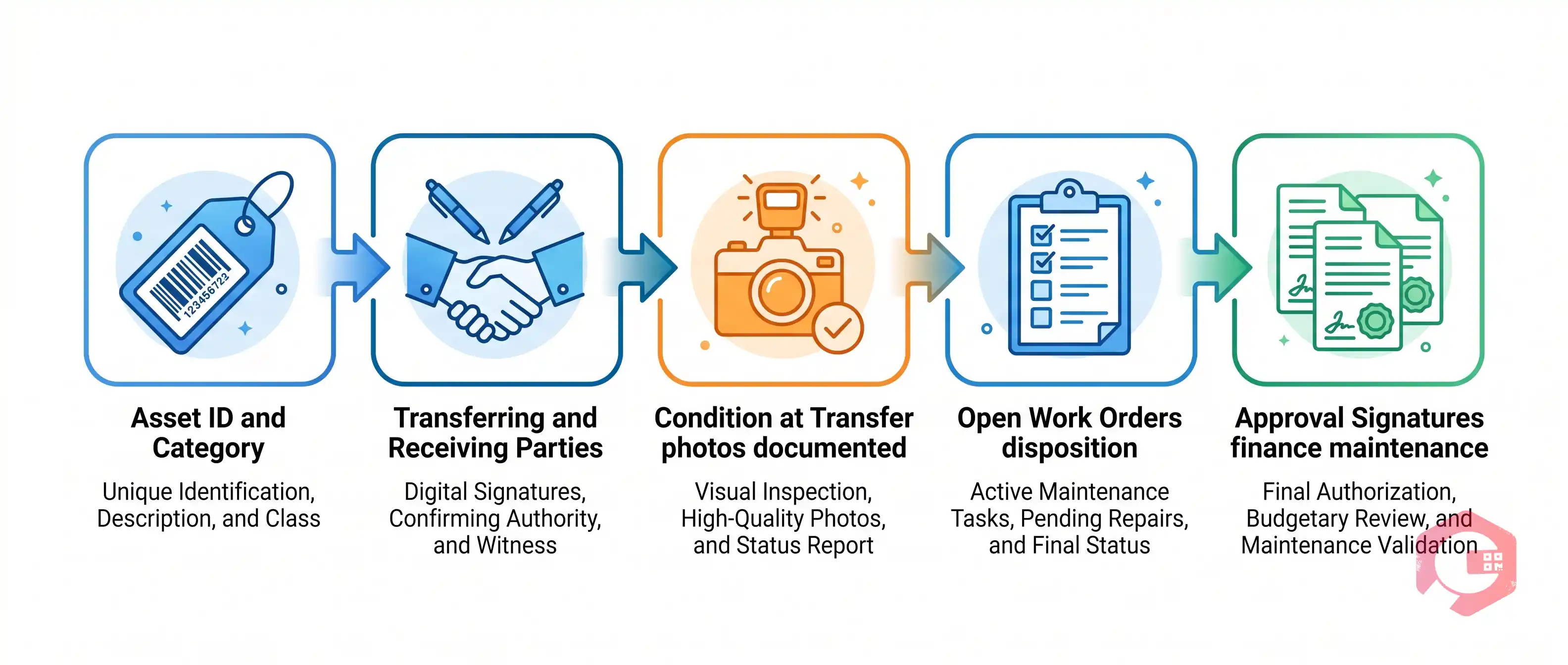
A well-designed asset transfer form captures everything you need to protect both parties and keep your records clean. At a minimum, your form should include the following fields:
These two transfer types look similar on the surface but have meaningfully different complexity and risk profiles. Here’s how they compare:

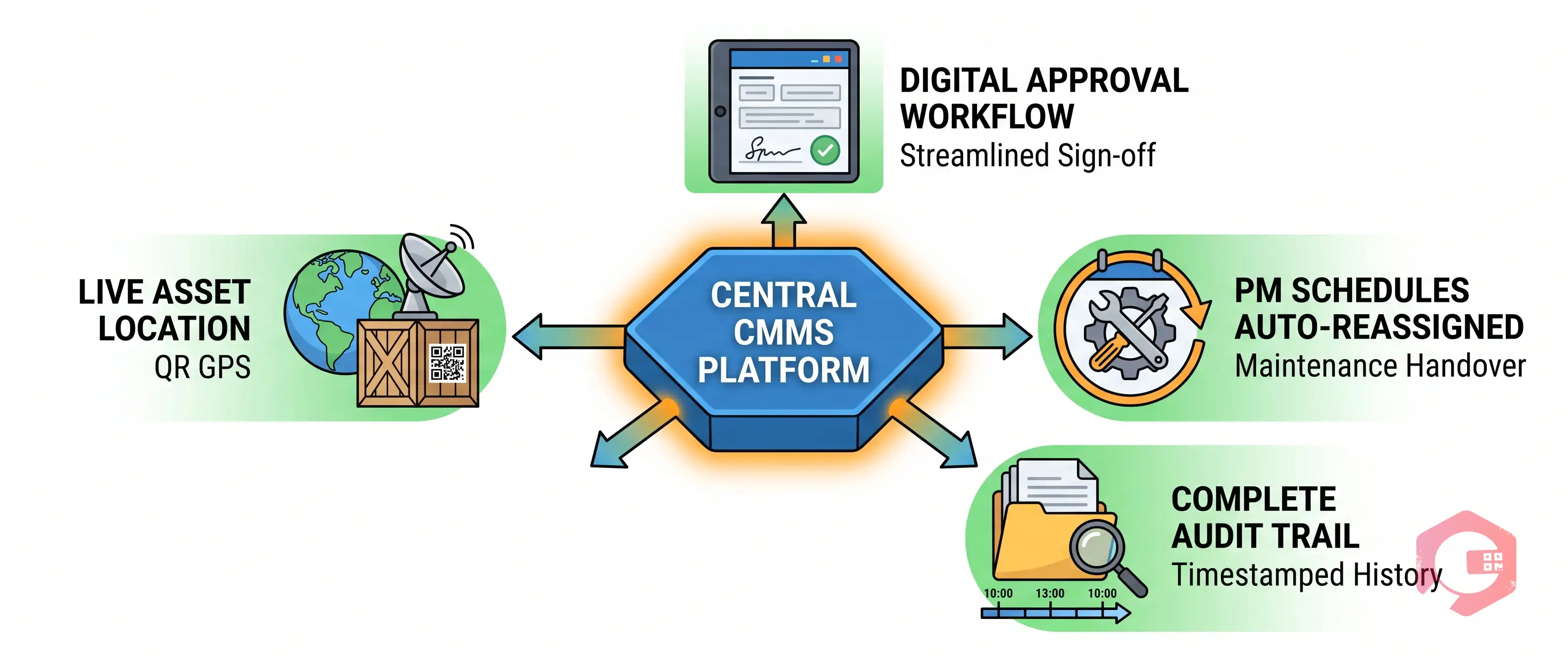
Managing asset transfers manually — via spreadsheets, paper forms, and email chains — is error-prone and time-consuming. A CMMS (Computerised Maintenance Management System) centralises the entire process and eliminates the most common failure points.
Here’s what a CMMS like Cryotos does to make asset transfers faster and more reliable:
Teams using a CMMS for asset transfers report significantly fewer discrepancies in asset registers, faster onboarding for receiving teams, and better compliance outcomes during audits.
Every asset transfer creates a compliance obligation. Whether you’re subject to ISO 55001, ISO 9001, a regulatory framework like OSHA, or simply your own internal audit standards, your asset records need to tell a clear, unbroken story about where every asset has been and who was responsible for it.
A solid asset transfer audit trail includes:
Without this trail, auditors have no way to verify that your assets are maintained, insured, and accounted for correctly. In regulated industries — food processing, pharmaceuticals, oil and gas — gaps in this trail can result in non-conformance findings, financial penalties, or operational shutdowns.
A CMMS provides this audit trail automatically. Every action taken on an asset is timestamped and stored — not as a separate report you have to generate, but as a living record attached to the asset itself.
If your maintenance team is still managing asset transfers through spreadsheets and email, you’re one audit away from a serious problem. Cryotos Asset Management gives you a digital transfer workflow, real-time location tracking, and an audit-ready record of every asset movement — so you’re always prepared, not just when an audit is scheduled. Request a free demo today and see how maintenance teams are streamlining asset transfers across departments and sites.

What is the difference between asset transfer and asset disposal?
An asset transfer moves a physical asset to a new custodian, location, or department while keeping it in active service. Asset disposal permanently removes the asset from service — through sale, scrap, or decommissioning. Both require formal documentation, but disposal additionally closes out all maintenance schedules, warranties, and insurance associated with the asset.
Does maintenance history transfer with an asset?
It should — and in a CMMS, it does automatically. The complete work order history, PM records, parts replaced, and failure logs travel with the asset when its location and custodian are updated in the system. In manual systems, this transfer of history requires deliberate effort and is frequently incomplete.
Who is responsible for an asset during transfer?
Responsibility remains with the outgoing custodian until the receiving custodian formally signs off on the handover. Both parties should sign a transfer form — or complete a digital handover in a CMMS — that records the condition of the asset at the point of transfer. From that moment, responsibility shifts to the receiving custodian.
How do you handle open work orders during an asset transfer?
Before transferring an asset, review all open work orders attached to it. Safety-related or urgent corrective work orders should be completed before the transfer. Routine or scheduled work orders can be reassigned to the receiving team’s maintenance staff. In a CMMS, this reassignment is straightforward.
What is an asset transfer form?
An asset transfer form is a document (physical or digital) that records all the details of an asset handover: asset ID, transferring and receiving parties, transfer date, condition at handover, open work orders, and approval signatures. It serves as the official record of the transfer and is the foundation of your audit trail.


Asset transfer in maintenance management is the formal process of moving a physical asset — a machine, tool, vehicle, or piece of equipment — from one location, department, or custodian to another within an organisation. It includes updating ownership records, transferring maintenance history, and ensuring the receiving team has everything they need to operate and maintain the asset safely.
Without a structured asset transfer process, teams lose track of where equipment is, maintenance history gets orphaned, and compliance audits become a nightmare. Studies show that organisations without documented asset transfers spend up to 20% more time on unplanned maintenance simply because technicians lack the context they need.
This guide covers everything you need to know — from what asset transfers involve to how a CMMS makes the entire process faster, cleaner, and audit-ready.
An asset transfer is the official handover of a physical asset from one responsible party to another. In maintenance management, this goes beyond simply moving equipment from Point A to Point B — it means transferring accountability, maintenance records, warranty information, and operational responsibility along with the physical asset.
Think of it like handing over a car to a new owner. The transfer isn't complete until the logbook, service history, insurance papers, and keys are all passed on. The same principle applies to industrial assets. When a CNC machine moves from the fabrication department to the assembly floor, the receiving team needs to know its maintenance history, its next scheduled PM, any open work orders, and what consumables it requires.
A properly executed asset transfer protects three things:

Not every asset transfer looks the same. Understanding the type helps you determine the level of documentation and coordination required.
The asset moves between departments within the same facility — for example, from the production floor to the quality control lab. Both departments typically report to the same site manager, which makes coordination easier, but documentation is still essential to keep the asset register accurate.
The asset moves between different locations — say, from a manufacturing plant in Chennai to a warehouse in Pune. This type involves more complexity: logistics, insurance during transit, updated location tracking, and often regulatory paperwork, especially for high-value or specialised equipment.
The asset moves to a new custodian for a defined period, after which it returns or moves on. Temporary transfers require a return date, a condition-check record at both ends, and clarity on who handles maintenance during the loan period.
The asset is removed from the active register — either scrapped, sold, donated, or disposed of. While technically an “exit” rather than a transfer, the same documentation discipline applies: records must be closed out, warranties cancelled or transferred, and the asset removed from all PM schedules.
The asset moves from one legal entity to another — for example, when a business unit is sold or when leased equipment is returned to the vendor. This involves formal contracts, legal documentation, and finance sign-off in addition to the operational handover.
Most asset transfer problems don’t come from the physical move — they come from the paperwork and data side. Here are the most common failure points:
The originating department submits a formal transfer request that includes the asset ID, current location, proposed new location, reason for transfer, and requested transfer date. This creates a paper trail from the very start.
Depending on the asset’s value and the organisation’s policy, approvals may be needed from the maintenance manager, finance controller, and site operations lead. High-value or safety-critical assets typically require multi-level sign-off.
Before the asset moves, a technician inspects and documents its current condition — including any existing damage, consumable levels, calibration status, and safety certification validity. Photographs are taken and attached to the transfer record.
Review all open work orders linked to the asset. Decide whether they should be completed before the transfer, reassigned to the destination team, or closed if they are no longer relevant. Do not move an asset with unresolved safety-related work orders.
Update the asset register with the new location, new custodian, and transfer date. If you’re using a CMMS, this happens in real time — location, department, cost centre, and maintenance schedule all update simultaneously.
Execute the physical transfer. At the point of handover, both the outgoing custodian and the incoming custodian sign off on the asset’s condition. Any accessories, spare parts, manuals, and safety certificates travel with the asset.
Once the asset arrives at its new location, the receiving team conducts a second condition check to confirm it arrived in the documented state. Any damage identified in transit is recorded immediately.
Reconfigure preventive maintenance schedules at the new location — different operating hours, environmental conditions, or usage patterns may require schedule adjustments. Notify all relevant stakeholders: finance (cost centre update), procurement (spare parts location), and the new maintenance team.

A well-designed asset transfer form captures everything you need to protect both parties and keep your records clean. At a minimum, your form should include the following fields:
These two transfer types look similar on the surface but have meaningfully different complexity and risk profiles. Here’s how they compare:

Managing asset transfers manually — via spreadsheets, paper forms, and email chains — is error-prone and time-consuming. A CMMS (Computerised Maintenance Management System) centralises the entire process and eliminates the most common failure points.
Here’s what a CMMS like Cryotos does to make asset transfers faster and more reliable:
Teams using a CMMS for asset transfers report significantly fewer discrepancies in asset registers, faster onboarding for receiving teams, and better compliance outcomes during audits.
Every asset transfer creates a compliance obligation. Whether you’re subject to ISO 55001, ISO 9001, a regulatory framework like OSHA, or simply your own internal audit standards, your asset records need to tell a clear, unbroken story about where every asset has been and who was responsible for it.
A solid asset transfer audit trail includes:
Without this trail, auditors have no way to verify that your assets are maintained, insured, and accounted for correctly. In regulated industries — food processing, pharmaceuticals, oil and gas — gaps in this trail can result in non-conformance findings, financial penalties, or operational shutdowns.
A CMMS provides this audit trail automatically. Every action taken on an asset is timestamped and stored — not as a separate report you have to generate, but as a living record attached to the asset itself.
If your maintenance team is still managing asset transfers through spreadsheets and email, you’re one audit away from a serious problem. Cryotos Asset Management gives you a digital transfer workflow, real-time location tracking, and an audit-ready record of every asset movement — so you’re always prepared, not just when an audit is scheduled. Request a free demo today and see how maintenance teams are streamlining asset transfers across departments and sites.

What is the difference between asset transfer and asset disposal?
An asset transfer moves a physical asset to a new custodian, location, or department while keeping it in active service. Asset disposal permanently removes the asset from service — through sale, scrap, or decommissioning. Both require formal documentation, but disposal additionally closes out all maintenance schedules, warranties, and insurance associated with the asset.
Does maintenance history transfer with an asset?
It should — and in a CMMS, it does automatically. The complete work order history, PM records, parts replaced, and failure logs travel with the asset when its location and custodian are updated in the system. In manual systems, this transfer of history requires deliberate effort and is frequently incomplete.
Who is responsible for an asset during transfer?
Responsibility remains with the outgoing custodian until the receiving custodian formally signs off on the handover. Both parties should sign a transfer form — or complete a digital handover in a CMMS — that records the condition of the asset at the point of transfer. From that moment, responsibility shifts to the receiving custodian.
How do you handle open work orders during an asset transfer?
Before transferring an asset, review all open work orders attached to it. Safety-related or urgent corrective work orders should be completed before the transfer. Routine or scheduled work orders can be reassigned to the receiving team’s maintenance staff. In a CMMS, this reassignment is straightforward.
What is an asset transfer form?
An asset transfer form is a document (physical or digital) that records all the details of an asset handover: asset ID, transferring and receiving parties, transfer date, condition at handover, open work orders, and approval signatures. It serves as the official record of the transfer and is the foundation of your audit trail.

Cryotos AI predicts failures, automates work orders, and simplifies maintenance—before problems slow you down.