Workflow Audit in CMMS: How to Link Preventive Maintenance to Work Orders

Article Written by:

Ganesh Veerappan

Created On:

April 28, 2026

Workflow Audit in CMMS: How to Link Preventive Maintenance to Work Orders

A workflow audit in CMMS is a structured evaluation of your maintenance processes - specifically designed to verify whether preventive maintenance (PM) tasks are completed correctly, and to automatically trigger corrective actions when they are not. In Cryotos CMMS, this means adding an audit field to any PM task with a Yes/No condition: when a technician selects "Yes" (issue found), the system auto-generates a linked work order - keeping your PM and WO records interlinked and fully traceable. According to a Plant Engineering study, maintenance teams that close the loop between inspection findings and corrective work orders reduce repeat failures by up to 42%.

If your PM tasks and work orders currently live in separate silos, you're missing the most powerful feature in modern CMMS software. This guide explains exactly how workflow audits work, how the audit field triggers work order generation, and how to set it up in Cryotos step by step.


What Is a Workflow Audit in Maintenance Management?

A workflow audit in maintenance management is a systematic review of how maintenance tasks flow from inspection to resolution. It answers one critical question: when a technician finds a problem during a PM inspection, does the right corrective action get triggered automatically - or does it fall through the cracks?

Traditional PM programs treat inspection and repair as separate events. A technician completes a checklist, notes an issue in a comment field, and moves on. That note might get actioned - or it might sit unread for days. A workflow audit closes this gap by embedding conditional logic directly into the PM task itself.


Workflow Audit vs. Process Audit: Key Differences

A process audit reviews whether a procedure was followed correctly - it's backward-looking. A workflow audit is forward-looking: it evaluates whether the outcome of a task triggers the right next action. In a CMMS context, this distinction matters because workflow audits are automated - they don't rely on a manager reviewing reports. The system itself acts on what the technician reports.


Why CMMS Makes Workflow Audits Actionable

Without a CMMS, a workflow audit is a spreadsheet exercise that happens quarterly. With a CMMS like Cryotos, it's a live, continuous loop. Every PM task can carry an audit field that evaluates findings in real time and generates work orders without any manual intervention. This is the difference between auditing your workflow and actually improving it.


The Audit Field in Preventive Maintenance Tasks Explained

The audit field is a configurable Yes/No input added to a preventive maintenance task in Cryotos. When a technician performs a PM inspection - say, checking coolant levels on a CNC machine - the audit field asks a binary question: "Is corrective action required?" The technician's answer drives what happens next inside the system.


How the Yes/No Audit Condition Works

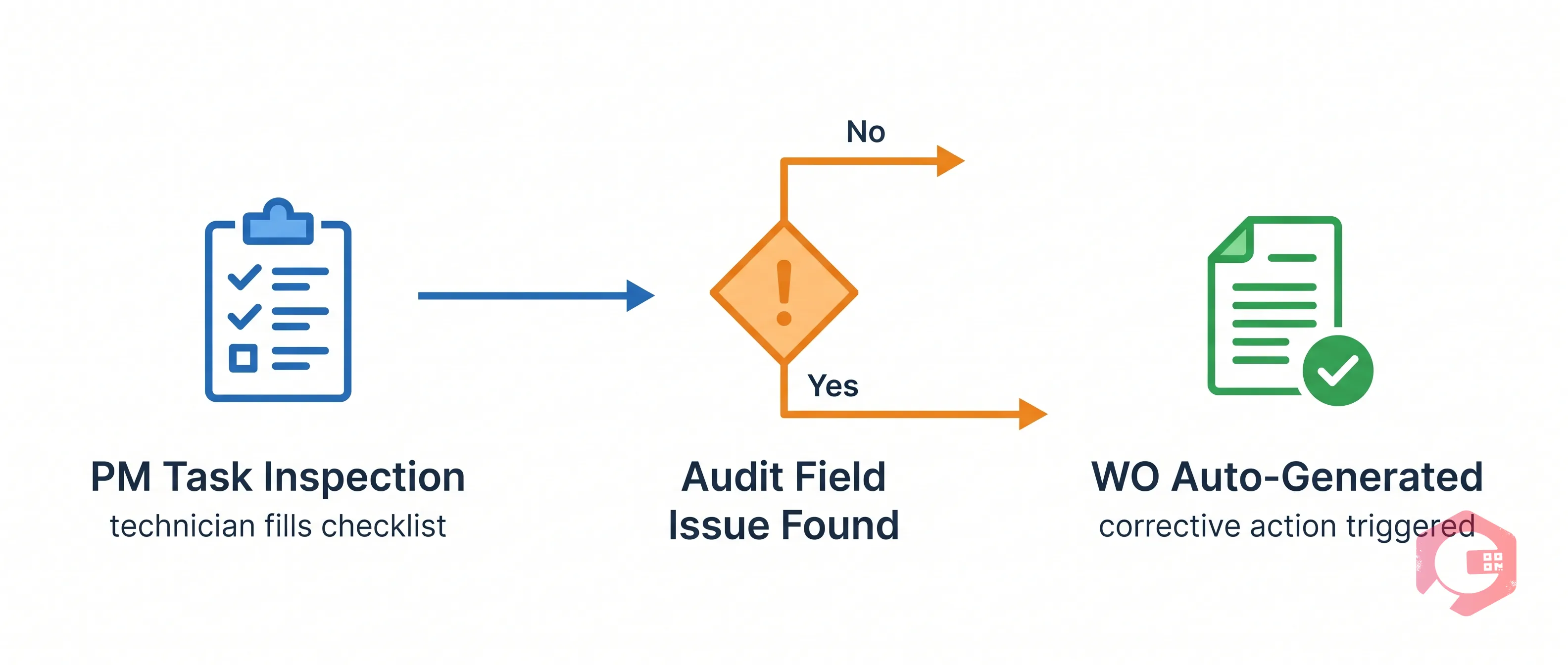
The logic is straightforward. When you configure a PM task in Cryotos, you can add an audit field and define two branches:


This Yes/No condition transforms a passive checklist into an active decision point. The technician doesn't need to remember to raise a work order - the system does it for them the moment they select "Yes."


What Happens When You Select "Yes" on an Audit Field

Selecting "Yes" on an audit field in a Cryotos PM task triggers an immediate cascade of actions:


Workflow Audit in CMMS — scenario

One of the most powerful - and most underused - features in modern CMMS software is the ability to interlink preventive maintenance tasks and work orders. Most maintenance teams manage PMs and WOs as completely separate modules. Cryotos connects them through the audit field workflow, creating a bidirectional record that supports both operations and compliance reporting.


The Trigger Logic: From Audit Finding to Auto-Generated WO

The trigger logic works as a conditional workflow inside the preventive maintenance module. Here's how the flow looks in practice:


This is the PM-to-WO interlink in action. According to Reliable Plant, organizations that connect PM findings to corrective work orders see a 35% improvement in first-time-fix rates because technicians arrive prepared with context from the original inspection.


Real-World Example: Audit Field in Action

A food processing plant runs weekly PM inspections on refrigeration units. Before implementing workflow audits in Cryotos, technicians flagged issues in paper logs - and corrective repairs were sometimes delayed by 48-72 hours while supervisors manually raised work orders. After enabling the audit field with a Yes/No trigger, the average time from finding to WO creation dropped to under 3 minutes. The PM and WO records are now permanently linked, giving the compliance team a complete paper trail for every finding and fix - critical for FDA HACCP compliance.


Step-by-Step: Setting Up Workflow Audit Triggers in Cryotos CMMS

Workflow Audit in CMMS — workflow

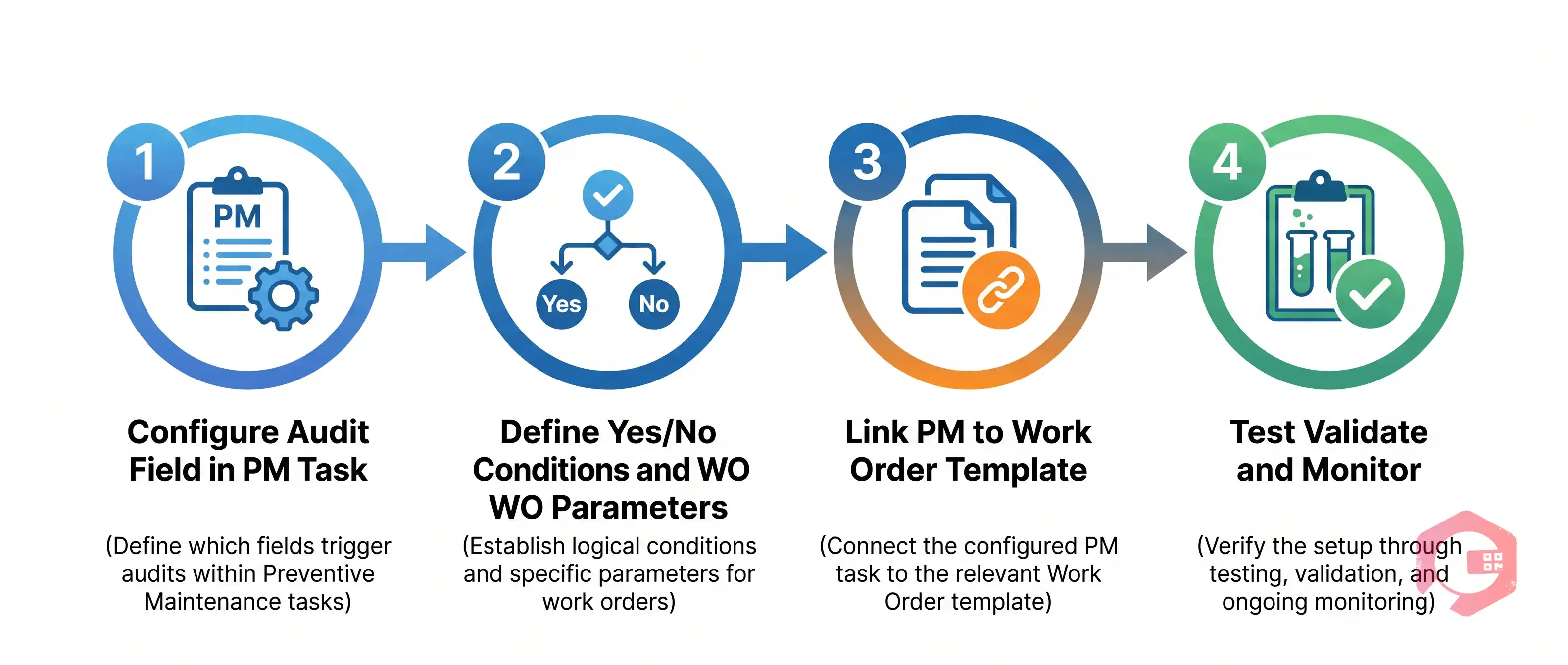
Setting up a workflow audit trigger in Cryotos takes less than 10 minutes once you understand the structure. Here's exactly how to do it.


Step 1 - Configure the Audit Field in Your PM Task

Open the Preventive Maintenance module in Cryotos and navigate to the PM task you want to add the audit to. In the task builder, add a new checklist item and set its type to Audit Field. Give it a clear label - for example, "Is corrective maintenance required?" - so technicians know exactly what they're evaluating.


Step 2 - Define Yes/No Conditions and WO Parameters

With the audit field added, configure the conditional logic. Set the "No" branch to close the checklist item with no further action. Set the "Yes" branch to trigger a work order. For the WO, define the default priority level (e.g., High), the work order type (Corrective Maintenance), and any pre-filled notes you want the system to include from the PM context.


Step 3 - Link the PM to a Work Order Template

Cryotos allows you to link the audit trigger to a specific WO template. This means the auto-generated work order will already have the correct task type, required parts, and assigned team pre-populated - not just a blank WO with a reference number. This is what separates a well-configured workflow audit from a basic trigger.


Step 4 - Test, Validate, and Monitor the Trigger

Before deploying to your full PM schedule, run a test: execute the PM task, select "Yes" on the audit field, and verify that the linked work order generates correctly with all expected fields. Check that the PM-WO relationship appears in both the PM task view and the WO view. Once validated, use the Cryotos BI Dashboard to monitor audit-triggered WOs over time - tracking response time, completion rate, and recurrence by asset.


Benefits of Linking Workflow Audits to Work Order Generation

Workflow Audit in CMMS — lifecycle

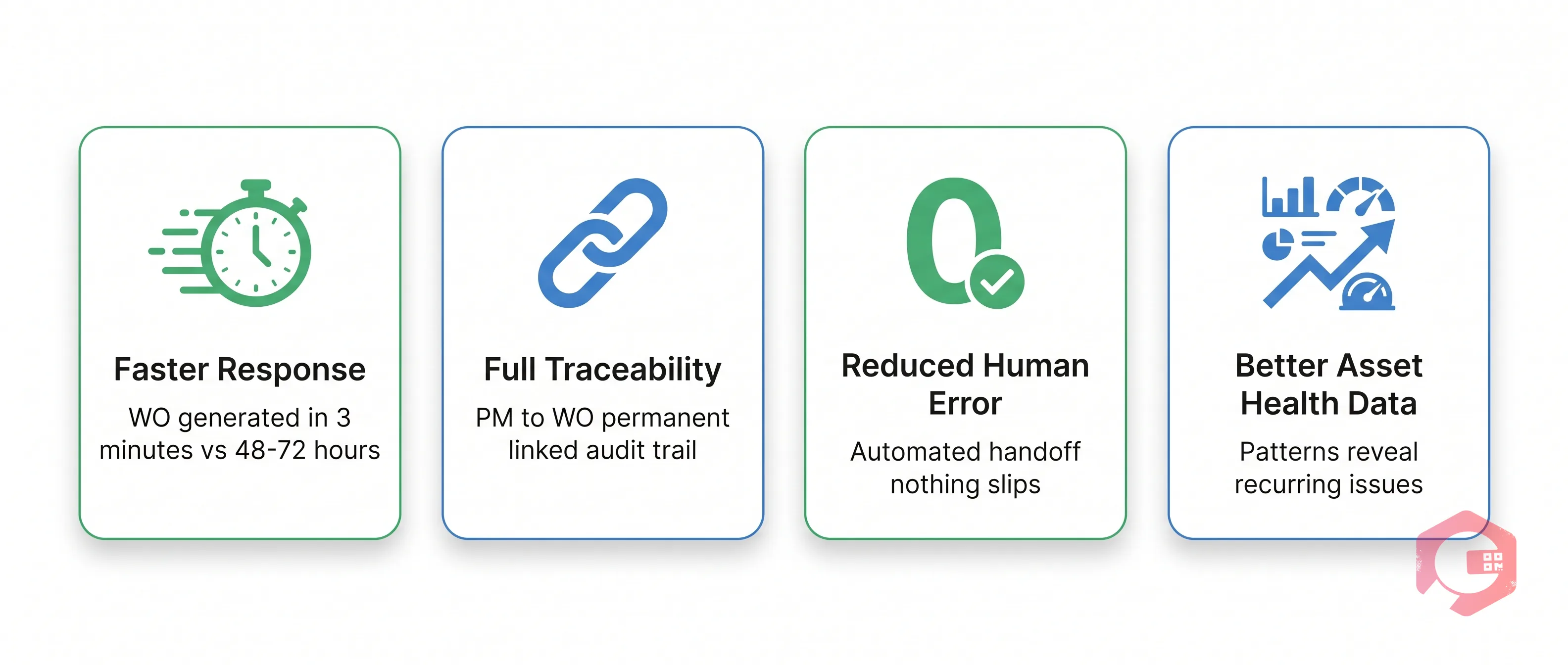
The operational gains from PM-WO interlinking through workflow audits go beyond convenience. Here's what maintenance teams consistently see after implementation:


Faster Response to Maintenance Findings

The single biggest benefit is speed. When a WO is auto-generated at the moment a technician finds an issue, the clock starts immediately. There's no delay while the tech finishes their shift, writes up a report, emails it to a supervisor, and waits for manual WO creation. In high-throughput environments like food manufacturing or automotive assembly, this speed difference - from hours to minutes - directly prevents production downtime. Cryotos customers report a 30% reduction in equipment downtime after enabling workflow audit triggers across their PM schedules.


Full PM-to-WO Traceability and Audit Trail

Every audited PM creates a linked chain: inspection record ? finding ? work order ? resolution. This chain is stored permanently in Cryotos, making it searchable and reportable. For industries with strict compliance requirements - pharmaceuticals, food processing, aerospace - this traceability is not optional. According to ISO 9001 quality management standards, organizations must demonstrate that maintenance findings are followed by documented corrective actions. Workflow audit triggers give you this documentation automatically, with no extra admin work.


Common Workflow Audit Mistakes (And How to Avoid Them)

Workflow Audit in CMMS — problems grid

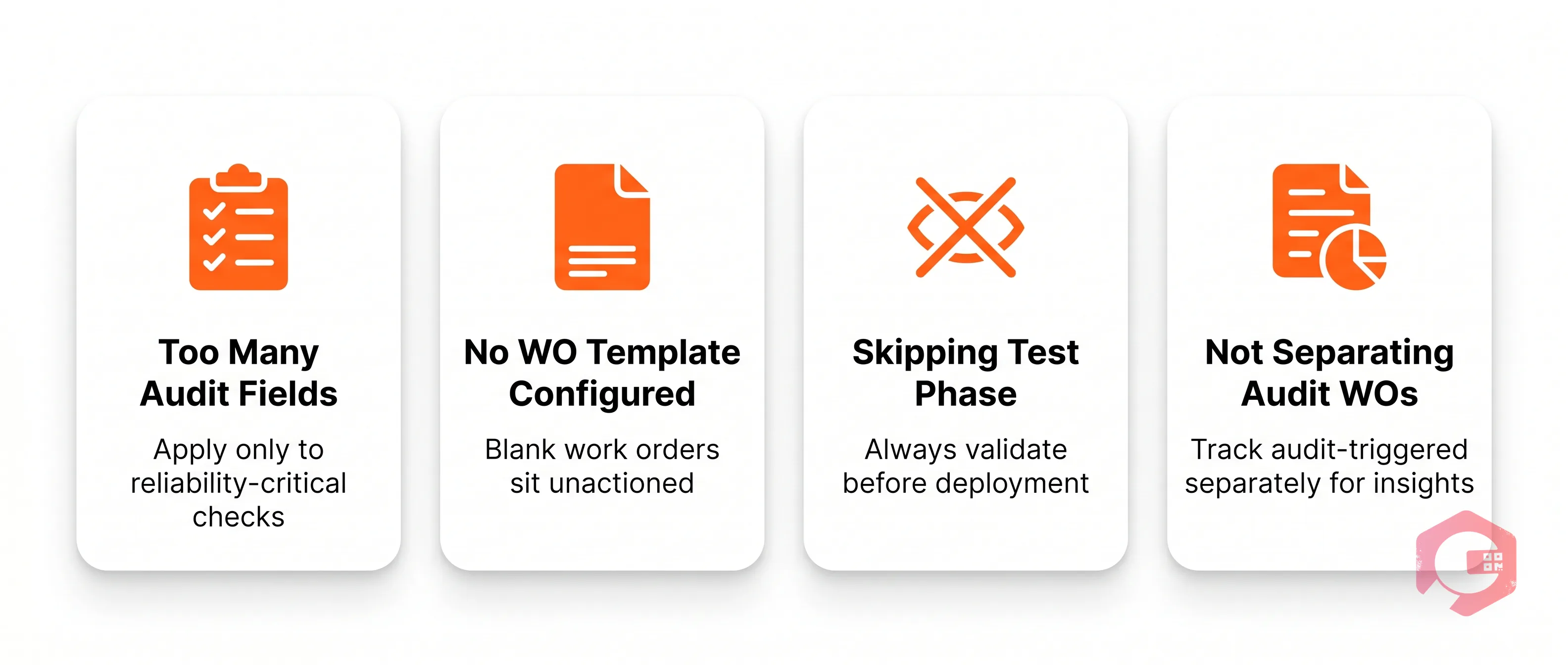
Even well-intentioned workflow audit setups can produce noise instead of value if configured poorly. Here are the most common mistakes teams make:


Frequently Asked Questions


What is a workflow audit in a CMMS?

A workflow audit in a CMMS is a built-in evaluation mechanism that checks the outcome of a maintenance task - typically a preventive maintenance inspection - and triggers the appropriate follow-up action automatically. In Cryotos, this is implemented through an audit field with Yes/No conditions embedded directly in PM task checklists.


How does the audit field trigger a work order in preventive maintenance?

When a technician marks "Yes" on an audit field during a PM task, Cryotos automatically generates a linked work order with the asset details, location, and priority pre-filled. The PM task and the resulting WO are permanently interlinked, creating a traceable parent-child record in the system. No manual WO creation is required.


Can PM tasks and work orders be interlinked automatically?

Yes. In Cryotos CMMS, PM tasks and work orders are interlinked through the workflow audit trigger. When the audit condition evaluates to "Yes," the system creates a WO that references the originating PM - visible in both modules. This interlink is maintained throughout the WO's lifecycle, from creation to closure.


What is the difference between a PM task and a work order in CMMS?

A preventive maintenance task is a scheduled, recurring inspection or service activity designed to prevent equipment failure. A work order is a reactive or corrective job record created in response to a finding or request. In a well-configured CMMS, PM tasks and work orders work together: PM inspections surface issues, and work orders track the corrective response. The workflow audit field is what connects them automatically.


How do I set up conditional workflow audits in Cryotos?

To set up a workflow audit in Cryotos: open a PM task, add an audit field to the checklist, define the Yes/No conditions, configure the Yes branch to auto-generate a work order using your chosen WO template, and assign a default team or technician. Test the trigger before deploying to your full PM schedule. Full configuration guidance is available inside the Cryotos platform and in the step-by-step section of this article.


Ready to connect your PM inspections to automatic work orders? Cryotos CMMS makes it easy to configure workflow audit triggers, interlink your PM tasks and work orders, and build a fully traceable maintenance operation - all without writing a line of code. Book a free demo of Cryotos and see the audit field in action on your own asset data.


Want to Try Cryotos CMMS Today? Lets Connect!
Thank you! Your submission has been received!
Oops! Something went wrong while submitting the form.
Related Post

Workflow Audit in CMMS: How to Link Preventive Maintenance to Work Orders

Calendar
Duration:
calendar today
Published on
April 28, 2026
Featured Image

A workflow audit in CMMS is a structured evaluation of your maintenance processes - specifically designed to verify whether preventive maintenance (PM) tasks are completed correctly, and to automatically trigger corrective actions when they are not. In Cryotos CMMS, this means adding an audit field to any PM task with a Yes/No condition: when a technician selects "Yes" (issue found), the system auto-generates a linked work order - keeping your PM and WO records interlinked and fully traceable. According to a Plant Engineering study, maintenance teams that close the loop between inspection findings and corrective work orders reduce repeat failures by up to 42%.

If your PM tasks and work orders currently live in separate silos, you're missing the most powerful feature in modern CMMS software. This guide explains exactly how workflow audits work, how the audit field triggers work order generation, and how to set it up in Cryotos step by step.


What Is a Workflow Audit in Maintenance Management?

A workflow audit in maintenance management is a systematic review of how maintenance tasks flow from inspection to resolution. It answers one critical question: when a technician finds a problem during a PM inspection, does the right corrective action get triggered automatically - or does it fall through the cracks?

Traditional PM programs treat inspection and repair as separate events. A technician completes a checklist, notes an issue in a comment field, and moves on. That note might get actioned - or it might sit unread for days. A workflow audit closes this gap by embedding conditional logic directly into the PM task itself.


Workflow Audit vs. Process Audit: Key Differences

A process audit reviews whether a procedure was followed correctly - it's backward-looking. A workflow audit is forward-looking: it evaluates whether the outcome of a task triggers the right next action. In a CMMS context, this distinction matters because workflow audits are automated - they don't rely on a manager reviewing reports. The system itself acts on what the technician reports.


Why CMMS Makes Workflow Audits Actionable

Without a CMMS, a workflow audit is a spreadsheet exercise that happens quarterly. With a CMMS like Cryotos, it's a live, continuous loop. Every PM task can carry an audit field that evaluates findings in real time and generates work orders without any manual intervention. This is the difference between auditing your workflow and actually improving it.


The Audit Field in Preventive Maintenance Tasks Explained

The audit field is a configurable Yes/No input added to a preventive maintenance task in Cryotos. When a technician performs a PM inspection - say, checking coolant levels on a CNC machine - the audit field asks a binary question: "Is corrective action required?" The technician's answer drives what happens next inside the system.


How the Yes/No Audit Condition Works

The logic is straightforward. When you configure a PM task in Cryotos, you can add an audit field and define two branches:


This Yes/No condition transforms a passive checklist into an active decision point. The technician doesn't need to remember to raise a work order - the system does it for them the moment they select "Yes."


What Happens When You Select "Yes" on an Audit Field

Selecting "Yes" on an audit field in a Cryotos PM task triggers an immediate cascade of actions:


Workflow Audit in CMMS — scenario

One of the most powerful - and most underused - features in modern CMMS software is the ability to interlink preventive maintenance tasks and work orders. Most maintenance teams manage PMs and WOs as completely separate modules. Cryotos connects them through the audit field workflow, creating a bidirectional record that supports both operations and compliance reporting.


The Trigger Logic: From Audit Finding to Auto-Generated WO

The trigger logic works as a conditional workflow inside the preventive maintenance module. Here's how the flow looks in practice:


This is the PM-to-WO interlink in action. According to Reliable Plant, organizations that connect PM findings to corrective work orders see a 35% improvement in first-time-fix rates because technicians arrive prepared with context from the original inspection.


Real-World Example: Audit Field in Action

A food processing plant runs weekly PM inspections on refrigeration units. Before implementing workflow audits in Cryotos, technicians flagged issues in paper logs - and corrective repairs were sometimes delayed by 48-72 hours while supervisors manually raised work orders. After enabling the audit field with a Yes/No trigger, the average time from finding to WO creation dropped to under 3 minutes. The PM and WO records are now permanently linked, giving the compliance team a complete paper trail for every finding and fix - critical for FDA HACCP compliance.


Step-by-Step: Setting Up Workflow Audit Triggers in Cryotos CMMS

Workflow Audit in CMMS — workflow

Setting up a workflow audit trigger in Cryotos takes less than 10 minutes once you understand the structure. Here's exactly how to do it.


Step 1 - Configure the Audit Field in Your PM Task

Open the Preventive Maintenance module in Cryotos and navigate to the PM task you want to add the audit to. In the task builder, add a new checklist item and set its type to Audit Field. Give it a clear label - for example, "Is corrective maintenance required?" - so technicians know exactly what they're evaluating.


Step 2 - Define Yes/No Conditions and WO Parameters

With the audit field added, configure the conditional logic. Set the "No" branch to close the checklist item with no further action. Set the "Yes" branch to trigger a work order. For the WO, define the default priority level (e.g., High), the work order type (Corrective Maintenance), and any pre-filled notes you want the system to include from the PM context.


Step 3 - Link the PM to a Work Order Template

Cryotos allows you to link the audit trigger to a specific WO template. This means the auto-generated work order will already have the correct task type, required parts, and assigned team pre-populated - not just a blank WO with a reference number. This is what separates a well-configured workflow audit from a basic trigger.


Step 4 - Test, Validate, and Monitor the Trigger

Before deploying to your full PM schedule, run a test: execute the PM task, select "Yes" on the audit field, and verify that the linked work order generates correctly with all expected fields. Check that the PM-WO relationship appears in both the PM task view and the WO view. Once validated, use the Cryotos BI Dashboard to monitor audit-triggered WOs over time - tracking response time, completion rate, and recurrence by asset.


Benefits of Linking Workflow Audits to Work Order Generation

Workflow Audit in CMMS — lifecycle

The operational gains from PM-WO interlinking through workflow audits go beyond convenience. Here's what maintenance teams consistently see after implementation:


Faster Response to Maintenance Findings

The single biggest benefit is speed. When a WO is auto-generated at the moment a technician finds an issue, the clock starts immediately. There's no delay while the tech finishes their shift, writes up a report, emails it to a supervisor, and waits for manual WO creation. In high-throughput environments like food manufacturing or automotive assembly, this speed difference - from hours to minutes - directly prevents production downtime. Cryotos customers report a 30% reduction in equipment downtime after enabling workflow audit triggers across their PM schedules.


Full PM-to-WO Traceability and Audit Trail

Every audited PM creates a linked chain: inspection record ? finding ? work order ? resolution. This chain is stored permanently in Cryotos, making it searchable and reportable. For industries with strict compliance requirements - pharmaceuticals, food processing, aerospace - this traceability is not optional. According to ISO 9001 quality management standards, organizations must demonstrate that maintenance findings are followed by documented corrective actions. Workflow audit triggers give you this documentation automatically, with no extra admin work.


Common Workflow Audit Mistakes (And How to Avoid Them)

Workflow Audit in CMMS — problems grid

Even well-intentioned workflow audit setups can produce noise instead of value if configured poorly. Here are the most common mistakes teams make:


Frequently Asked Questions


What is a workflow audit in a CMMS?

A workflow audit in a CMMS is a built-in evaluation mechanism that checks the outcome of a maintenance task - typically a preventive maintenance inspection - and triggers the appropriate follow-up action automatically. In Cryotos, this is implemented through an audit field with Yes/No conditions embedded directly in PM task checklists.


How does the audit field trigger a work order in preventive maintenance?

When a technician marks "Yes" on an audit field during a PM task, Cryotos automatically generates a linked work order with the asset details, location, and priority pre-filled. The PM task and the resulting WO are permanently interlinked, creating a traceable parent-child record in the system. No manual WO creation is required.


Can PM tasks and work orders be interlinked automatically?

Yes. In Cryotos CMMS, PM tasks and work orders are interlinked through the workflow audit trigger. When the audit condition evaluates to "Yes," the system creates a WO that references the originating PM - visible in both modules. This interlink is maintained throughout the WO's lifecycle, from creation to closure.


What is the difference between a PM task and a work order in CMMS?

A preventive maintenance task is a scheduled, recurring inspection or service activity designed to prevent equipment failure. A work order is a reactive or corrective job record created in response to a finding or request. In a well-configured CMMS, PM tasks and work orders work together: PM inspections surface issues, and work orders track the corrective response. The workflow audit field is what connects them automatically.


How do I set up conditional workflow audits in Cryotos?

To set up a workflow audit in Cryotos: open a PM task, add an audit field to the checklist, define the Yes/No conditions, configure the Yes branch to auto-generate a work order using your chosen WO template, and assign a default team or technician. Test the trigger before deploying to your full PM schedule. Full configuration guidance is available inside the Cryotos platform and in the step-by-step section of this article.


Ready to connect your PM inspections to automatic work orders? Cryotos CMMS makes it easy to configure workflow audit triggers, interlink your PM tasks and work orders, and build a fully traceable maintenance operation - all without writing a line of code. Book a free demo of Cryotos and see the audit field in action on your own asset data.

Want to Try Cryotos CMMS Today?

Get Free Demo

Let AI Take Control of Your Maintenance

Cryotos AI predicts failures, automates work orders, and simplifies maintenance—before problems slow you down.

Try AI-Powered CMMS
🡢